December 8, 2021
C++ File handling

DURATION
9mincategories
Tags
share

Being able to read/write files is a very important skill, especially in the case of C++, which is usually used to make software that works more closely to the operating system. Let’s set up our project and see how to do that.
Project Setup
Create an empty folder, and add two files in it named app.cpp and file.txt. We will read/write the file.txt file. Now paste the following code into the app.cpp file.
1
2
3
4
5
6
7
8
9
#include<iostream>

#include<fstream>

using namespace std;

int main() {

}
Here, I have imported a header file called fstream. In order to work with the file, we will have to first open the file. To do this we will create a variable of type fstream, and use that variable to open the file. Go ahead and create the variable in the following way inside the main function.
fstream myFile;
Now, we will have to open the file. There are several modes in which one might want to open the file. You only want to open the file in reading mode, or write mode, or append mode, or some other mode.
Note: Here we have declared the variable myFile of type fstream, which can handle all modes. We could have declared it off only ifstream type or ofstream type, which allows only specific modes. We are using fstream because it is more general.
Writing into files:
Let’s open a file in writing mode. Write the following line.
myFile.open("file.txt", ios::out);*//Write mode.*
Now, our file named file.txt is writable by code. If the file did not exist beforehand then it will be created when you execute the code. Since we will be outputting in the file using our code (writing in the file), the file mode is ios::out.
First, we will check whether our file opened or not, and after that, we will write in it. Note that if we want to write in our console, we use cout<<, here since we want to write in the file we will use myFile<<. Let’s see a program that takes text from the user and writes that into the file.
1
2
3
4
5
6
7
8
9
10
11
12
13
14
15
16
17
18
19
20
21
22
23
24
25
#include <iostream>

#include <fstream>

using namespace std;

int main() {
  fstream myFile;
  myFile.open("file.txt", ios::out); //Write mode.
  if (myFile.is_open()) {
    cout << "Enter what you want to save in file:\n";
    string str;
    while (1) {
      getline(std::cin, str);
      if (str == "-1")
        break;
      else {
        myFile << str << endl;
      }
    }
    myFile.close();
  } else {
    cout << "Sorry could not open file";
  }
}
If we run the program and enter the following values in the terminal,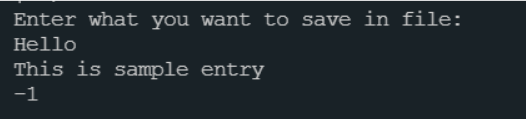
then our file will look like this.

Appending into files:
Every time you run this code the file will be overwritten. If you only want to add content to the file without deleting the old values then you should be opening the file in append mode. To do that use the following code snippet while opening the file, everything else can be done in the same way as above.
myFile.open("file.txt", ios::app);
Reading the files:
To read the file we will use a suitable opening mode, which will be as follows.
myFile.open("file.txt", ios::in);
We will use a while loop to read the file line by line, each line will be stored in a variable and then we can access that variable. This process will go on until we reach the end of the file. Let’s say we store the line in a variable called str, which will be of type string. The following is the code implementation of it.
1
2
3
4
5
6
7
8
9
10
11
12
13
14
15
16
17
18
19
#include <iostream>

#include <fstream>

using namespace std;

int main() {
  fstream myFile;
  myFile.open("file.txt", ios::in); //Write mode.
  if (myFile.is_open()) {
    string str;
    while (getline(myFile, str)) {
      cout << str << "\n";
    }
    myFile.close();
  } else {
    cout << "Sorry could not open file";
  }
}
The condition inside the while loop is getline function. As long as we have not reached the end of the file, some value will be read into str variable and the loop will keep on going, and that value will be printed in the console.
Let’s see the output.
The following is our file.