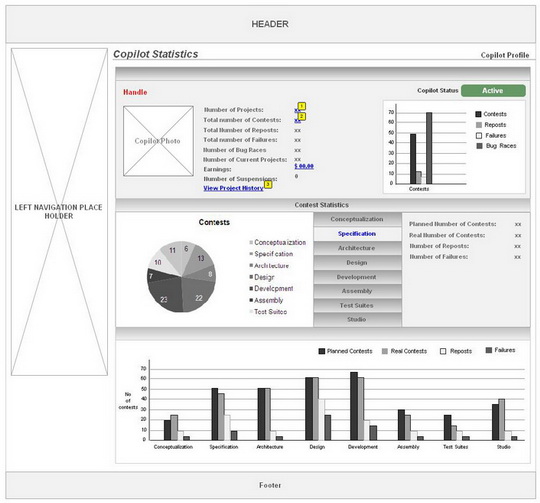
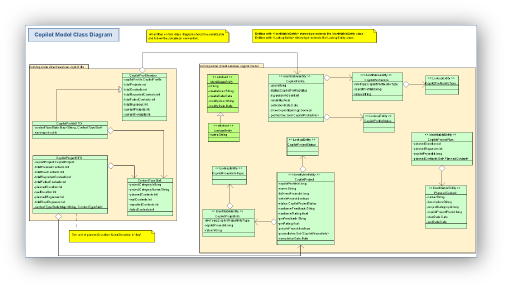
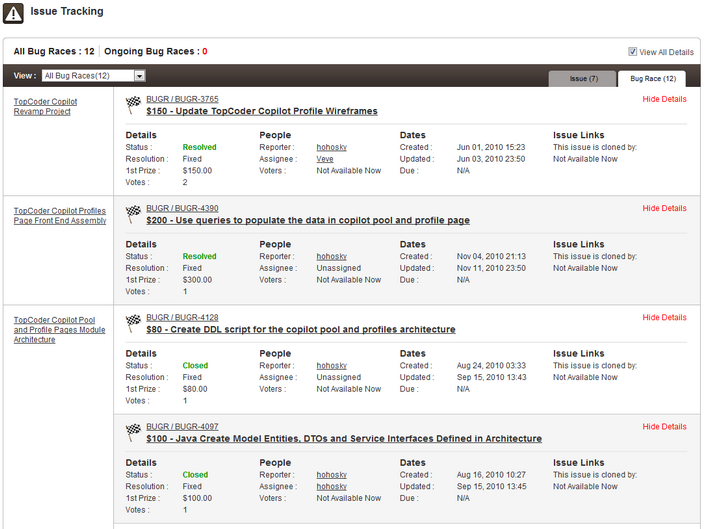
Wireframe

Download

Storyboards

Download

Specification

Download

Architecture

Download

UI Prototype

Download

Architecture

Download

Software Design & Development

Download

Wireframe

Wireframe

UI Prototype

Questionnaire

Table of Contents

1 Instructions
1.0 Instructions
2 Concept Questionnaire
2.1 Objective
2.2 Opportunity or Current Application/Process
3 Proposed Application
3.1 Business Requirements
3.2 Background and Basic Functionality
3.3 Usability
3.4 Wish List
3.5 Security
3.6 Technology

Instructions

The purpose of this questionnaire is to help TopCoder learn how your new application should operate to best address your need, problem or opportunity. We'll ask you to describe your current process, and identify your main needs or opportunities. We'll also ask questions about the sort of technical environment the new application should expect, and what features the new application should include.

Your responses to this document will be fed into the Pipeline to start the process of creating a prototype and writing a formal Requirements Specification for your application.

What this Document is Not

This Questionnaire is just a starting place – it is not a formal requirements specification. After you or your team complete this document, your Platform Manager will compile responses and post them to competition. The competition includes a lengthy question-and-answer period with you that will flush out details and exceptions. So, don't worry if you miss a few details – there will be many opportunities to fill in the gaps later!

What You Need To Do

Please answer the questions below to the best of your knowledge. If you would like to include drawings or diagrams to make your point better or easier, please feel free. Screenshots of the current application are always helpful too. You can answer questions directly in this document, or include attachments with your responses if you need more space.

Some questions are more important than others. Please do your best to answer questions marked with the red asterisk. If you cannot provide an answer, please include a few remarks about the reason.

When you're done, please email the Questionnaire to your Platform Manager.

Objective

Q.   Please describe the chief goal(s) you wish to achieve by developing this application.
A.   TopCoder is looking to put more structure around the copilot process.
At this initial phase, we'd like to define the whole copilot process on document such as how people are selected, what data a copilot profile should contain, how to determine copilot payments, the scope of copilot's work, and how copilot communicates with the client.
We also like to
• Build a module in TopCoder's new Direct application to support the whole copilot process defined above.
• Have a copilot profile page integrated into current TopCoder site.

Opportunity or Current Application/Process

Q.   If you are planning to replace an existing application or business process, please describe the process below. Or, if you are creating an application to take advantage of an opportunity, please describe it here as well. If you wish, include a diagram that illustrates the steps and systems that are involved in the process. In this section, you are "telling the story."
A.   Over the past years, TopCoder have posted copilot opportunities where members were selected to manage some parts of the TopCoder Software Development process. The opportunities varied in size and scope, from managing the build of an overall project to managing bug races and merges.
TopCoder PMs post new copilot opportunities to a Project called Copilot Opportunities in Jira (TopCoder's bug traker system):
https://www.topcoder.com/bugs/browse/COPILOT
Any member who is interested in certain copilot opportunities can vote and put comments in the corresponding tickets. Which member is chosen as copilot is at TopCoder PM's discretion.
After the copilot is chosen, he must perform the required tasks, an overview of the copilot can be viewed here: http://www.topcoder.com/wiki/display/tc/Copilot+Overview

Q.   Broadly speaking, who is involved with the data or application? (Please briefly describe the roles of people who will be involved or affected and the information that they will provide or receive.)
A.   • TopCoder PM: who posts copilot opportunity, defines the payment and work scope of the copilot, and chooses the copilot(s) from voted members.
• TopCoder members: who votes to copilot opportunity ticket in Jira, he/she can ask questions and leave comments about the copilot opportunity.
• Copilot: The TopCoder member(s) who is chosen as the copilot by TopCoder PM. He/she will perform copilot's duties according to requirements defined by PM.

Q.   What information do you need to feed into the system to complete the process (system input)? For example, do you need to key in customer account numbers or names? Is there a list of shopping cart items?
A.   TopCoder PM will put the following information into the copilot opportunity ticket:
• General introduction on the project.
• Payment structure for each contest type.
• Specific responsibilities of the copilot.
o Tasks before the contest launch
o Tasks after the contest launch
o Tasks after the contest completion

The members vote and leave comments in copilot opportunity ticket.

Q.   What are the outputs of the system? For example, does the application charge the customer and print a receipt? Does it update another system?
A.   The final choice of the copilot by PM.

Q.   Does the application or process depend on other systems, documents or people? If so, name and briefly describe them here.
A.   TopCoder Jira (bug tracker) – the place where TopCoder PM posts copilot opportunities, where members vote for the opportunities.
TopCoder Direct – The application the copilots use to create contests for the projects they manage.
TopCoder Wiki – The place where copilot put contest specifications.
TopCoder Online Review – The central place to monitor and manage contests after the creation of them.

Q.   Are there shortcomings to the current system? If so please list and describe them here.
A.   • There are no historical data like completed projects, completed contests, fulfillment percentage and real-time data like current project occupations maintained for copilots. So when choosing copilot, there is no quantitative metrics mentioned above for reference.
• There is no initial discussion between TopCoder platform manager/client before the copilot is chosen. So copilots might not get enough information on the project to tell whether they are qualified for the required tasks.
• The copilot payment is based on contests number, which is not optimized.
• Current copilot process does not take the situation that the client PM directly manages the project into account.
• There isn't a copilot pool defined yet (like our review board for each competition track), every member can vote for the opportunity, which increases the difficulty of choosing a good / qualified copilot.
• Our current proposal for payment is a standard fee per managed contest, but the downsides to that is it provides greater incentives for the copilots to run more contests. It also doesn't address the situation where a more qualified copilot should earn more than a newer copilot.

Q.   If your system or process is comprised of different sub-applications, please briefly describe them here. For example, does/will the system integrate tightly with a 3rd party system? Is that system in scope or out? Are there tools that are used solely for user administration? Or a tool for managing home page content?
A.   Not Applicable

Q.   Please list any mission-critical reports that are produced by the system.
A.   Not Applicable

Q.   Is there anything else about the application that you'd like people to know? This is the place to address any functionality, problems, opportunities, risks, etc. that didn't "fit" in earlier questions.
A.   Not Applicable

Business Requirements

Q.   Why are you taking the time to build this application? What are the expected benefits? What features will indicate success?
A.   We want to improve our current copilot process by defining a more structural one, and build tools to support the new process.
The chief goals of this initial phase of Copilot Revamp project are:
• Creating Copilot Profile pages that will contain copilot stats around the number of contests managed, fulfillment %, number of opportunities managed, etc
• Make Copilot Opportunities followed by a contest format where copilots will submit GamePlans and Development Strategy documents based on discussions with the platform managers and/or clients about the scope of work
• Only having authorized pre-approved members be part of the copilot pool that will have access to these opportunities
• Bringing copilots and customers/partners one step closer together in the overall management of the TopCoder Platform.
• Increased incentives/disincentives around submitting on these opportunities and the subsequent management of them
• Make the whole copilot process more structural, and propose new copilot payment mechanisms more suitable to the new copilot process.

Q.   What will the inputs to the system be? For example, what data or resources do the users or the system need in order to start the process?
A.   Not defined yet.

Q.   What are the expected outputs from the system? (Outputs can include printed reports, receipts, modified displays, electronic data feeds to external systems, etc)
A.   Not defined yet.

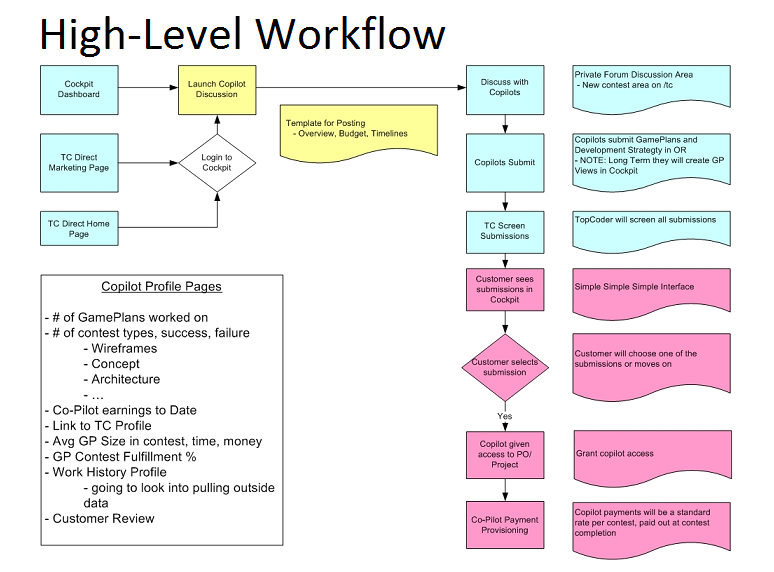
Q.   Please describe the ideal task flow of the new application; how should it work? Begin with the inputs and end with the outputs. In this section, you should exclude the exceptions that might occur.
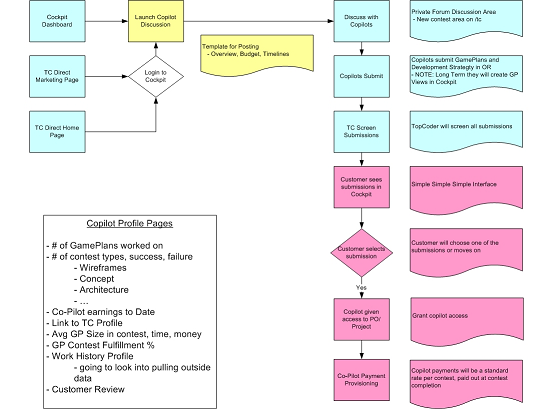
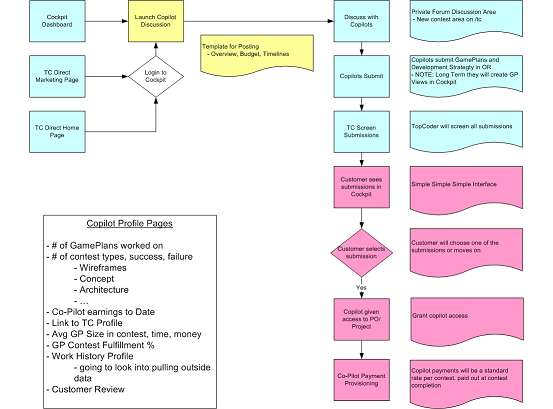
A.   Below is a high-level process flow of the intended process:process flow

Q.   If possible, please describe the reasons why the path above can fail (or fails today). This could include time or resource limitations, problems with data relationships, other glitches, etc.
A.   Not Applicable

Background and Basic Functionality

Q.   Is this a new system, or an upgrade to an older one?
A.   It's a upgrade to current system

Q.   Approximately how many users will be using the application?
A.   All the TopCoder platform managers, clients, and the members in copilot pool

Q.   How many users will be on the application concurrently?
A.   Not Applicable

Q.   Will any users be using the system from different timezones?
A.   Yes

Q.   Will the system need to receive feeds from external systems? If so, please name them, if possible. Include a description of the data that must be transferred, and the form it must be transferred in (e.g. email, paper, electronic feed, etc).
A.   No defined yet

Q.   Will the system need to send feeds to external systems? If so, please name them, if possible. Include a description of the data that must be transferred, and the form it must be transferred in (e.g. email, paper, electronic feed, etc).
A.   No defined yet

Q.   Is the system expected to send or receive email? Under which conditions?
A.   No defined yet

Q.   Is the system expected to operate with any peripheral devices besides a printer? For example, will the application be required to support fingerprint scanners, barcode guns, touchscreens, tablets, RFID, etc.
A.   No

Usability

Q.   Please describe the computer resources the designers should expect of the users. For example, will every user have a PC, or should the application be a "green-screen" app? Do users have keyboards and mice? Will users have internet access?
A.   Web application accessed by PC

Q.   Do users have specific GUI needs of the application? For example, should the application support "heads-down" or "cash register" style usage?
A.   Not Applicable

Wish List

Q.   Please describe some new features that you would like to see the system include.
A.   Not Applicable

Security

Q.   Should the system require the user to log in?
A.   Yes

Q.   Is there a "central authority" that manages user's accounts that this system should "talk" to? If so, please name or describe it if possible.
A.   Based on current system of TopCoder

Q.   Are there special auditing needs for user's activity on this application?
A.   Not Applicable

Q.   Will the user be working directly with financial or other protected information, like health records and classified data?
A.   No

Technology

Q.   Should the application be networked or stand-alone? Browser-based or thick-client?
A.   Browser based

Q.   Is there a particular language or platform on which the system must be built?
A.   The system is built as part of TopCoder platform

Requirements

1.0 Project Overview

Topcoder Copilot Revamp project is intended to improve current copilot process of TopCoder. It will define a more structural copilot process and build tools on current TopCoder platform to support the new Copilot process.

In this conceptualization contest, we'd like to address the following requirements:

• Define the whole copilot process as what is outlined in this high-level copilot process diagram. The process should be defined from :

° TopCoder's viewpoint
° Copilot's viewpiont
° Client's viewpoint

It's expected that there're high-level workflow diagrams for each viewpiont and a step by step process description.

workflow diagram

• Define requirements of the copilot page which will contain copilot statistics around the number of contests managed, fullfillment %, number of opportunities managed, etc.
• Define requirements of tool which will be used to support the new copilot process (this tool will be part of the TopCoder's new Direct application)
• Define the contest format which is used to choose copilot. In this contest, copilots will submit Gameplans and Development strategy documents based on dicussions with the platform managers and/or clients about the scope of work. The Gameplan template and draft Development Strategy Document Template will be provided for this conceptualization contest, you are required to ask questions and post your feedbacks on these two templates, and polish these two documents with the information in the forum.
• Propose different copilot payment mechanisms (i.e. copilot compsensation approach) other than current one, the new payment mechannisms should all be under the context of gettting to a deployed application. Our current proposal for payment is a standard fee per managed contest, but the downsides to that is it provides greater incentives for the copilots to run more contests. It also doesn't address the situation where a more qualified copilot should earn more than a newer copilot.

Tips for success

° Asking questions early and getting PM's feedback is very important for the success of this conceptualization competition.
° There is a round forum post which is used to discuss this copilot revamp project, try getting important information and feedbacks from there: http://forums.topcoder.com/?module=Thread&threadID=672895
° This conceptualization requires a more detailed step by step process description than the typical conceptualization workflow description. Make sure you remember that!
° Submit milestone submission and get valuable feedbacks from PM.

1.1 Competition Task Overview

One Round Contest

This Conceptualization Contest uses the One Round format. Read carefully ALL SECTIONS of this contest specification to ensure you understand the contest. You may use the "Contact PM" to clarify any contest rules.
1. This competition will consist of a SINGLE ONE (1) round with a milestone.
2. This contest will be scored against a new scorecard located here: http://www.topcoder.com/wiki/display/tc/Conceptualization+Changes

Competitors will be responsible for submitting the FINAL DELIVERABLE specifiied in section 1.2. The MILESTONE DELIVERABLE is optional. Ensure you are understand the difference and what is being asked of you with the Milestone vs. Final Submission.
This contest will follow a single one round format with a milestone deliverable. The milestone deliverable is a subset of the final document outlined in section 1.2.2. Competitors are allowed to submit before the specificed deadline in section 1.5 to earn a prize. The milestone will be judged solely by the client. The client will pick the top two submissions and rank them according to their own preference. The client is NOT obligated to award prizes if they feel the submissions are lacking in effort or scope. After determining the top two winners, the client will share feedback about use cases, scope, and process flows.
The milestone submission deliverable will consist of a subset of the Conceptulization Document. Please refer to refer to section 1.2

1.2 Submission Deliverables

1.2.1 Milestone Deliverable

The milestone submission deliverable consists of the following sections of the Conceptulization Document.

• Section 1.1 Overivew
• Section 3.1 Proposed Overview
• Section 3.3 High Level Workflows
• Seciton 3.4 Use Case Diagrams
• Section 4.4 Task Requirements - draft descriptions for the use cases identified in section 3.4

1.2.2 Final Deliverable

Your final deliverable will consist of the following. A contest distribution will be available in the forum for you

• Conceptualization Document -

° a fully complete conceptulization document. The contest distribution will be provided to you in the forums

• A .tcuml file for the use case diagrams
• All original artifacts referenced in your conceptualization document such as visio diagrams.
• Polished Development Strategy Document template

1.3 Documentation Provided

The following documentation is provided as input:

Document Name Document Description
BRD Submission Template This is the Conceptualization Document template. Fill it out and submit it both for the Milestone and Final Submission.
Questionnaire Questionnaire. You should analzye this document and post questions to the forum to engage with the client.
Copilot Gameplan template The copilot gameplan template.
Draft Copilot Development Strategy Template The draft copilot Development Strategy Document Template

1.5 Time Line

Registration Phase Duration (days): 3 days
Submission Phase Duration (days) 6 days

• Milestone submission 3 days
• Milestone Review: 1 day
• Final Deliverable 2 days

The milestone review is scheduled for 24 hours. You may continue working and posting questions during the milestone review.

1.6 Payment

This competition will be run as a single Online Review project.

1.6.1 Milestone

For the milestone, the top two (2) submissions will be chosen and ranked by the client. Read below carefully......

1. The winners are completely at the client's discretion.
2. For this contest, you must upload your milestone to Online Review. The timestamp of your submission will be used to determine if you are eligible for a milestone review and prize. The milestone deadline will be posted to the forum. You simply need to upload your milestone submission before the deadline.
3. If you are selected to win a milestone prize, YOUR FINAL SUBMISSION MUST PASS SCREENING TO EARN YOUR MILESTONE PRIZE. If you do not pass screening, you will not be awarded the prize money.

Place Prize
Milestone 1st $150
Milestone 2nd $50

1.6.2 Final

The final submission will be determined based on the normal review process against a scorecard.

Place Prize
Final 1st place $1000
Final 2nd place $500

Conceptualization

1.1 Overview of Application

Currently TopCoder offers Co-Pilot opportunities to member. Co-Pilot responsibility is assisting Project Manager in contest management. One of drawback in TopCoder process is the fact that usually no member is following the project during whole project life. Co-Pilot is the only member that will work on project from beginning to end.

Current Co-Pilot process is very simple and not as efficient as it can be. Co-Pilot is selected by Project Manager, no statistics is available, Co-Pilot responsibilities and payments are not adjusted optimally. 

To improve the quality and responsibility of Co-Pilots and at the same time make their work more comfortable and productive, several changes will be applied to Co-Pilot mechanisms. 

Improvements to current process will affect following areas:
1) Co-Pilot payments;
2) Co-Pilot selection;
3) Co-Pilot reliability and quality of work history;
4) More tight Co-Pilot and client interactions;

New system will restrict access to Co-Pilot opportunities for members of Co-Pilot pool. 

The application will be based on existing TopCoder applications:
1) TopCoder Direct for customer usage;
2) Online Review for Co-Pilot submissions (based on these submissions Co-Pilot will be selected);
3) TopCoder Web-Site for viewing Co-Pilots profiles and statistics;
4) TopCoder Forums for Customer and Co-Pilots communication;
5) Jira for BugTracking, VM assignment.

New process will make Co-Pilot selection more similar to other tracks. A contest will be run to determine Co-Pilot for the project. Not only submissions but Co-Pilot profiles will be analyzed by client on selection stage. Payment model will be changed in order to reflect Co-Pilot work quality better.

Also, some convenience tools will be created to make Co-Pilot work easier. 


ROI Metrics
Though ROI metrics cannot be completely defined, but some thoughts for the return of investment can be provided.
1) New system will highly increase responsibility of Co-Pilot. Having public profile and project history open for clients, Co-Pilots will likely be more responsible.
2) New payment model will provide higher payments for better Co-Pilots, at the same time lowering cost for client and increasing TopCoder income. 
3) Creating projects only with Co-Pilots without a lot of help from PM will allow taking more projects than now without hiring more fulltime employees. It is much more expensive to hire full-time PM than having remote Co-Pilot because of other taxes, insurance, work place, office rent and equipment costs.
4) Having Co-Pilots profiles and better structured initial documentation, more detailed review and analyzes of finished project can be done. It will be easier to determine what errors were made during any phase.

1.2 Project Objectives

The business objectives of this project are listed below.  Delivering these objectives will deliver the expected benefits of the application.

• Make Co-Pilot work more structured and responsible
• Make Co-Pilot selection process more objective
• Make Co-Pilot history and profiles available
• Improve Co-Pilot and Client communication process
• Reduce TopCoder Management Team workload on projects with Co-Pilot involved
• Make Co-Pilot earnings better reflect the skills and efforts made by Co-Pilot
• Restrict Co-Pilot opportunities to a pool of well-skilled TopCoder members
• Give client an ability to choose Co-Pilot based on presented documentation and Co-Pilot profile
• Provide client a way to see and explore Co-Pilot work history
• Provide client a way to write a feedback for the Co-Pilot

1.3 Assumptions

Some assumptions generally must be made in order to write a succinct definition of the application.  Some assumptions are technical (e.g. "the new system will employ a normalized database schema"), while others are business natured (e.g. "the client will provide an enterprise Oracle environment").  Assumptions critical to the success of this project are listed below:

• New system will be based on existing TopCoder applications
• New system will be implemented in Java, as all TopCoder applications are written using this language/technology.
• Initial Co-Pilot pool will be filled manually.
• Project can run with PM without Co-Pilot
• Project can run without PM but with Co-Pilot
• Project can run both with PM and Co-Pilot
• Submission screening will be performed by TopCoder managers currently
• Existing Co-Pilot statistics will be moved to new system.
• Client will be using simplified interface and will NOT need to use OnlineReview, Jira, Wiki. Only TopCoder Direct, Forums, and the website (for profile viewing) will be used.

1.4 Limitations

Every project has limitations on the scope of the problem it attempts to solve, on the capabilities of the implementation technology, etc.  Some limitations are assumptions on the extent of feature scope.  Others are restrictions on resources or methods for achieving the objectives.  The limitations of this project are listed below:

• The access to Co-Pilot pool will be limited to high-rated/reliable members.
• There will be no second place in Co-Pilot contests
• Only new projects will use new system

1.5 Open Items and Risks

During the conceptualization of the project and in the process of writing this document, some issues may have been discovered, and others may remain open.

• The payment model is subject to change. At least percentages can be tuned
• The content of contest status page is subject to change.
• Proof on concept can’t be made during some testing. Only real projects can be a proof. For this application the quality of new payment system can be determined only after launching the platform and having some projects done. 
• If a lot of projects will arrive to TopCoder, pool will have to be extended and less experienced members will become Co-Pilots.
• The process of ‘changing Co-Pilot’ in the middle of the project is not well-defined. It must not happen normally, the Co-Pilot is not allowed to leave project. However, this is a possible scenario (Co-Pilot leaves the project). 
• The rules of forming ‘Problems’ and ‘Attentions’ on contest status page are subject to change.
• The set of questions in initial client documentation can be changed
• The set of questions for client review process can be changed
• The description of Co-Pilot system for the client is not created
• There will be no appeals in Co-Pilot contests

2.1 Overview

step description
This section documents the current business process.  The purpose of doing so is to confirm the author understands the current procedures or opportunity.  This will provide a backdrop against which the benefits of the new proposal can be illustrated in the next section.

Currently, TopCoder provides a distinct way for the members to work. It is Co-Pilot opportunity. Co-Pilot is a member who helps PM with project during all project lifetime. 
Co-Pilot payments are fixed fees for contests run.

Current Co-Pilot responsibilities are:
1. Creation of contest specs and management of spec reviews.
2. Setup and launch contests
3. Monitor/Manage contests as they are in progress, including questions in the forums, issuing VM's, etc.
4. Testing the final submissions
5. Optionally, merging the final submission into the main application branch and validating that the code works on a VM. In other cases this is done as deployment task.
6. Working with the customer team to meet deployment schedules.
7. Run BugRaces and check their results to fix errors in the application/documentation.

Co-Pilot opportunities are posted as Bugs in Jira. PM chooses one of Co-Pilots from voted members. There are no formal rules for Co-Pilot selection currently; PM selects Co-Pilot at his own discretion.

After Co-Pilot selection, Co-Pilot is responsible for creating Game Plan. Game plan is a project plan adapted to TopCoder software production model.

This project plan is continuously updated reflecting changes after some key competitions (Conceptualization, System Architecture). 

For each finished contest Co-Pilot earns fixed percent of contest prize. This payment is distributed in following way: 60% is paid at the contest finish, another 40% - at the project completion.

2.2 Context Diagram

The Context Diagram illustrates the systems, modules, business processes, etc that feed or interact with this application, where the application is the "center of the universe."
step description

2.3 High Level Workflow

The workflow required to complete the primary objectives of this application is described below. The workflow is business-centered, and includes "decision forks" for decisions the business user, or application, must make to achieve the objective. The workflow omits application faults or exceptions. Individual tasks in the workflow are briefly described in section 2.3.2.

2.3.1 Workflow Diagram/Process Map 
2.3.2 Workflow Description 
• PM posts position at page http://www.topcoder.com/wiki/display/tc/Active+Copilot+Opportunities
o Problems: This approach misses the overall contest-based TopCoder development style. It is not as useful as other tracks are.
• Then members can vote for the position
o Problems: there’s no strict timeline for the ‘contest’. No information except for interest in work is provided by voters.
• After that, Co-Pilot will be selected by PM. 
o Problems: The selection can be quite "random" and will not reflect real project needs
• Co-Pilot signs SOW. 
o Problems: none
• Currently, Co-Pilots can be responsible both for overall project and for some subset of competitions. In this case, no Game Plan creation is needed.
o No problems here
• If GamePlan creation is required, Client must confirm it before moving project forward. 
o Problems: Game Plan at this stage is like a guess. No communication with client was done before this.
• After client confirmation, Co-Pilot will create and manage contest.
o No problems here

2.4 Dependencies

The list below enumerates external applications, business procedures, personnel, etc, that are required to achieve the objectives of the current application.  For example, if the application is a data warehouse, it will depend on one or more OLTP systems at the enterprise.  Those systems would be listed here.


• TopCoder JIRA Bugtracker
o It is used for Co-Pilot opportunity posting and bug races run by the Co-Pilot
• TopCoder forums. 
o Forums are used for communication between Co-Pilot, PM, Client and Contestants
• TopCoder Direct
o Is used by client to initiate the project and by Co-Pilot for contest creation.
• TopCoder Online Review
o It is used for contest status check and contest review results analyze.
• TopCoder website
o It is used for overall information getting, checking registered member profiles and watching contest statuses.
• TopCoder wiki
o It is used for Specifications and Requirements creation and viewing

2.5 Current Limitations/Problems

Limitations of and problems with the current application are listed below.  These are the issues that the new application strives to address.

• There’s no Co-Pilot profile available
• There’s no project history for Co-Pilot
• There’s no formalized process for Co-Pilot selection
• It is hard to create contest with Co-Pilot and without PM
• Co-Pilot payments do not reflect the skills and efforts made by the Co-Pilot
• There’s a chance for not very skilled member to become a Co-Pilot
• There’s no defined penalization for failed contests and projects
• Co-Pilot has no direct control over project timeline. It is manager responsibility.
• A lot of communication is done over e-mail, so it is hard to keep track on all contests.
• There’s no page where Co-Pilot is able to see and track all running contests.
• There’s no page where Co-Pilot can see current detailed timeline

3.1 Overview

This section includes a concise description of the features and operation of the proposed solution. ?It also compares and contrasts the solution with the current process. ?The context and workflow of the proposed solution are defined in subsequent sections.

All these sections add new functionality and solve some of previous version limitations. All they are ‘contrast’ with previous solution.
3.1.1 Client Initial documentation
To start the contest client should provide some initial documentation. This documentation will be similar to conceptualization questionnaire, but will have some other questions in it. Any additional documentation that client can provide is desirable.
The preliminary list of questions:

Only for existing system upgrade
1) Short description of current application.
2) Who uses the application currently?
3) What is wrong with current application? Why should it be changed?
4) What dependencies exist for the current system?
5) What technical details can you provide about existing app? (Environment, etc.)

For existing system upgrade and new application
6) What are you expecting to achieve in new application?
7) Who will use new application?
8) What systems will depend on new application?
9) What systems does new application depend on?
10) What is expected deadline for the application production?
11) What technical details can you provide about new application requirement? (Environment, etc.)
12) What are future directions for the system?
13) What type of the application will it be (these will be checkboxes, as complex system can consist of several applications):
a. Web-application
b. Mobile application (define platforms: iPhone, Android, Blackberry, etc.)
c. Desktop application (define platforms: Windows, Linux, Mac OS)
d. Web-Service?

3.1.2 Client Communication Tool
Currently, client is communicating with competitors on forums. It is convenient for contest participants, but can be not very convenient for client. It will be easier for client to answer using e-mails. Similar approach is used in Google groups (http://groups.google.com/). In this system user can answer to special ‘group email’. After that, message will be automatically posted to the forums. Similar tool can be created for client communication on new Co-Pilot platform.

For each forum new email must be created automatically (i.e. elephant-project-co-pilot@topcoder.com). Writing a mail to this address will cause a new thread to appear. Responding to a message from this mail will cause posting to existing thread.?

Currently this tool is a suggestion and the tool will potentially be created later, after the new process run. It will be described better after more contests run and more client feedbacks gathered.
3.1.3 Client selection
Before starting project, client may hire Co-Pilot to help with the project. The description on what a co-pilot is must be provided to the client. The information must contain:
1) What benefits will the client obtain: experienced TC member, assist with contest creation, question answering and so on.
2) How much will it cost to the client.

If client wants to have Co-Pilot, a contest will be created for Co-Pilot selection.
Client will select one of submitted Co-Pilots based on submission and Co-Pilot profile. If client does not like any submission, he is able to discard all Co-Pilot inquiries.

The client can also hire a TopCoder Project Manager for his project. This will cost him additional money, but will make the process better managed and predictable.?

During the contest the client will communicate with Co-Pilot on forums and/or using e-mail based communication tool.

The client will not be required to use online review, jira or any other TC systems except TC Direct and TC Forums.
3.1.4 Co-Pilot Pool
Only members from Co-Pilot pool will be allowed to take Co-Pilots positions. Initially Co-Pilot pool will be formed as follows:
1) Members who have previous successful Co-Pilot work history;
2) Members who have rating > 1200 in architecture, specification or concept;
3) Members who have reliability 100% in architecture, specification or concept and 3 or more contests with 1st or 2nd place in these tracks;

Requests for Co-Pilot pool entering will be handled by TopCoder project managers manually at this moment.

3.1.5 Co-Pilot Profile
New tab will be added to TopCoder profile page. It will contain information about Co-Pilot work history. Following information will be presented initially. More metrics can be added later
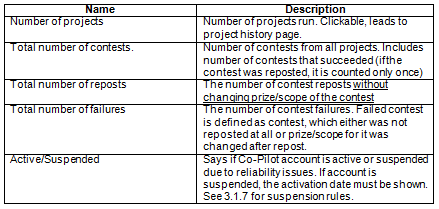
Project history page will show the list of projects run by the Co-Pilot. The real names of the projects must be hidden. Following information must be shown for each project:
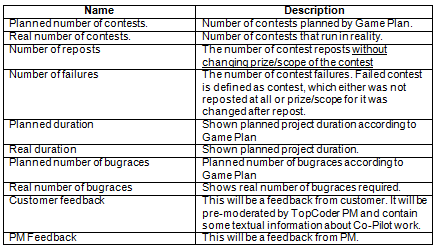
Also special page will be created to see statistics grouped by contest type. Following information will be available for each contest type:
Initial ratings will be filled from existing project\contest statistics. Potentially, some manual work will be required. In cases, when there’s no enough information, the feedback from PM must be filled with more details.
3.1.6 Co-Pilot Selection
In contrast with existing approach, new Co-Pilot system will be more objective to the Co-Pilot selection process. It will be a kind of mini-contest, where each member will be required to submit Game Plan and Development Strategy document. Member will be able to unregister from the competition during registration phase. This will allow potential Co-Pilot to get more information about the project from forums and decide if their skills match the required project.?
After submission, short screening phase will be started. The screening will be performed by TopCoder Managers currently, but in future, review board can be created. Screening will have a list of questions, that checks:
1) Game Plan
2) Development Strategy
3) The fact that these two documents are correlated.
4) Grammar and spelling of the documents will be checked, but some errors here will not lead to screening failure.
After that, client will decide, which submission describes his needs better. Please note, that, unlike other contests, client here selects not ‘submission’ but ‘Co-Pilot’. So, the information about submission will not be anonymous for the client. Client must be able to see previous history of the Co-Pilot work. For example, if one’s Game Plan was always an underestimation, then client can think that the budget can be exceeded this time as well.

There will be no formal rules for client to fill, but there will be a list of recommended questions to answer during Co-Pilot selection:
1) Does the provided documentation meet project timeline and budget?
2) Does the content of development strategy document meet application needs?
3) Does the development strategy document prove the Game Plan?
4) How experienced submitter is?
5) Has submitter any current projects?
6) Has submitter positive history?

There will be no appeal phase for the screening and Co-Pilot client selection.?

3.1.7 Co-Pilot Reliability
Co-Pilot reliability is much more important issue than reliability in other contest tracks. Instead of providing bonuses to reliable members (as in other tracks), unreliable Co-Pilots will be punished. There are following options:
1) Co-Pilot contest registrant did not submit Game Plan and Development Strategy. In this case member will be unable to take any Co-Pilot opportunity during next 60 days.
2) Co-Pilot discards an opportunity after he was selected (before the actual project start). In this case, member will be unable to take any Co-Pilot opportunity during next 90 days.
3) Co-Pilot leaves the project in the middle, with some warning (i.e. he writes letter to PM with information, that he will be unable to complete the project). In this case, member will be unable to take any Co-Pilot opportunity during next 120 days.
4) Co-Pilot stops working on the project without any warning. In this case Co-Pilot will be removed from Co-Pilot pool forever.


3.1.8 Co-Pilot Payments

Criteria
Following criteria must be taken into account:
1) Quality of proposed Game Plan. The more precise initial Game Plan was the larger must Co-Pilot payment be.
2) Responsiveness of work. Co-Pilot must be active in forums and monitor all managed contests.
3) The most important factor: the quality of obtained result.?
4) The positive Co-Pilot history must be accounted. The idea and relative size of this bonus will be similar to reliability bonus in other tracks.
5) Project complexity. The larger project is the higher Co-Pilot compensation for one contest must be. This is because for larger project Co-Pilot will need to analyze more information and have the whole project image in mind.?
6) At the same time, the formula for calculating earnings must not be very complex. Potential Co-Pilots must be able to understand easily, how much money they will earn for the project.?

Now several different approaches will be proposed. They’ll be given some codenames to refer them easily. Some approaches are more suitable for large projects, others for small ones.

Current payment (roughly) is equal to 25% of contest prizes. New system will have average earnings be similar in size, but these earnings will vary according to above factors.


Completion Model
This model will be oriented on the produced result mostly. Here’s a description.
1) Co-Pilot will obtain fixed fee per contest equal to 20% of contest price (i.e. 400$ for component competition). This is applicable only to contests mentioned in Game Plan. 50% will be paid after contest finish, 50% on successful project completion.
2) If any additional contest is required (not mentioned in Game Plan), the payment will be 15% of contest first prize in compare with 20% for normal contest.
3) In case of contest repost, larger part of payment will be moved to project completion (i.e. 40% will be paid on contest completion, and 60% on project completion). This must be done because there’s a risk that result of the contest will not have enough quality. The size of Co-Pilot payment will remain the same after contest prize increase (i.e. if 600$ design was reposted for 800$, Co-Pilot will receive 20% of 600$ - design).?
4) Payment for each bugrace that was planned is equal to 50% of the bugrace prize. It should be large. For each not planned bugrace, Co-Pilot will receive 10%.
5) In case of leaving the project, Co-Pilot will not receive any payments planned for future.?
6) After completion, following bonuses/cuts can be applied to the payment:
a. Project size bonus. If project size was large (i.e. number of contests is larger than 35) 10% bonus will be added to initial payment.?
b. Reliability bonus. If member has 5 or more successful Co-Pilot project in his history, 10% bonus is added. If member has 10 or more successful Co-Pilot project in history, 15% bonus is added.
c. In case of some serious troubles, that, on the other hand, did not prevent project from successful completion (for example, Co-Pilot haven’t responded for three days), his payment will be decreased by 2% for each such issue.
Sample:
Experienced Co-Pilot with 7 successful projects in history has created a Game Plan with 16 contests:
1) Conceptualization (2000$ )
2) Specification (2000$)
3) System Architecture (2000$)
4) Module Architecture (2000$)?
5) 5 Components (2000$ each)
6) Assembly (2000$)
7) Testing Scenarios (300$)
20300 prizes in total.?

Also, 5 bugraces were planned.?

In reality, one additional design/development was required. 10 Bugraces for 50$ each were run.?

Co-Pilot payment for such situation will be:
Initial payment: 20300 * 20% = 4060$
Payment for additional component: 2000 * 15% = 150$?
Payment for planned bugraces: 250 * 50% = 125$
Payment for not planned bugraces: 250 * 10% = 25$
The sum is: 4360$.
Member will have experience bonus 10%: 4360 * 10% = 436$
Total payment will be: 4796$

Greedy Model
This model is based on the fact that client wants to pay less and Co-Pilot wants to earn more. In this model Co-Pilot will be paid for each contest that was not required to have. This model will require Co-Pilot to be more experienced and professional in both technical and management and look deeper in the details.

In this model payment structure will be defined as follows:
1) Game plan will be a ‘worst-case scenario’. Each Game Plan economy will cause bonus payments, each Game Plan exceed will be highly penalized.?
2) For each contest mentioned in the Game Plan, Co-Pilot will receive 15% of the first prize. 60% of it will be paid after contest finish, 40% - after project completion.
3) For saved money (by reducing contest cost or by decreasing contest number) ‘saved’ money will be distributed between client and Co-Pilot. TopCoder fee will remain the same. For example, component production estimated cost is 2000$. It includes design, development and review. Reduce design cost from 600$ to 450$ (and development from 400 to 300) will reduce total cost from 2000$ to 1500$. Co-pilot will receive 250$ and client will pay 250$ less. This money will be paid after project completion.
4) For each failed contest Co-Pilot will be penalized. Each reposted contest will not be eligible for ‘economy bonus’. The payment for such contest will be only 10% of the contest prize.
5) For each extra contest 10% of the contest prize will be paid.
6) In case of leaving the project, Co-Pilot will not receive any payments planned for future.?
7) After completion, following bonuses/cuts can be applied to the payment:
a. Project size bonus. If project size was large (i.e. number of contests is larger than 35) 5% bonus will be added to initial payment.?
b. Reliability bonus. If member has 5 or more successful Co-Pilot project in his history, 15% bonus is added. If member has 10 or more successful Co-Pilot project in history, 25% bonus is added.
c. In case of some serious troubles, that, on the other hand, did not prevent project from successful completion (for example, Co-Pilot haven’t respond for three days), His payment will be decreased by 2% for each such issue.

Co-Pilot with 3 successful projects in history has created a Game Plan with 16 contests:
1) Conceptualization (2000$ )
2) 2 * Module Specification (2000$ each)
3) System Architecture (2000$)
4) 2 * Module Architecture (2000$)?
5) 10 Components Designs (2000$ each)
6) 2 * Module Assembly (2000$ each)
7) System Assembly (2000$ each)
8) Testing Scenarios (400$)
Total cost: 38400$
Also, 10 bugraces were planned.?

In reality, 8 components were created and Module Assemblies cost 1600$.?
It means, that 4800$ was saved.?
All 10 bugraces were used.

Co-Pilot payment will be:
Initial payment for run contests: (38400 - 4800) * 15% = 5040$
Payment for saved money: 4800 * 50% = 2400$?
Payment for planned bugraces: 500 ?* 50% = 250$
The sum is: 7690$.

3.1.9 Co-Pilot contest tracking
Currently it is hard to track contest status for all projects that Co-Pilot is involved in.
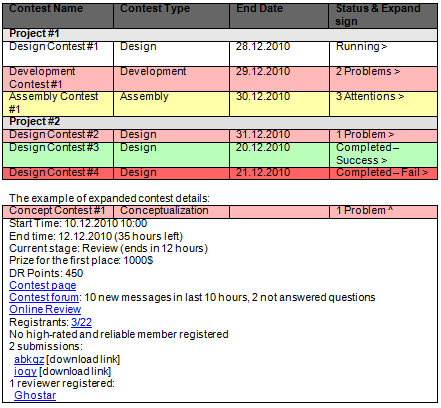
There’s no page, where Co-Pilot can see what is happening with his projects and what project needs additional attention. New system will introduce such special page. Short description will follow. Provided mock-ups are just drafts and must be elaborated during specification stage.?

The page will show a list of contests. The list can be grouped by contest type or by project. Co-Pilot must be able to switch from one view to another quickly (using button or dropdown box, without going to any settings).

Information for each contest will contain:
1) Contest type (design/development/…)
2) Contest start date and time
3) Contest finish date and time
4) Current stage (registration/submission/review/…)
5) Link to contest page
6) Link to contest forum
7) Link to contest online review
8) Number of rated/unrated registrants
9) Is there any high-rated and reliable registrant (i.e. rating > 1500 && reliability == 100). These numbers must be able to be adjusted for each contest type, because there’re several red designers but no red architects.?
10) Number of submissions (with submitters handles)
11) Links for submission downloads directly from this page
12) Forum activity (number of posts in last 24 hours and number of new posts)
13) Number of not-answered messages if it is possible. As a first assumption, it could be number of threads where last post’s author is one of registrants.?
14) Number of reviewers registered.
15) Winner/second place
16) Prize and DR points for the contest.
17) Problems area (see detailed description below)?
18) Attention area (see detailed description below)

Problems area will contain a list of problems that must be solved. It is hidden if there’s no problem with the contest. Each message in this area will have a link associated that can be used to resolve the issue.?
Problems include:
1) Screening/Review has been started but there’s no screener/reviewer registered. Link will follow to Review Opportunities page.
2) Screening/Review/Aggregation is late. List of reviewers who did not submit their work in time will be shown.
3) Final Fixes are late. Handle of submitter will be shown.
4) There was no answer for questions for more than 24 hours on forums. Link to the forums will be shown.
5) Registration has been closed but no rated member has registered. Link to ‘registrants’ page will be shown.
6) There were no submissions for the contest.

Attention is less strong than problem. It can just ‘warn’ about something.
Attentions include:
1) Submission stage is closing in 24 hours but there’s no submission. However, if 2 or more members with reliability 100% are registered, the attention will be shown only one hour before submission deadline.
2) Review/Screening/Aggregation is closing in 2 hours but there’re left deliverables
3) Submission is closing in 24 hours but reviewer has not been registered
4) There’re non-answered questions in the forum.

The list of running contests can be quite large, so, all this information must be shown in ‘expanded view’ for the contest. In usual view there will be only one line for each project.?

The example of contest list (grouped by project).

3.1.10 Time tracking
Existing system lacks the ability for easy looking the project timeline. PM uses some special tools (like MS Project), but Co-Pilot does not have access to it. To improve the process, export to portable Calendar format can be used. The tracking must be set up in Cockpit to allow scheduled contest runs. This timelines must be able to be exported to iCal/Outlook/Google Calendar.
3.1.11 Game Plan Online
In contrast with current approach, when Gameplan is submitted into Online Review as an Excel file, online viewing of GamePlan should be created. This functionality will be implemented later. Such addition will help clients to see Gameplan easily.

3.2 Context Diagram

The Context Diagram illustrates the modules, business processes, etc that feed or interact with this proposed application.

3.3 High Level Workflow

The workflow required to complete the primary objectives of the proposed application is described below. The workflow is business-centered, and includes "decision forks" for decisions the business user, or application, must make to achieve the objective. The workflow omits application faults or exceptions. Individual tasks in the workflow are described.
3.3.1 Workflow/Process Map Diagram
These diagrams describes the same process – Co-Pilot selection, but, from different points of view: member and client.
Client Co-Pilot Selection
1) When client creates project he will see description of Co-Pilot opportunities
a. Problems: since TopCoder software production model is quite different from classic approaches, it is possible that client will not understand why he needs a Co-Pilot?
b. Opportunities: some textual examples and graphic could be created for this section. A kind of PowerPoint presentation would be useful as well?
2) If client desires to use Co-Pilot, the contest will be created.
a. Opportunities: The interface for that must be intuitive and straightforward.?
3) After contest starts, customer must discuss the contest on forums
a. Problems: Client can have not much time to answer all questions in time. In this case contest should be extended.?
4) After submission and screening, a number of submissions will be presented to client. He can select one of them or discard all submissions.
a. Problems: Client may select wrong Co-Pilot based on low budget/small timeline. This must be clearly explained to client.
5) Client provides feedback to the winning submission and waits for fix
a. Problems: some new details can be figured out on this stage
6) Client checks final submission. If everything is fine, contest is launched. Otherwise, new fix must be applied.

Member Co-Pilot Contest
1) Member registers for the contest. Only members from Co-Pilot pool are allowed to register.
2) Member communicates with client on forums.
a. Problems: TopCoder community is more technical than business-analyst. The ‘right’ questions for such contests can be very different from technical-based contests.
3) During registration phase member is allowed to unregister
a. Problems: member can forget to unregister and will be seriously penalized. It must be clearly stated on registration
4) If member is not unregistered he must submit and pass screening. See 3.1.5 section for reliability penalizations.
a. Problems: contestant may want to appeal, but appeals are not allowed here.
5) If client does not select member’s submission, the process ends.
a. Problems: none;
6) If client selects member as co-pilot, member must confirm it. If he fails to do it, he will be penalized (see 3.1.5 for details)
7) Member must fix all issues in his submission described by client.
a. Problems: new details can be found out on this stage
8) If client confirms fixes, Co-Pilot work starts. Otherwise, Co-Pilot must fix the submission again.

Co-Pilot Contest Management
1) Co-Pilot creates the contest.
2) Co-Pilot writes Requirement Specification.
3) Specification Reviewer checks the requirements
4) Contest starts at scheduled time.
5) TC Members register
a. Problems: there can be a few registrants;
6) Members and Co-Pilot communicate on forums
a. Problems: Due to different time zones communication can be slow;
7) If there was no submission, contest is failed.
a. Problems: the failure is problem itself. Contest will possibly be reposted.?
8) If no submission passes review, contest is failed.
a. Problems: the failure is problem itself. Contest will possibly be reposted.
9) Otherwise, contest succeeded.
b. Problems: the quality of submission should be checked by Co-Pilot.

3.4 Use Case Diagrams

Use case diagrams are helpful illustrations of how the application’s users interact with the system. Use case "bubbles" correlate to distinct task domains and are useful in determining user roles, module boundaries, shared tasks, etc. The use case diagram are intentionally high level, and exclude activity details such as for example "submit shopping cart." The diagram below should be used to verify that the required functionality of the application is covered.
TopCoder Member UseCase Diagram
Co-Pilot Pool Member Use-Case Diagram
Co-Pilot Use-Case Diagram
Customer Use-Case Diagram
TopCoder Manager Use-Case Diagram
System Use-Case Diagram

4.1 Users

All applications have users and most have several users of different types. ?This section identifies, at a high level, the types of users of the system. ?

4.1.1 Customer
This user is TopCoder client who wishes to hire a Co-Pilot for his project.

4.1.2 TopCoder Project Manager
This user is a TopCoder employee that will be the main responsible person for the project. Co-Pilot will help him. Manager is responsible for checking Co-Pilot work.?

4.1.3 TopCoder Member
This is TopCoder member who is not added to Co-Pilot pool.

4.1.4 Co-Pilot Pool Member
This is TopCoder member who is able to register for Co-Pilot positions.

4.1.5 Co-Pilot
This is user who selected for Co-Pilot position.

4.2 Inputs/Outputs

This section identifies and describes the inputs to and outputs from the new application. ?Inputs can include electronic inputs, like RSS and EDI feeds, updates from external databases, etc, as well as human inputs, like "user X keys in results from report Y." ?Output can include electronic feeds, printed reports, etc. ?In this section, all electronic inputs and outputs are captured. ?Human inputs are omitted from this section.


4.2.1 Inputs
4.2.1.1 TopCoder past contest statistics for Co-Pilot profiles
4.2.1.2 TopCoder forum posts?
4.2.1.3 Final project timeline documents
4.2.1.4 TopCoder Contest Statuses and Information. It includes registrants, reviewers and other contest-related information.
4.2.1.5 Login/logout information

4.2.2 Outputs
4.2.2.1 Google Calendar Events
4.2.2.2 Email notifications from TopCoder website
4.2.2.3 Created product and documentation
4.2.2.4 New Contest statistics
4.2.2.5 Payment provisioning
4.2.2.6 Requirement specifications

4.3 Dependencies

Human inputs are also categorized as dependencies. List all dependencies.

4.3.1 Client dependency
System depends on Client actions and provided documentation. Client actions include forum posts, other communication with Co-Pilots, review of Co-Pilot contest submissions and writing Co-Pilot feedback
4.3.2 Co-Pilot dependency
Co-Pilots will submit documentation, provide answers on forums and communicate with Client and PM using all means of connection.?
4.3.3 PM dependency
PM will input Co-Pilot feedbacks, screening results, review of Client feedback and other communication.?
4.3.4 TopCoder wiki
Wiki will be used for specification creation and review.
4.3.5 TopCoder forums
Forums will be the main communication tool for the system.
4.3.6 TopCoder database
Current database will be used as data source for Co-Pilot statistics fill.
4.3.7 TopCoder Direct
TopCoder direct will be used by client to manage and observe the process and create initial contest.
4.3.8 TopCoder Online Review
Online review will be used for contests submissions.
4.3.9 Google Calendar
Google calendar will be used for timelines export.
4.3.10 TopCoder bugtracker (JIRA)
TopCoder Jira will be used for BugRaces, deployment tasks and as a result of competitor contact (when user contact manager from OR a bug is created automatically).
4.3.11 Communication tool
Communication tool described in 3.1.2 will be used for easy communication.
4.3.12 TopCoder website
It will be used as a base for UI implementation for this module.

4.3.13 TopCoder Studio
Will be used for Studio contest status tracking and management.

4.4 Task Requirements

Task Requirements correlate to the use cases, above. ?There should be at least one task for each use case bubble. ?Each use case should be briefly described. ?If there are specific requirements related to the use case, they should also be listed. ?This section captures high-level, basic functional requirements. ?Detailed requirements will be defined during the Requirements Specification contests.

TopCoder Member Requirements
4.4.1 Request membership in Co-Pilot Pool
Each member can request membership in Co-Pilot pool. Each request will be processed by TopCoder managers. Following categories are allowed to enter the pool:
1) Members who have previous successful Co-Pilot work history;
2) Members who have rating > 1500 in architecture, specification or concept;
3) Members who have reliability 100% in architecture, specification or concept and 3 or more contests in these tracks;
4) On PM discretion, well-known and qualified designer and developers can also be added to Co-Pilot pool

4.4.2 View Co-Pilot Profile
Each member can see Co-Pilot profile. However, the information will not be full. Member will be unable to download previous submissions.

Co-Pilot Pool Member Requirements
4.4.3 Communicate with Customer on forums
When Co-Pilot Pool Member registers for a contest, he must communicate with customer on forums to reveal all details of the project and create a reasonable documentation. This is one of the main differences in compare with previous Co-Pilot process, where direct communication with client was very limited.

4.4.4 Register for Co-Pilot contest
Each Co-Pilot Pool Member can register for the Co-Pilot contest. He must submit a gameplan and pass screening, if he didn’t unregister.

4.4.5 Unregister from Co-Pilot contest
During registration phase, each registrant is able to unregister from the contest. This is very important to unregister if member is not going to submit, because penalizations for it will be serious.?

4.4.6 Submit documentation
Co-Pilot contest registrant must submit documentation that will be screened by TopCoder and analyzed by client.

4.4.7 Submit Development Strategy document
Development strategy document is a kind of ‘vision’ for the project. It is a merge of conceptualization and system architecture, greatly reduced in size and details. This document will be a proof for the game plan provided.

4.4.8 Submit Game Plan
Game plan is a document that defines project timeline and cost. Although game plan is a subject to change, it is important to create as precise game plan as possible initially, since this is one of factors for Co-Pilot work quality measurement.

4.4.9 View screening result
After screening, submitter can see screening result. No appeal phase will be available, so documentation must be as clear as possible.

4.4.10 Set up privacy settings
In TopCoder profile there will be a separate setting – hide Co-Pilot earnings. This will be separate from usual Payments number.

4.4.11 View Past Contest Submissions
Each Co-Pilot pool member can see previous submissions on previous Co-Pilot selection contests. This will help to provide valuable submissions.?

Co-Pilot Requirements
4.4.12 Manage contests
Co-Pilot’s main task is to help with contest management. It includes different aspects of the TopCoder software development process, so, the experience in different types of contests is encouraged for the Co-Pilot. He must be familiar with all available competition tracks.?

4.4.13 Check and adjust contest timeline
The timeline for the competition can be adjusted, if some member asked to extend the deadline. The extension will not affect Co-Pilot payment, but, in case of large number of extensions, overall project timeline will be extended and this will be seen in Co-Pilot profile page. Possibly, it is one of the main things the client will check when selecting co-pilot – how precise he’s able to meet the timeline.?
This use-case also corresponds to notifying submitters/reviewers about late reviews/final fixes.

4.4.14 Check reviewer existence
Each contest must have reviewers registered. If reviewer is not registered, broadcast mail to review board members must be sent to ensure that timeline won’t shift because of empty reviewer slot.

4.4.15 Fix initial submission?
Client will describe issues found in initial submission. Co-Pilot must fix them in order to start work on project.

4.4.16 Track contest status
Co-Pilot will be able to see contest statuses for his project on one page. This information is detailed in 3.1.9

4.4.17 See project timeline in Google Calendar
Co-Pilot will be able to see project timeline in Google Calendar on his web-browser or mobile-phone. This information is detailed in 3.1.10

4.4.18 Communicate on forums with contestants
One of the main tasks is to assist contestants. Often, other member is responsible for answering questions (i.e. architect answers designer questions, designer answers developer questions), but, Co-Pilot is the only member who follows project from the beginning to end and he must be able to address any complex and not trivial issue.

4.4.19 Process VM requests
Development is often done on Virtual Machines provided by Amazon. Co-Pilot is responsible for VM assignments to competitors.

4.4.20 Check that somebody works on the contest
If forum is inactive no one is going to submit, Co-Pilot must communicate with registrants and ask about submission perspectives. In case that anyone needs extension/more information, required help must be given.?
4.4.21 Launch contests
Co-Pilot will be responsible for launching the contests and gathering all required documentation for them.?

4.4.22 Leave the project in the middle
It can happen that Co-Pilot is unable to continue working on project. It is very bad for the project, however, this possibility must be taken into account. The Co-Pilot who leaves the project in the middle will be penalized seriously and lost all his payments delayed for project finish.?

4.4.23 Discard co-pilot opportunity
After client selection, Co-Pilot can discard the position. Such behavior is highly discouraged and will be penalized, however, it is better than leaving project in the middle. The penalization will not be as strong as in 4.4.19 case.

4.4.24 Work with client on deployment
The deployment on client environment is Co-Pilot responsibility. He must ensure that software was correctly deployed and use bug-races if any small problems arise. In case of serious errors that prevents projects from being deployed, additional contests could be made, but this will lead to lower Co-Pilot characteristics. In cases when deployment work is not very simple (this happens quite often), special Deployment task can be created by Co-Pilot.

4.4.25 Test final submission
The final distribution must be tested by Co-Pilot. It includes both testing on TopCoder VM and client environment.

4.4.26 Communicate with customer
The key for project success is good communication skills. Co-Pilot must ask client early about each problem/possible choice.?

4.4.27 Communicate with customer using IM
To allow faster communication than in e-mail or forums, client and Co-Pilot can exchange their IMs and use them. However, this way is discouraged, because it will be hard to track conversation history.

4.4.28 Communicate with customer on forums
Communication on forums is still important, because allows to include community opinions.?

4.4.29 Communicate with customer using e-mail
E-mail conversations are still a most convenient and traditional way to communicate and will definitely be used. However, this way is discouraged, because it will be hard to track conversation history.

Customer requirements
4.4.30 View Co-Pilot service description
Client must be able to get clear description about what is a ‘Co-Pilot’, what are benefits of Co-Pilot and how much will it cost. Some descriptive graphic can be created for this in addition.

4.4.31 Request for Co-Pilot
Client can request for a Co-Pilot and ask for a special copilot selection contest. The client will choose one of submitters as Co-Pilot for his project.

4.4.32 Communicate with Co-Pilot?
The key for project success is good communication skills. Client should communicate with Co-Pilot on all project-related questions.?

4.4.33 Communicate with Co-Pilot on forums
Communication on forums is still important, because allows to include community opinions.

4.4.34 Communicate with Co-Pilot using e-mail
E-mail conversations are still a most convenient and traditional way to communicate and will definitely be used.

4.4.35 Communicate with Co-Pilot using IM
To allow faster communication than in e-mail or forums, client and Co-Pilot can exchange their IMs and use them.

4.4.36 Communicate with Co-Pilot Pool Members
On the Co-Pilot selection contest, client must answer questions on forums to allow better project understanding.?

4.4.37 View Co-Pilot profiles
Client should view submitters’ profiles to learn Co-Pilots project history and find out who fits the position best.

4.4.38 View Co-Pilots submissions
Client will view the submissions which passed screening and determine their fit to the project needs.

4.4.39 View Game Plan
Game plan is a document that defines project timeline and budget. On this early stage this document can be not ideally, but it will give a rough estimation. The quality of estimation will be reflected in Co-Pilot’s profile, so customer can determine the usual correctness of one’s submission.?

4.4.40 View Development strategy document
This document is a proof for a provided gameplan. It must contain enough technical and business details to allow clear feeling of right way for project implementation.

4.4.41 Describe issues of Co-Pilot submission
Client will describe issues that are required to be fixed in the winning submission (if any). He must do it using TC Direct and/or Forums for communication.?

4.4.42 Write Co-Pilot review
After project finish, client can write Co-Pilot review. It will be moderated by TopCoder PMs and shown on Co-Pilot profile page. Reading these reviews can help customer to select Co-Pilot for their needs.

4.4.43 Select Winning Submission
Selection of winning submission must be done not only by quality of that submission, but the history and profile of Co-Pilot. There will be no objective criteria for that selection, client will choose the Co-Pilot.
?
4.4.44 Discard all submissions
If client likes no submission/submitter than no Co-Pilot will be selected. TopCoder will provide hired Project Manager for that project possibly.

4.4.45 Hire TopCoder Manager
TopCoder can provide PM in addition to Co-Pilot. This will make process more expensive for the client, but the process will be more responsible and reliable.

4.4.46 Provide initial documentation
Client will have to provide initial documentation in questionnaire form defined in 3.1.1

TopCoder manager requirements
4.4.47 View Co-Pilot profile
TopCoder Manager will be able to view Co-Pilot profiles as any other members. In addition, they’ll be able to see hidden fields (as Co-Pilot payments).

4.4.48 Check GamePlan Quality
Checking initial GamePlan and its comparison with real timeline will be project manager responsibility. He will determine that information and will Co-Pilot profile with corresponding values after project finish.

4.4.49 Do screening
Initially no community review board will be created for screening Co-Pilot contests. TopCoder staff will do this work. In future, screening will also be community driven.

4.4.50 Manage Co-Pilot pool access request
Managers will be responsible for populating Co-Pilot pool with new members. Members can be added using common criteria defined above, or, at Manager discretion (he knows that this member is qualified well).

4.4.51 Communicate with Co-Pilot Pool Members?
News and Co-Pilot opportunities can be mailed to Pool Members by Project Manager.?

4.4.52 Communicate with Customer
Manager must communicate with customer and resolve all problems raised between Co-Pilot and client.?

4.4.53 Communicate with Co-Pilot
Project manager can communicate with Co-Pilot. He should notify him about some not answered questions or other problems in cases when client and Co-Pilot didn’t manage to solve the problem by themselves.?

4.4.54 Remove member from Co-Pilot pool
In cases of low-quality work or reliability issues member can be removed from Co-Pilot pool.

4.4.55 Remove member from Co-Pilot pool temporarily
In case of reliability issues, member of Co-Pilot pool can be suspended for some amount of time (1,2,3,4 months). After that time member account must become active automatically.

4.4.56 Remove member from Co-Pilot pool permanently
In case of serious issues (leaving the project without any notification), member can be removed from Co-Pilot pool forever without restore rights.

4.4.57 Remove member from Co-Pilot pool permanently
PM can write review of Co-Pilot work. It will be also seen at Co-Pilot profile.

System requirements
4.4.58 Track statistics
All contest-related statistics must be tracked. It includes all contests, all reposts, all successes for the project.

4.4.59 Process statistics
Gathered statistics will be process to present in human readable way in Co-Pilot profile page

4.4.60 Assign Co-Pilot to project
Co-Pilot must be ‘assigned’ to the project in the backend in order to allow him management actions.

4.4.61 Calculate payments
Co-Pilot payments must be calculated according to selected payment model.

4.5 Security Requirements

This section documents, at a high level, the basic security requirements of the application. ?For example, does the system require the user to log in? ?Should the user’s identity be authenticated on just this system, or against a central authority? ?Are there any special or unusual security requirements, like fingerprint scanning?


4.5.1 Co-Pilot Privacy
Co-Pilot must be able to hide his earnings.
4.5.2 Page Authorization
Only PM and Co-Pilot of the project must be able to see Project Status pages as it contains links to submission downloads.
4.5.3 Logins
Existing TopCoder login process will be re-used. Co-Pilot will not be required to login additionally.
4.5.4 Client
Client will be logged into TopCoder Direct. It should be allowed to access forums without additional login.
4.5.5 Co-Pilot rights
Co-Pilot management rights must be restricted to the project he runs. He must not be able to manage contest that belongs to other project.

4.6 Performance Requirements

Performance Requirements for the application are defined at a high level below. ?If there are specific requirements for specific features to perform at a quantifiable level, they too are listed below. These requirements will be developed in more detail when the Requirements Specification is written, in a later phase.

4.6.1 Web Pages will Load in ~2 seconds or less after initial hit
4.6.2 The system will achieve 99.999% uptime
4.6.3 The system will be available 24x7
4.6.4 For email-based messaging tool ~60 seconds delay is allowed
4.6.5 System will be used by several hundreds of users

4.7 Data Migration

Data Migration describes the data that needs to be moved from an older or external system to the new system, in order for it to operate at launch. Migration also includes data that must be transferred from the new system to another external system. Any data migration requirements are listed below.

Though there’s no data ‘migration’ in common sense, existing data that contains contest statistics must be included in Co-Pilot profile. It includes number of run contests, their results, timeline changes. Some of the data will be filled manually (like comparison between initial gameplan and real one).

Architecture

1.1 Work Flow Description

The TopCoder Website will be updated with the following new and updated request processors:

  • ViewCopilotPool – used to render the copilot pool
  • ViewCopilotProfile – used to render the copilot profile
  • ViewCopilotProject – used to render the copilot project
  • ViewCopilotProjectHistory – used to render the copilot history
  • EditPreferences – used to edit show-copilot-earnings option

These request processors will delegate to the defined copilot services, which will in turn use the copilot DAOs to manage the data in the database.


The copilot services will also be reused in the TC Direct site in the future to manage the copilot pool, launch copilot project, and associate contest to copilot project etc.  

1.2 Component Requirements

  1. TopCoder Software Components

    1. New Custom Components

  • Copilot Pool and Profile DAO 1.0
    • Provides DAOs to mange the copilot profile and project.
  • Copilot Pool and Profile Services 1.0
    • Provides services to mange the copilot profile and project.
  • Copilot Pool and Profile Request Processors 1.0
    • Provides request processors to display copilot profile and project.

        1. TCS Generic Components

  • Logging Wrapper ?0
    • Provides the functionality to log invocation details.
  • Base Exception ?0
    • Provides the base exception for custom exceptions.

        1. TCS Custom Components

  • Project Management 1.0.1
    • Provides the functionality to manage the online review projects.
  • Project Phases 1.0
    • Provides the entities for the online review project phases.
  • Phase Management 1.0.4
    • Provides the functionality to manage the online review project’s phases.

        1. 3rd Party Library

  • Spring 12.5.6
    • Provides the functionality to configure through the injection.  
  • Hibernate 3.5
    • It’s used to manage the data in the database.  
  • Google Charts Visualization
    • It’s used to render the charts.  

1.3 Application Management

  1. Transactions

The data update, create and delete operations to the database need to be transactional.

Spring declarative transaction approach is used to annotate the transactional methods.  

      1. Threading

The defined copilot services and DAOs are expected to be called from multiple threads simultaneously, so they have to be thread-safe.


The TopCoder Website will create new request processors to process the incoming user requests, so they don’t need to be thread-safe.

      1. Configuration

Spring framework is used to load the configuration. Refer to the specific component for more details about what should be configured.  

      1. Error handling

Some base exceptions have already been defined for the copilot services and DAOs.


The request processors should redirect to an error page defined in TC Website if exception occurs when processing the requests.  

      1. Logging

Logging Wrapper will be used to log the invocation details. The method entry and exit information will be logged with DEBUG level, and the exceptions will be logged with ERROR level.


      1. Internationalization

None.


      1. Auditing

The database tables contain audit fields create_user, create_date, modify_user and modify_date columns), they need to be updated when inserting and updating the data record.


      1. Security

User is able to access the newly added copilot pool, profile, and project pages anonymously.


The copilot profile has an option to show the copilot earnings or not, and the copilot project has an option to show the project name or not. The TC Admin, Customer and owner 鮫f copilot profile or project) will be able to view the copilot earnings and project names always.


This feature will be implemented programmatically in the request processors.

      1. Copilot Reliability

The current reliability calculation utility will be updated to calculate the copilot reliability. And the copilot reliability is stored into the copilot_profile.reliability table column.


      1. TC Direct Integration

TC member is copilot if it has a copilot profile in copilot_profile database table), the CopilotProfileService.create method should be used to add a TC member into copilot pool.


And copilot profile’s status indicates the copilot is active or suspended temporary or permanently). The CopilotProfileService.update method should be used to update the copilot profile’s status, and the CopilotProfile.activateDate attribute should be set if the copilot is temporarily suspended.  


After a copilot is selected for a TC Direct project, a CopilotProject should be created for the copilot. The copilot project has a wholeProject attribute, if it’s true, it indicates all the contests in the whole TC Direct Project will be managed by the copilot; otherwise, only the associated contests will be managed by the copilot.


In the former case, all the contests launched in the same TC Direct project are automatically managed by the copilot. In the latter case, the launched contest should be associated with specific copilot project.


Customer and PM are also able to add feedback about the copilot’s performance on the project; it’s done by updating the CopilotProject’s customerFeedback, customerRating, pmFeedback and pmRating fields through the CopilotProfileService.update method.


      1. Database Tables

The tables defined in this module will be created in the tcs_catalog database.


The copilot_profile_status will contain the following values:

1 – Active

?– Temporary Suspended

3 – Permanently Suspended


The copilot_project_status will contain the following values:

1 – Active

?– Finished successful)

3 – InComplete failed)


        1. Column Reference

copilot_profile.user_id  - common_oltp.user.user_id

copilot_project.tc_direct_project_id  - the same as tcs_catalog.project.tc_direct_project_id

planned_contest.project_category_id – tcs_catalog.project_category_lu.project_category_id


        1. copilot_project_info and copilot_profile_info

These two database tables will be used to store additional attributes for the copilot_project and copilot_profile. They are not used for now, and they are added for extensibility only.


The copilot_project_info_type and copilot_profile_info_type database tables define the metrics e.g. name) of the additional attributes.

      1. Contest Types

The ProjectManager from project management component) contains a “ProjectCategory[] getAllProjectCategories?” method to return all the contest types.


      1. Copilot Project Contests

The mapping between the tc-direct-project and copilot-project is always one-to-one. The online review contests in the tc-direct-project will have a copilot resource role to indicate which copilot the contest belongs to.  

    1. Deployment Constraints

The request processors will be merged into the existing TC Website, and then the TC Website should be re-compiled and re-deployed into JBoss Application Server.


1.4 Deployment Constraints

The request processors will be merged into the existing TC Website, and then the TC Website should be re-compiled and re-deployed into JBoss Application Server.


The copilot services and DAOs will be packaged into jar files and added to the TC Website library directory.

      1. Environment overview

  • Java 1.5
  • JBoss 4.0.2
  • Informix 11.0
  • JSP 1.2/ HTML 4

1.5 Development Standards

The component design and development solutions must adhere to the guidelines as outlined in the TopCoder Software Component Guidelines.

1.6 Interfaces Classes Overview

See the TCUML file.

1.7 Changes to Existing System

The TC Website is updated with the new and updated request processors.

2. User Interface


The UI is implemented using JSP and Google charts visualization.

3.1 Architecture Documentation

  • Component Diagram
  • Component Interfaces Class Diagrams
  • Sequence Diagrams
  • Application Design Specification
  • Assembly Specification
  • Component Specifications
  • ERD

4. Future Enhancements


None.

Specification

1.1 Overview

TopCoder is implementing a more structural copilot process. With this new process, they will build a copilot pool – only authorized pre-approved members will be part of the copilot pool that will have access to future copilot opportunities and each copilot will have a copilot profile page to show his/her copilot performance statistics such as number of contests managed, number of opportunities managed and current occupation etc. The clients, TopCoder members, TopCoder admins can access the copilot profiles to view the performance of the related copilots and some information about their projects. The information about copilot profiles will be provided through the TopCoder web-site.


In this document, we will specify the detailed requirements of the copilot pool and copilot profile pages from the wireframes.


Important: There are two user roles, related to copilots:

  • CoPilot Pool Member – the TC member which has rights for election to be a CoPilot for projects. TC Member has to achieve good results in other competitions (like design, architecture, etc. – according to the defined rules) to be placed to the CoPilot Pool.
  • CoPilot – the CoPilot Pool Member selected for performing management and client-related actions for the given TC project.

Please note, this specification does not cover project management actions of the CoPilot user role, so the functionality of the CoPilot Pool Member user role is specified, but the functionality specific to the CoPilot is out of scope.


This specification slightly changes the confusing messages from the wireframes, like “No of ...” was changed to “Number of ...”.


The pool management use cases were added for additional clarity, but they are quite general, because of absent wireframes.


1.2 Objectives

The objectives of the entire copilot application are:

  • Make Co-Pilot work more structured and responsible
  • Make Co-Pilot selection process more objective
  • Make Co-Pilot history and profiles available
  • Improve Co-Pilot and Client communication process
  • Reduce TopCoder Management Team workload on projects with Co-Pilot involved
  • Make Co-Pilot earnings better reflect the skills and efforts made by Co-Pilot
  • Restrict Co-Pilot opportunities to a pool of well-skilled TopCoder members
  • Give client an ability to choose Co-Pilot based on presented documentation and Co-Pilot profile
  • Provide client a way to see and explore Co-Pilot work history
  • Provide client a way to write a feedback for the Co-Pilot

ROI metrics (though ROI metrics cannot be completely defined, but some thoughts for the return of investment can be provided) for the entire copilot application are:

  • New system will highly increase responsibility of Co-Pilot. Having public profile and project history open for clients, Co-Pilots will likely be more responsible.
  • New payment model will provide higher payments for better Co-Pilots, at the same time lowering cost for client and increasing TopCoder income.
  • Creating projects only with Co-Pilots without a lot of help from PM will allow taking more projects than now without hiring more fulltime employees. It is much more expensive to hire full-time PM than having remote Co-Pilot because of other taxes, insurance, work place, office rent and equipment costs.
  • Having Co-Pilots profiles and better structured initial documentation, more detailed review and analyzes of finished project can be done. It will be easier to determine what errors were made during any phase.

General Capacity Metrics:

  • System will be used by several hundreds of users.
  • Web pages will load in ~2 seconds or less after initial hit.
  • The application will be available 24x7 and will achieve 99.999% up-time.

General Usability Metrics:

  • Needs to be simple, intuitive and useful. Using the application should be mostly self explanatory so that someone can use it without having to be training in the TC process.

1.3 Limitations & Assumptions

The limitations of the entire copilot application are listed below:

  • The access to Co-Pilot pool will be limited to high-rated/reliable members.
  • There will be no second place in Co-Pilot contests
  • Only new projects will use new system

Assumptions for the entire copilot application are listed below:

  • New system will be based on existing TopCoder applications
  • New system will be implemented in Java, as all TopCoder applications are written using this language/technology.
  • Initial Co-Pilot pool will be filled manually.
  • Project can run with PM without Co-Pilot
  • Project can run without PM but with Co-Pilot
  • Project can run both with PM and Co-Pilot
  • Submission screening will be performed by TopCoder managers currently
  • Existing Co-Pilot statistics will be moved to new system.
  • Client will be using simplified interface and will NOT need to use Online Review Tool, Jira, Wiki. Only TopCoder Direct, Forums, and the website (for profile viewing) will be used.

Use case diagram is shown below:


2.1 View CoPilot Profile

All the users, registered to the TC web-site, can view the profiles of the CoPilot Pool Members. The profile will show the status, earnings, suspensions, reliability and overall projects/contests statistics for the related CoPilot Pool Member. The information will be displayed in visually attractive and intuitive tabular, pie/bar charts and textual formats. Not all the information will be displayed for all the users. The access rights are as following:

  • CoPilot Pool Member (an owner of the profile), Customers, TC – can view the information on the Copilot Statistics page of the CoPilot Pool Member profile.
  • TC Members and other CoPilot Pool Members (not owners of the profile) – can view most of the information on the CoPilot profile page with the following exceptions:
    • They can view CoPilot earnings only if the CoPilot allowed that in his/her account settings.

Wireframes page: “CoPilot Profile”.

  • Pre-conditions: the registered user selected a CoPilot Pool Member to view his/her profile page or simply chose to view the copilot profile from other navigation menus (please refer chapter ?5 for details).
  • Post-conditions: the profile data of the chosen CoPilot Pool Member was displayed to the user.

      1. View CoPilot Profile Activity


        1. Display CoPilot Statistics

  • The application will display the information about what data is shown on the page. That message will be in the top left corner of the page:
Copilot Statistics
  • The application will display the page name on the top right corner of the page:
Copilot Profile
  • The application will display the statistics information for the CoPilot Pool Member in the following fields:
   
Data Element Description Format Possibly From R?
<Member Handle> The TC handle of the CoPilot Pool Member String, max 15 chars, non empty From TC web-site user accounts Y
Status The current status of the CoPilot Pool Member – says if Co-Pilot account is active or suspended due to reliability issues. If account is suspended, the activation date must be shown. String, max 10 chars, non empty.

It can be Active, or Suspended.

It will be colored: Active – green, Suspended – red.
This application data Y
Activation Date The date when the suspended CoPilot Pool Member will be able to get any CoPilot opportunity (i.e. when he/she become active). String, date format like “MM/DD/YYYY”, it will be absent if Status is “Active” This application data N
Earnings The amount of money earned as Co-Pilot. This will be hidden from other TC Members if member decided to hide. If earnings were hidden, then it will be displayed Positive number, or 0. It will be money value. By default it is displayed in whole dollars, but will also display cents if cents are non-zero. It will have “$” prefix. ?comma separator for thousands and millions of dollars is needed.

If earnings were hidden, then it will be displayed like String “<<HIDDEN>>”
TC Web-site PAcTs, TC Direct Y
Suspension Shows count of suspensions – i.e. how many times the CoPilot Pool Member was suspended. Must be 0 for good Co-Pilot Positive integer or 0. This application data Y
Reliability The percentage of the CoPilot Pool Member reliability – how many his/her projects were successfully finished by him/her. 1) If the reliability was already calculated for the CoPilot Pool Member, then Positive floating point number with up-to two digits after point – like “?.67%”. ?whole numbers will be displayed as integers – like “100%”, “0%”. The “%” postfix is needed.

? Else (no data on the CoPilot Pool Member reliability is present) it will be “n/a” String message.
This application data Y
  • The screen example of the CoPilot statistics is shown below:


        1. Display Projects Overall Statistics

  • The application will display the statistics data on the finished/active/incomplete projects for the CoPilot Pool Member on the one row table with the following fields:
Data Element Description Format Possibly From R?
# of Projects Number of projects run (all projects – finished, active, incomplete). Clickable, leads to project history page. Positive integer, or 0. This application  data, Online Review Tool, TC Direct Y
# of Contests Number of contests from all projects. Includes number of contests that succeeded (if the contest was reposted, it is counted only once) Y
# of Reposts The number of contest reposts for all the projects of the CoPilot Pool Member without changing prize/scope of the contest Y
# of Failures The number of contest failures for all the projects of the CoPilot Pool Member. Failed contest is defined as contest, which either was not reposted at all or prize/scope for it was changed after repost. Y
# of Bug Races Total number of bug races in all projects for all the projects of the CoPilot Pool Member This application  data, Online Review Tool, TC Direct, JIR?/td> Y
  • The application will additionally display the information about the currently active projects contests according to the following fields:
Data Element Description Format Possibly From R?
Number of Current Projects Number of projects in which Co-Pilot is involved currently Positive integer, or 0. This application  data, Online Review Tool, TC Direct Y
Number of Current Contests Number of contests, which were posted by CoPilot, but are not finished yet Y
  • The screen example of the projects statistics is like following:


        1. Display Contests Statistics

  • The application will show the header with the following name:
Contest Statistics
  • The application will show the pie chart with the information on the breakdown by type of all the contests for the CoPilot Pool Member.
    • Each pie on the pie chart diagram will represent the count of the contests of the related type.
    • The list of contest types is flexible and can be configured.
    • Please note, all the possible Studio contest types will be supported.
    • A least the following contest types will be supported:
      • Conceptualization,
      • Specification,
      • Achitecture,
      • Design,
      • Development,
      • RI?Component,
      • RI?Build,
      • UI Prototype
      • Assembly,
      • Test Suites,
      • Test Scenarios,
      • Studio:
        • Web Page Design,
        • Application Front End Design,
        • Web Elements,
        • Logo Design,
        • Icons,
        • Print Design,
        • PowerPoint Presentation,
        • Other Static Design.
    • Just the contest types, which have 1 or more contests for the CoPilot Pool Member, will be shown.
    • Each pie will be colored differently.
    • Each pie will display the count of the contests of the corresponding type.
Data Element Description Format Possibly From R?
<Real Number of Contests> Number of contests (run in reality) of the type related to the pie for all the projects of the CoPilot Pool Member Positive integer, greater than 0. This application  data, Online Review Tool, TC Direct Y
    • There will be the legend on all the contest types, displayed on the pie chart.
    • Each legend item will have the name of the related contest type and the color, representing that contest type on the pie chart diagram.
Data Element Description Format Possibly From R?
<Contest type> The type of the contest (including the sub-type for the Studio) String, max 50 chars, non empty Online Review Tool, TC Direct Y
    • The screen example of the contests pie chart is shown below:
  • The application will display more detailed statistics on the contests breakdown:
    • The application will display the clickable menu with the names of all the contest types, which have 1 or more contests for the CoPilot Pool Member.
    • Please refer for the possible names and length upper in this chapter (for the pie chart).
    • The first item in the menu of the contest types will be selected by default and display the detailed statistics according to the following table:
Data Element Description Format Possibly From R?
Planned Number of Contests Number of contests of the chosen type planned by Game Plan for all the projects of the CoPilot Pool Member Positive integer number, greater than 0, at least two digits are shown. This application  data, Online Review Tool, TC Direct Y
Real Number of Contests Number of contests of the chosen type that run in reality for all the projects of the CoPilot Pool Member Y
Number of Reposts The number of contest (of chosen type) reposts for all the projects of the CoPilot Pool Member without changing prize/scope of the contest Positive integer number, or 0, at least two digits are shown. Y
Number of Failures The number of contest (of chosen type) failures for all the projects of the CoPilot Pool Member. Failed contest is defined as contest, which either was not reposted at all or prize/scope for it was changed after repost. Y
    • The screen example of the detailed contests breakdown (with Specification contest type selected) is like following:

        1. Display Bar Chart of Contests Statistics

  • The application will display the bar chart with contest counts for the contest types breakdown.
  • Just the contest types, which have 1 or more contests for the CoPilot Pool Member, will be shown.
  • The X axis will show contest type names (please refer the format description of the contest type in chapter ?1.1.3) as labels; and the groups of bars of several counts of contests for each contest type entry.
  • The contest type entry will have 4 corresponding counts of contests, which are shown as differently colored bars on the diagram:
Data Element Description Format Possibly From R?
Planned Contests Number of contests of the chosen type planned by Game Plan for all the projects of the CoPilot Pool Member Positive integer number, greater than 0. This application  data, Online Review Tool, TC Direct Y
Real Contests Number of contests of the chosen type that run in reality for all the projects of the CoPilot Pool Member Y
Reposts The number of contest (of chosen type) reposts for all the projects of the CoPilot Pool Member without changing prize/scope of the contest Positive integer number, or 0. Y
Failures The number of contest (of chosen type) failures for all the projects of the CoPilot Pool Member. Failed contest is defined as contest, which either was not reposted at all or prize/scope for it was changed after repost. Y
  • The Y axis will show the number of contests in each bar.
  • The Y axis will have the following label:
Number of contests
  • There will be grid lines on the Y axis (like on each 10 contests).
  • The application will display the legend for four counts of contests:
    • Planned Contests,
    • Real Contests,
    • Reposts,
    • Failures.
  • That legend will display the names of counts (listed above) and the color of the related bar on the diagram.
  • The screen example of the bar chart of contests statistics is shown below:


        1. Contact CoPilot

  • The user can press “Contact Co-Pilot” hyperlink to contact the related CoPilot Pool Member – please refer chapter ??for details.

        1. View CoPilot Projects History

  • The user can press the hyperlink on the “# of Projects” to view the history of projects for the CoPilot Pool Member – please refer chapter ?3 for details.

        1. Select Contest Type

  • The user can choose the contest type item from the navigation menu to view detailed statistics for that contest type.
  • The screen example of the navigation menu (with Specification selected) is shown below:


        1. Display Statistics for Chosen Contest Type

  • The application will display the detailed statistics for the selected contest type according to the following table:
Data Element Description Format Possibly From R?
Planned Number of Contests Number of contests of the chosen type planned by Game Plan for all the projects of the CoPilot Pool Member Positive integer number, greater than 0, at least two digits are shown. This application  data, Online Review Tool, TC Direct Y
Real Number of Contests Number of contests of the chosen type that run in reality for all the projects of the CoPilot Pool Member Y
Number of Reposts The number of contest (of chosen type) reposts for all the projects of the CoPilot Pool Member without changing prize/scope of the contest Positive integer number, or 0, at least two digits are shown. Y
Number of Failures The number of contest (of chosen type) failures for all the projects of the CoPilot Pool Member. Failed contest is defined as contest, which either was not reposted at all or prize/scope for it was changed after repost. Y
  • The screen example of the displayed statistics is like following:
   
  • Display Help on Statistics

    • The application will display a brief help on several data fields in the statistics when the user hovers the mouse cursor over the “?” icon nearby that field.
    • The help data will be displayed on the small tooltip window.
    • The help window will be automatically closed when the user moves mouse cursor out of the “?” icon.
    • The list of help messages with references to the related statistics fields is like following:
    Field Name Help Message
    # of Projects This shows the number of Projects successfully completed by the member
    # of Contests This shows the number of Contests successfully completed by the member
    # of Reposts This shows the number of Reposts done in order to successfully complete a contest
    # of Failures This shows the number of Contests that had failed to complete
    # of Bug Races This shows the number of bugs created in order to complete a project
    Contest Statistics The Graph below shows the statistics by different contest types

    2.2 Contact CoPilot Pool Member [external]

    It is possible to contact the related CoPilot Pool Member from his/her profile. This use case extends “View CoPilot Profile” use case – so the user can open the profile of some CoPilot Pool Member and contact him/her by pressing “Contact Co-Pilot” hyperlink. Actual contacting will be performed externally (like TC Member contact works on the TC web-site – sending a message to the member) – this future is fully re-used and is out of scope for this specification.

    Wireframes page: “Contact Co-Pilot” hyperlink on the “CoPilot Profile” page.

    • Pre-conditions: the registered user pressed “Contact Co-Pilot” hyperlink on the “CoPilot Profile” page. The user has to be logged in to the TC web-site to perform this action.
    • Post-conditions: the CoPilot Pool Member was contacted by the user.

    2.3 View History of CoPilot Projects

    The registered user can get access to the history of the projects, managed by the CoPilot, from that CoPilot Pool Member profile. This use case extends “View CoPilot Profile” use case. The user will view the page-able table of the expanded information on the CoPilot Pool Member projects – finished, active and incomplete. Not all the information will be displayed for all the users. The access rights are as following:

    • CoPilot Pool Member (an owner of the profile) and TC Admmins can view all the information of the projects history.
    • Customers – can view most of the information on the project history page with the following exceptions:
      • They can view names of projects, related to them (their ordered projects).
      • They can view names of other customers’ projects only if the settings of those projects allowed that and if the settings for those customers allowed viewing project names.
    • TC Members and other CoPilot Pool Members (not owners of the profile) – can view most of the information on the project history page with the following exceptions:
      • They can view names of projects only if the settings of those projects allowed that and if the settings for those members allowed viewing project names.

    Wireframes page: “Project History”.

    • Pre-conditions: the registered user pressed “# of Projects” hyperlink on the “CoPilot Profile” page or simply chose to view the copilot projects history from other navigation menus (please refer chapter .5 for details). The user has to be logged in to the TC web-site to perform this action.
    • Post-conditions: the projects history data of the chosen CoPilot Pool Member was displayed to the user.

        1. View History of CoPilot Projects Activity


          1. Display Table of CoPilot Projects

    • The application will display the information about what data is shown on the page. That message will be in the top left corner of the page:
    Project History
    • The application will display the clickable hyperlink to return back to the CoPilot Profile. It will be show on the top right corner of the page:
    Copilot Profile
    • The application will display the handle of the CoPilot Pool Member.
    Data Element Description Format Possibly From R?
    Member: The TC handle of the CoPilot Pool Member. It will be a hyperlink to view the CoPilot Pool Member profile String, max 15 chars, non empty From TC web-site user accounts Y
    • The application will display the information about projects (all projects: finished, active, incomplete), managed by the CoPilot Pool Member on the table with the following columns:
    Data Element Description Format Possibly From R?
    Project Name The name of the project, managed by the CoPilot Pool Member. It can be hidden according to the user settings, or because of the project settings.

    It will be clickable to view the project details
    String, max chars, non empty.

    If hidden it will be displayed as “<<HIDDEN>>” String.
    This application  data, Online Review Tool, TC Direct Y
    Status The current status of the project: Finished (means the successfully completed project), Active (means currently running project), Incomplete (means failed project) String, max 10 chars, non empty.

    It can be Finished, Active, Incomplete.

    It will be colored: Finished – green, Active – yellow, Incomplete – red.
    This application  data, Online Review Tool, TC Direct Y
    # of contests Planned Number of contests planned by Game Plan for the project Positive integer number, or 0, at least two digits are shown. Y
    Real Number of contests of that run in reality for the project Y
    Duration Planned Shown planned project duration (in days) according to Game Plan Positive integer or 0 in days, at least two digits are shown, it will have “ days” postfix, like “1 days”. Y
    Real Shown actual project duration (in days) Y
    # of reposts The number of contest  reposts without changing prize/scope of the contest for the project Positive integer number, or 0, at least two digits are shown. Y
    # of failures The number of contest  failures for the project. Failed contest is defined as contest, which either was not reposted at all or prize/scope for it was changed after repost. Y
    • Each project will occupy one row in the Projects History table.
    • The application will display the information message on how to view the project details:
    * Click project name to view statistic details
    • The screen example on the project history is like following:


          1. Navigate through Projects History Table

    • The Projects History table will be page-able.
    • The user can select the count of rows to be displayed in the Projects History table.
    • It will be like a drop down control with the following values: 5, 10, 50, 鮨l.
    • By default, 5 rows will be displayed in one page of the Projects History table.
    • There will be page navigation buttons (like “<< prev, 1, , ..., next>>”) for the Projects History table.
    • Navigation buttons will be displayed over and below the Projects History table.
    • The user can press page navigation buttons to view the related pages of the Projects History table.

          1. View CoPilot Profile

    • The user can press the “Member: <Handle>” hyperlink to return back to the CoPilot Pool Member profile page.
    • Or the user can press “Copilot Profile” hyperlink to return back to the CoPilot Pool Member profile page.
    • Please refer chapter .1 for details on the CoPilot Profile viewing.

          1. View Project Details

    • The user can press hyperlink on a project in the “Project Name” column in the Projects History table to view that project details. Please refer chapter .4 for more information on the displayed project details.

      1. View CoPilot Project Details

    The registered user can get access to the details of the project, managed by the CoPilot, from the history of projects for that CoPilot Pool Member profile. This use case extends “View History of CoPilot Projects” use case. The user will view the overall statistics on the project contests, the breakdown of that statistics by the contest types, the bar chart diagrams on the planned vs. real schedules/contests for that project. Not all the information will be displayed for all the users. The access rights are as following:

    • CoPilot Pool Member (an owner of the profile) and TC Admmins can view 鮈L the information of the project details.
    • Customers – can view most of the information on the project details page with the following exceptions:
      • They can view names of projects, related to them (their ordered projects).
      • They can view names of other customers’ projects only if the settings of those projects allowed that and if the settings for those customers allowed viewing project names.
    • TC Members and other CoPilot Pool Members (not owners of the profile) – can view most of the information on the project details page with the following exceptions:
      • They can view names of the projects only if the settings of those projects allowed that and if the settings for those members allowed viewing project names.

    Wireframes page: “Project Detail”.

    • Pre-conditions: the registered user pressed “Project Name” hyperlink on the “Project History” page or simply chose to view the project details from other navigation menus (please refer chapter .5 for details). The user has to be logged in to the TC web-site to perform this action.
    • Post-conditions: the details information of the chosen project for the selected CoPilot Pool Member was displayed to the user.

        1. View CoPilot Project Details Activity


          1. Display Project Detailed Data

    • The application will display the information about what data is shown on the page. That message will be in the top left corner of the page:
    Project Details
    • The application will display the clickable hyperlink to return back to the CoPilot Profile. It will be show on the top right corner of the page:
    Copilot Profile
    • The application will display the clickable hyperlink to return back to the Projects History table. It will be show on the right corner of the page just below the Copilot Profile hyperlink:
    Project History
    • The application will display the project name and status as following:
    Data Element Description Format Possibly From R?
    Project Name The name of the project, managed by the CoPilot Pool Member. It can be hidden according to the user settings, or because of the project settings. String, max chars, non empty.

    If hidden it will be displayed as “<<HIDDEN>>” String.
    This application  data, Online Review Tool, TC Direct Y
    Status The current status of the project: Finished (means the successfully completed project), Active (means currently running project), Incomplete (means failed project) String, max 10 chars, non empty.

    It can be Finished, Active, Incomplete.

    It will be colored: Finished – green, Active – yellow, Incomplete – red.
    This application  data, Online Review Tool, TC Direct Y
    • The application will display the handle of the CoPilot Pool Member.
       
    Data Element Description Format Possibly From R?
    Member: The TC handle of the CoPilot Pool Member. It will be a hyperlink to view the CoPilot Pool Member profile String, max 15 chars, non empty From TC web-site user accounts Y
    • The application will display the information about projects All projects: finished, active, incomplete), managed by the CoPilot Pool Member on the table with the following columns:
    •  
    • Each project will occupy one row in the Projects History table.
    • The application will display the information message on how to view the project details:
    * Click project name to view statistic details
    • The screen example on the project history is like following:


          1. Navigate through Projects History Table

    • The Projects History table will be page-able.
    • The user can select the count of rows to be displayed in the Projects History table.
    • It will be like a drop down control with the following values: 5, 10, ?, 50, All.
    • By default, 5 rows will be displayed in one page of the Projects History table.
    • There will be page navigation buttons like “<< prev, 1, ? ..., next>>”) for the Projects History table.
    • Navigation buttons will be displayed over and below the Projects History table.
    • The user can press page navigation buttons to view the related pages of the Projects History table.

          1. View CoPilot Profile

    • The user can press the “Member: <Handle>” hyperlink to return back to the CoPilot Pool Member profile page.
    • Or the user can press “Copilot Profile” hyperlink to return back to the CoPilot Pool Member profile page.
    • Please refer chapter ?1 for details on the CoPilot Profile viewing.

          1. View Project Details

    • The user can press hyperlink on a project in the “Project Name” column in the Projects History table to view that project details. Please refer chapter ?4 for more information on the displayed project details.

    2.4 View CoPilot Project Details

    The registered user can get access to the details of the project, managed by the CoPilot, from the history of projects for that CoPilot Pool Member profile. This use case extends “View History of CoPilot Projects” use case. The user will view the overall statistics on the project contests, the breakdown of that statistics by the contest types, the bar chart diagrams on the planned vs. real schedules/contests for that project. Not all the information will be displayed for all the users. The access rights are as following:

    • CoPilot Pool Member An owner of the profile) and TC Admins can view ALL the information of the project details.
    • Customers – can view most of the information on the project details page with the following exceptions:
      • They can view names of projects, related to them their ordered projects).
      • They can view names of other customers’ projects only if the settings of those projects allowed that and if the settings for those customers allowed viewing project names.
    • TC Members and other CoPilot Pool Members cannot owners of the profile) – can view most of the information on the project details page with the following exceptions:
      • They can view names of the projects only if the settings of those projects allowed that and if the settings for those members allowed viewing project names.

    Wireframes page: “Project Detail”.

    • Pre-conditions: the registered user pressed “Project Name” hyperlink on the “Project History” page or simply chose to view the project details from other navigation menus release refer chapter ?5 for details). The user has to be logged in to the TC web-site to perform this action.
    • Post-conditions: the details information of the chosen project for the selected CoPilot Pool Member was displayed to the user.

        1. View CoPilot Project Details Activity


          1. Display Project Detailed Data

    • The application will display the information about what data is shown on the page. That message will be in the top left corner of the page:
    Project Details
    • The application will display the clickable hyperlink to return back to the CoPilot Profile. It will be show on the top right corner of the page:
    Copilot Profile
    • The application will display the clickable hyperlink to return back to the Projects History table. It will be show on the right corner of the page just below the Copilot Profile hyperlink:
    Project History
    • The application will display the project name and status as following:
    Data Element Description Format Possibly From R?
    Project Name The name of the project, managed by the CoPilot Pool Member. It can be hidden according to the user settings, or because of the project settings. String, max ?5 chars, non empty.

    If hidden it will be displayed as “<<HIDDEN>>” String.
    This application  data, Online Review Tool, TC Direct Y
    Status The current status of the project: Finished means the successfully completed project), Active means currently running project), Incomplete means failed project) String, max 10 chars, non empty.

    It can be Finished, Active, Incomplete.

    It will be colored: Finished – green, Active – yellow, Incomplete – red.
    This application  data, Online Review Tool, TC Direct Y
    • The application will display the handle of the CoPilot Pool Member.
    Data Element Description Format Possibly From R?
    Member: The TC handle of the CoPilot Pool Member. It will be a hyperlink to view the CoPilot Pool Member profile String, max 15 chars, non empty From TC web-site user accounts Y
    • The application will show the header with the following name:
    Project Details
    • The application will display the following information of the project details:
    Data Element Description Format Possibly From R?
    Planned Number of Contests Number of all contests planned by Game Plan for the currently chosen project of the CoPilot Pool Member Positive integer number, greater than 0, at least two digits are shown. This application  data, Online Review Tool, TC Direct Y
    Real Number of Contests Number of all contests that run in reality for the currently chosen project of the CoPilot Pool Member Y
    Number of Reposts The number of all  contest reposts for the currently chosen project of the CoPilot Pool Member without changing prize/scope of the contest Positive integer number, or 0, at least two digits are shown. Y
    Number of Failures The number of all contest failures for the currently chosen project of the CoPilot Pool Member. Failed contest is defined as contest, which either was not reposted at all or prize/scope for it was changed after repost. Y
    Planned Duration Shown planned project duration in days) according to Game Plan Positive integer or 0 in days, at least two digits are shown, it will have “ days” postfix, like “1?days”. This application  data, Online Review Tool, TC Direct Y
    Real Duration Shown actual project duration in days) Y
    Planned Number of Bugraces Planned number of bugraces for the currently chosen project according to Game Plan Positive integer number, or 0, at least two digits are shown. This application  data, TC Direct, JIRA Y
    Real Number of Bugraces Shows real number of bugraces required for the currently chosen project. Y
    Customer Feedback This will be a feedback on the currently chosen project from customer. It will be pre-moderated by TopCoder PM and contain some textual information about Co-Pilot work. String, max 4096 chars, can be empty This application  data, TC Direct N
    PM Feedback This will be a feedback from PM on the currently chosen project. String, max 4096 chars, can be empty N
    • The screen example of the project details data is like following:


          1. Display Statistics Breakdown by Project Contests

    • The application will display the detailed statistics on the contests breakdown for the currently chosen project.
    • The application will display the clickable menu with the names of all the contest types, which have 1 or more contests for the currently chosen project.
    • The contest type is like following:
    Data Element Description Format Possibly From R?
    <Contest type> The type of the contest including the sub-type for the Studio) String, max 50 chars, non empty Online Review Tool, TC Direct Y
    • At least the following contest types will be supported:
      • Conceptualization,
      • Specification,
      • Architecture,
      • Design,
      • Development,
      • RIA Component,
      • RIA Build,
      • UI Prototype
      • Assembly,
      • Test Suites,
      • Test Scenarios,
      • Studio:
        • Web Page Design,
        • Application Front End Design,
        • Web Elements,
        • Logo Design,
        • Icons,
        • Print Design,
        • PowerPoint Presentation,
        • Other Static Design.
    • The first item in the menu of the contest types will be selected by default and display the detailed statistics according to the following table:
    Data Element Description Format Possibly From R?
    Planned Number of Contests Number of contests of the chosen type planned by Game Plan for the currently chosen project of the CoPilot Pool Member Positive integer number, greater than 0, at least two digits are shown. This application  data, Online Review Tool, TC Direct Y
    Real Number of Contests Number of contests of the chosen type that run in reality for the currently chosen project of the CoPilot Pool Member Y
    Number of Reposts The number of contest of chosen type) reposts for the currently chosen project of the CoPilot Pool Member without changing prize/scope of the contest Positive integer number, or 0, at least two digits are shown. Y
    Number of Failures The number of contest of chosen type) failures for the currently chosen project of the CoPilot Pool Member. Failed contest is defined as contest, which either was not reposted at all or prize/scope for it was changed after repost. Y
    • The screen example of the detailed contests breakdown for the currently chosen project with Design contest type selected) is like following:


          1. Display Project Statistics

    • The application will show the header with the following name:
    Project Statistics
    • The application will display the bar chart diagram of planned vs. real contests and bug races for the currently chosen project.
      • Bars will display the counts of the contests and bug races respectively.
      • The X axis will show “Contests” and “Bug Races” as labels; and the grouped bars of planned/real counts for contests and bug races.
      • The planned and real contest bars are shown in different colors.
       
    Data Element Description Format Possibly From R?
    Planned Contests Number of all contests planned by Game Plan for the currently chosen project of the CoPilot Pool Member Positive integer number, greater than 0. This application  data, Online Review Tool, TC Direct Y
    Real Contests Number of all contests that run in reality for the currently chosen project of the CoPilot Pool Member Y
    Planned Bug Races Planned number of bugraces for the currently chosen project according to Game Plan Positive integer number, or 0, at least two digits are shown. This application  data, TC Direct, JIRA Y
    Real Bug Races Shows real number of bugraces required for the currently chosen project. Y
      • The Y axis will show the number of contests or bug races in each bar.
      • There will be no label for the Y axis.
      • There will be grid lines on the Y axis like on each 10 contests).
      • The application will display the legend for two counts of contests or bug races:
        • Planned,
        • Real.
      • That legend will display the names of counts listed above) and the color of the related bar on the diagram.
    • The application will display the horizontal bar chart diagram of planned vs. real duration for the currently chosen project.
      • Bars will display the time amount for the project planned and real).
      • The Y axis will show “Planned vs. “Real” as a label; and the bars of planned/real amount of time for the currently chosen project.
      • The planned and real duration bars are shown in different colors.
      • The values of bar charts are as following:
    Data Element Description Format Possibly From R?
    Planned Duration Shown planned project duration in days) according to Game Plan Positive integer or 0 in days This application  data, Online Review Tool, TC Direct Y
    Real Duration Shown actual project duration in days) Y
      • The bars will have the labels over them:
        • Planned Duration,
        • Real Duration.
      • The X axis will show the amount of time scheduled for the currently chosen project.
      • The X axis will have the label: “Project Duration”.
      • There will be short grid lines on the X axis like on each 1 month).
      • The short grid lines will be labeled like “1 month”, “?months”, etc.).
      • There will be no legend on this horizontal bar chart diagram.
    • The application will display the bar chart with contest counts for the currently chosen project.
      • The X axis will show the project name as a label; and just one group of bars of several counts of contests for the currently chosen project.
    Data Element Description Format Possibly From R?
    Project Name The name of the project, managed by the CoPilot Pool Member. It can be hidden according to the user settings, or because of the project settings. String, max ?5 chars, non empty.

    If hidden it will be displayed as “<<HIDDEN>>” String.
    This application  data, Online Review Tool, TC Direct Y
      • The group of bars will have 4 corresponding counts of contests, which are shown as differently colored bars on the diagram:
    Data Element Description Format Possibly From R?
    Planned Contests Number of all contests of planned by Game Plan for the currently chosen project of the CoPilot Pool Member Positive integer number, greater than 0. This application  data, Online Review Tool, TC Direct Y
    Real Contests Number of all contests that run in reality for the currently chosen project of the CoPilot Pool Member Y
    Reposts The number of all contest  reposts for the currently chosen project of the CoPilot Pool Member without changing prize/scope of the contest Positive integer number, or 0. Y
    Failures The number of all contest failures for the currently chosen project of the CoPilot Pool Member. Failed contest is defined as contest, which either was not reposted at all or prize/scope for it was changed after repost. Y
      • The Y axis will show the number of contests in each bar.
      • The Y axis will have the following label:
    Number of contests
      • There will be grid lines on the Y axis like on each ?contests).
      • The application will display the legend for four counts of contests:
        • Planned Contests,
        • Real Contests,
        • Reposts,
        • Failures.
      • That legend will display the names of counts listed above) and the color of the related bar on the diagram.
    • The screen example of the project statistics is like following:


          1. Select Contest Type

    • The user can choose the contest type item from the navigation menu to view detailed statistics of the project’s contests for that contest type.
    • The screen example of the navigation menu with Design selected) is shown below:


          1. Display Statistics for Chosen Contest Type

    • The application will display the detailed statistics for the project’s contests of the selected contest type according to the following table:
    Data Element Description Format Possibly From R?
    Planned Number of Contests Number of contests of the chosen type planned by Game Plan for the currently chosen project of the CoPilot Pool Member Positive integer number, or greater than 0, at least two digits are shown. This application  data, Online Review Tool, TC Direct Y
    Real Number of Contests Number of contests of the chosen type that run in reality for the currently chosen project of the CoPilot Pool Member Y
    Number of Reposts The number of contest if chosen type) reposts for the currently chosen project of the CoPilot Pool Member without changing prize/scope of the contest Positive integer number, or 0, at least two digits are shown. Y
    Number of Failures The number of contest if chosen type) failures for the currently chosen project of the CoPilot Pool Member. Failed contest is defined as contest, which either was not reposted at all or prize/scope for it was changed after repost. Y
    • The screen example of the displayed statistics is like following:


          1. View CoPilot Profile

    • The user can press the “Member: <Handle>” hyperlink to return back to the CoPilot Pool Member profile page.
    • Or the user can press “Copilot Profile” hyperlink to return back to the CoPilot Pool Member profile page.
    • Please refer chapter ?1 for details on the CoPilot Profile viewing.

          1. View Projects History

    • The user can press “Project: <Name>” hyperlink to return back to the Projects History for the CoPilot Pool member.
    • Or the user can press “Project History” hyperlink to return back to the Projects History for the CoPilot Pool member.
    • Please refer chapter ?3 for details of the Projects History viewing.

    2.5 Navigate CoPilot Profile Pages

    The registered user can freely navigate to all the pages, related to the CoPilot Pool Members: CoPilot Profile page, Project History page, Project details page. The navigation can be performed through the left navigation bar iut of scope for this specification), or through the links of the mentioned pages itself.

    Wireframes page: “CoPilot Profile”, “Project History”, “Project Details”.

    • Pre-conditions: the registered user selected to view the copilot-related pages from the left navigation bar or pressed navigation links in the copilot pages. The user has to be logged in to the TC web-site to perform this action.
    • Post-conditions: the user redirected to the chosen page, related to the copilots.

        1. Navigate CoPilot Profile Pages Activity


          1. Choose CoPilot from Left Navigation Bar

    • The user will choose the concrete CoPilot Pool Member to view his/her profile by using the left navigation bar or some other navigation path from the TC web-site.
    • That external navigation will be used to select other copilots for viewing their profiles as well.

          1. View CoPilot Profile

    • The application will display the page with the chosen CoPilot Pool Member’s profile – please refer chapter ?1 for details.
    • The user can choose another CoPilot to view that CoPilot Pool Member profile from the left navigation bar ir other means of navigation on the TC web-site).

          1. Press "# of Projects" Hyperlink

    • The user can press hyperlink under the displayed overall count of the projects for the CoPilot Pool Member to view the projects history for that CoPilot Pool Member.

          1. View Projects History

    • The application will display the page with history of the projects for the chosen CoPilot Pool Member – please refer chapter ?3 for details.
    • The user can press the “Member: <Handle>” hyperlink to return back for viewing the CoPilot Profile.
    • The user can press the “Copilot Profile” hyperlink to return back for viewing the CoPilot Profile.
    • The user can choose another CoPilot to view that CoPilot Pool Member profile from the left navigation bar ir other means of navigation on the TC web-site).

          1. Press "Project Name" Hyperlink

    • The user can press hyperlink under the project name to view that project details for the currently chosen CoPilot Pool Member.

          1. View Project Details

    • The application will display the page with details on the chosen project for the currently select CoPilot Pool Member – please refer chapter ?4 for details.
    • The user can press the “Member: <Handle>” hyperlink to return back for viewing the CoPilot Profile.
    • The user can press the “Copilot Profile” hyperlink to return back for viewing the CoPilot Profile.
    • The user can press the “Project: <Name>” hyperlink to return back for viewing the history of projects for the currently chosen CoPilot Pool Member.
    • The user can press the “Project History” hyperlink to return back for viewing the history of projects for the currently chosen CoPilot Pool Member.

    2.6 Set up Earnings Privacy Settings [external]

    The CoPilot Pool Member can choose whether to display his/her earnings for other TC Members and CoPilots or not. In TopCoder profile there will be a separate setting – hide Co-Pilot earnings. This will be separate from usual Payments number hiding option of the TC community users.

    • Pre-conditions: the CoPilot Pool Member open his/her account on the TC web-site and decide to hide/open his/her CoPilot earnings to other TC Members and CoPilots. The CoPilot Pool Member has to be logged in to the TC web-site to perform this action.
    • Post-conditions: the CoPilot earnings were hidden/open according to the CoPilot Pool Member choice.

    2.7 Write Project Feedback for CoPilot [external]

    The customer and the TC Admin can provide textual feedback for the project. That feedback will be stored to the profile of the CoPilot Pool Member, managed that project. That action will be performed externally out of scope for this specification).


    After the project finish or fail), the customer can write Co-Pilot review. It will be moderated by TC Admin and shown on Co-Pilot’s related to that project) profile page. Reading these reviews can help customer to select Co-Pilot for their needs.


    The TC Admin can write his/her own review of Co-Pilot work after the project finish or fail). It will be also seen at Co-Pilot profile.

    • Pre-conditions: the project has finished or failed) and the Customer or the TC Admin decided to provide some comments on the CoPilot’s work. The Customer or the TC Admin has to be logged in to the TC web-site to perform this action.
    • Post-conditions: the customer and/or the TC Admin provided the feedback on the project and that feedback message) become publicly available on the related CoPilot Pool Member’s profile.

    2.8 Request Membership in CoPilot Pool

    There will be ability for the TC Member to request for membership in the CoPilot Pool. Each request will be processed manually by TC Admins and they will decide whether to place applied TC Member to the CoPilot Pool or not. This use case will be especially useful at the initial phase of the application usage, when the CoPilot Pool have small amount of members.

    • Pre-conditions: the TC Member decided to apply for the election to the CoPilot Pool. The TC Member has to be logged in to the TC web-site to perform this action and the TC Admins have to be logged in to the TC web-site to process request from the TC Member.
    • Post-conditions: the TC Member request for the CoPilot Pool admitting was processed by the TC Admin and whether approved or rejected.

        1. Request Membership in CoPilot Pool Activity


          1. TC Member Asks for Election to CoPilot Pool

    • Each TC Member can request membership in Co-Pilot pool by asking TC Admin for the approval.
    • The request can be sent to the TC Admin in the usual communication ways like e-mail, send message from the TC web-site, etc.).

          1. TC Admin Checks Admitting Rules for the Applied TC Member

    • Each TC member request to the CoPilot Pool will be processed by TC Admins.
    • They will receive the request from the applied TC Member by the usual communication ways like e-mail, send message from the TC web-site, etc.).
    • The following rules can be applied for manually allowing the TC Member to be placed to the CoPilot Pool all of them are configurable):
      • TC Members who have previous successful CoPilot work history,
      • TC Members who have rating > 1500 in architecture, specification or conceptualization,
      • TC Members who have reliability 100% in architecture, specification or concept and 3 or more contests in these tracks,
      • On PM discretion ubjective decision), well-known and qualified designer and developers can also be added to Co-Pilot pool.

          1. Add TC Member to CoPilot Pool

    • If TC Member achievements were enough according to rules from the chapter ?8.1.? the TC Admin can add that TC Member to the CoPilot Pool – please refer chapter ?9 for details.

          1. Reject TC Member Request

    • If TC Member was recognized as not eligible to the CoPilot Pool according to rules from the chapter ?8.1.? the TC Admin will reject the request from that TC Member and will not place him/her to the CoPilot Pool – please refer chapter ?9 for details.

    2.9 Manage CoPilot Pool Access Requests

    TC Admins will be responsible for populating CoPilot Pool with new members in case of manual filling of the CoPilot Pool on the initial phase of the application usage). TC Members can be added using common rules defined above, or, at Manager discretion 鮤e/she knows that this member is qualified well).

    • Pre-conditions: the TC Member has requested an access to the CoPilot Pool and his/her achievements were evaluated. The TC Admin have to be logged in to the TC web-site to perform this action.
    • Post-conditions: the TC Admin added or not placed) requesting TC Member to the CoPilot Pool

        1. Manage CoPilot Pool Access Requests Activity


          1. Reject TC Member Request for CoPilot Pool

    • TC Admin will not accept the request of the TC Member for addition to the CoPilot Pool if:
      • TC member is already present in the CoPilot Pool or was permanently removed from the pool,
      • TC member achievements are not enough for the CoPilot pool according to the rules from the chapter ?8.1.? and the TC Admin subjectively think that TC Member is not fine for the CoPilot Pool.
    • TC Admin will skip the TC Member request without modification of the CoPilot Pool.

          1. Add TC Member to CoPilot Pool

    • TC Admin will add TC Member to the CoPilot Pool if:
      • TC Member is not present in the CoPilot Pool and was not permanently removed from the pool,
      • TC Member achievements matched the rules from the chapter ?8.1.? or the TC Admin subjectively decided that TC Member performance/skills are good enough for addition to the CoPilot pool.
    • TC Admin will manually apply CoPilot Pool Member user role to the TC Member.

          1. Create CoPilot Profile for TC Member

    • The application will automatically create the profile for that CoPilot Pool Member

          1. Add CoPilot Statistics to Profile

    • If the newly added TC Member has already performed some CoPilot tasks, then the TC Admin can manually place some history to the profile of the newly created TC Member.

          1. Notify TC Member on Request Processing Results

    • The TC Admin will notify the TC Member about successfully addition to the CoPilot Pool.
    • TC Admin will notify the TC Member about failed request for the CoPilot Pool addition as well.
    • Notification can be performed in the common ways – like by e-mail or by sending message from the TC web-site.

    2.10 Remove Member from CoPilot Pool Temporarily

    TC Admin will be able to temporarily remove the CoPilot Pool Member from the CoPilot Pool in cases of the low quality job or reliability issues. The application will notify TC Admins about such cases, but the last decision will be made by the TC Admin.

    • Pre-conditions: the CoPilot has performed not well and have to be penalized by the TC Admin. Please note, the TC Admin has to be logged in to the TC web-site to perform this action on the CoPilot.
    • Post-conditions: the CoPilot was temporarily removed from the CoPilot Pool or warned on that.

        1. Remove Member from CoPilot Pool Temporarily Activity


          1. Notify TC Admin about Not Good Performance of the CoPilot

    • In cases of low-quality work or reliability issues member can be temporarily removed from Co-Pilot pool.
    • The following rules can be applied for the case of temporary removal from the CoPilot Pool:
      • Co-Pilot contest registrant did not submit Game Plan and Development Strategy. In this case member will be unable to take any Co-Pilot opportunity during next 60 days.
      • Co-Pilot discards an opportunity after he was selected before the actual project start). In this case, member will be unable to take any Co-Pilot opportunity during next 90 days.
      • Co-Pilot leaves the project in the middle, with some warning i.e. he writes letter to PM with information, that he will be unable to complete the project). In this case, member will be unable to take any Co-Pilot opportunity during next 1? days.
    • The application will notify TC Admin about that issue – like by e-mail.
    • The TC Admin has to decide what to answer on that removal confirmation: whether to immediately punish the CoPilot or give him/her another chance and just warn.

          1. Remove CoPilot Temporarily form CoPilot Pool

    • If TC Admin decided that the CoPilot has to be punished, then TC Admin will confirm the application notification and remove the CoPilot from the CoPilot Pool for the predefined amount of time.
    • The temporarily removed CoPilot becomes suspended, lost some reliability and can not apply for the new CoPilot opportunities for the predefined amount of time.
    • After that time the CoPilot must become active automatically.

          1. Notify CoPilot About Temporary Removal

    • The application will notify the CoPilot about his/her temporary removal from the CoPilot Pool.
    • Notification can be performed through e-mail.

          1. Warn CoPilot About Performance Problems

    • If the TC Admin decided to forgive the CoPilot, then the TC Admin will provide some explanation and reject the application confirmation on the removal from the CoPilot Pool.
    • The application will warn the CoPilot about his/her low performance, the explanation from the TC Admin and the description that this time he/she was forgiven.

    2.11 Remove Member from CoPilot Pool Permanently

    TC Admin will be able to permanently remove the CoPilot Pool Member from the CoPilot Pool in cases of the extremely low quality job or full violation of the reliability. The application will notify TC Admins about such cases, but the last decision will be made by the TC Admin.

    • Pre-conditions: the CoPilot has performed very bad and have to be penalized by the TC Admin. Please note, the TC Admin has to be logged in to the TC web-site to perform this action on the CoPilot.
    • Post-conditions: the CoPilot was permanently removed from the CoPilot Pool or warned on that.

        1. Remove Member from CoPilot Pool Permanently Activity

       
          1. Notify TC Admin about Bad Performance of the CoPilot

    • In cases of bad quality work or strong reliability issues member can be permanently removed from Co-Pilot pool.
    • The following rules can be applied for the case of permanent removal from the CoPilot Pool:
      • Co-Pilot stops working on the project without any warning. In this case CoPilot will be removed from CoPilot pool forever.
    • The application will notify TC Admin about that issue – like by e-mail.
    • The TC Admin has to decide what to answer on that removal confirmation: whether to immediately punish the CoPilot or give him/her another chance and just warn.

          1. Remove CoPilot Permanently form CoPilot Pool

    • If TC Admin decided that the CoPilot has to be punished, then TC Admin will confirm the application notification and remove the CoPilot from the CoPilot Pool for infinite amount of time.
    • The permanently removed CoPilot lost his/her CoPilot Profile and will be never accepted to the CoPilot Pool in the future.
    • That CoPilot’s profile is marked as removed in the database to actual removal for the audit purpose), but nobody can access it from the application.

          1. Notify CoPilot About Permanent Removal

    • The application will notify the CoPilot about his/her permanent removal from the CoPilot Pool.
    • Notification can be performed through e-mail.

          1. Warn CoPilot About Performance and Reliability Violation

    • If the TC Admin decided to forgive the CoPilot, then the TC Admin will provide some explanation and reject the application confirmation on the removal from the CoPilot Pool.
    • The application will warn the CoPilot about his/her bad performance and the reliability, the explanation from the TC Admin and the description that this time he/she was forgiven.

    2.12 Configure Application [external]

    The TC Admin can freely configure application options and settings. It will be performed externally – like through configuration files, TC members accounts, customer accounts in the TC Direct, customers’ project entries in the Online Review tool and TC Direct, etc. TC Admin can choose which project names will be hidden i.e. private), and which – are not. He/she can also configure access rights to customers and other users – whether they can view names of projects in this application or not. The TC Admin can define types of the contests as well.

    • Pre-conditions: the application is deployed and the TC Admin decided to configure it; or if something has changed in the TC business process, then TC Admin was asked to apply changes to the application configuration. The TC Admin has to be logged in to the TC web-site to perform this action.
    • Post-conditions: the application was configured by the TC Admin.

    2.13 Process CoPilot Rules

    The application will maintain several rules for copilots – this use case is just a set of such rules. There will be rules for TC Members to qualify for the CoPilot Pool. The rules for suspension / removal of CoPilot Pool Members from the CoPilot Pool are also defined. There are many other rules for CoPilots, CoPilot Pool Member, Customers and TC Admins, defined in this use case – all of them relate to the copilot functionality of the application.

    • Pre-conditions: the application has started and becomes automatically applying copilot rules to the TC Members, CoPilots and CoPilot Pool Members.
    • Post-conditions: the copilot-related rules were successfully applied to the TC Members, CoPilots and CoPilot Pool Members.

        1. Initial filling of the CoPilot Pool

    • The CoPilot Pool will be filled manually by TC Admins.
    • TC Admins will choose proper TC Members and place them to the CoPilot Pool.

        1. Migration of Existing CoPilot statistics

    • The existing CoPilots’ statistics have to be moved to the new application.
    • Initial statistics values will be filled from existing project\contest statistics.
      • It includes number of run contests, their results, timeline changes.
    • Potentially, some manual work will be required like comparison between initial game plan and real one). In cases, when there’s no enough information, the feedback from TC Admins must be filled with more details.

        1. Highly-rated and Reliable TC Member Encourage

    • The ability to be elected to CoPilot Pool will be limited to high-rated/reliable TC Members.

        1. Placements when Selecting CoPilot

    • There will be just one first) place when selecting the CoPilot for the project.
    • No second place will be present when selecting the CoPilot for the project.

        1. CoPilot Leaves the Project

    • The CoPilot can leave the project in the middle – he/she will be penalized for that.

        1. TC Admin and CoPilot Usage for the Project

    • A project  can be managed by just TC Admins.
    • A project can be managed by just a CoPilot.
    • A project can be managed by TC Admins and a CoPilot.

        1. Customer Requests and Selects a CoPilot for the Project

    • If client wants to have Co-Pilot, a contest will be created for Co-Pilot selection.
    • Client will select one of submitted Co-Pilots based on submission and Co-Pilot profile.
    • If client does not like any submission, he is able to discard all Co-Pilot inquiries.
    • During the contest the client will communicate with Co-Pilot on forums and/or using e-mail based communication tool.
    • The client will not be required to use online review, JIRA or any other TC systems except TC Direct and TC Forums.

        1. Ability to Become a CoPilot Pool Member

    • Each TC Member can request membership in Co-Pilot pool.
    • Each request will be processed by TC Admins.
    • Initially Co-Pilot pool will be formed as following:
      • Members who have previous successful CoPilot work history;
      • Members who have rating > 1?0 or 1500, etc. – configurable) in architecture, specification or concept;
      • Members who have reliability 100% in architecture, specification or concept and 3 or more contests with 1st or ?sup>nd place in these tracks.
    • Requests for Co-Pilot pool entering will be handled by TopCoder project managers manually at this moment.

        1. Ability to Become a CoPilot for a Project

    • Only members from Co-Pilot Pool will be allowed to take Co-Pilots positions.

        1. CoPilot Profile Integration

    • The CoPilot profile will be a separate page in the TC web-site.
    • It will contain information about CoPilot work history and statistics.
    • The initially needed data on the CoPilot profile is described in chapters ?1 – ?4.
    • The profile will be flexible – more metrics can be added in the future.

        1. CoPilot Selection Competition

    • Only CoPilot Pool-related rules of the CoPilot Selection Competition are described here others – are out of scope for this specification):
      • Only members from Co-Pilot pool are allowed to register for the CoPilot Selection Competition.
      • Customer must be able to see previous history of the Co-Pilot work in the CoPilot Profile when CoPilot Selection competition is going on.
      • For example, if one’s Game Plan was always an underestimation, then customer can think that the budget can be exceeded this time as well.

        1. CoPilot Reliability and Banning

    • Instead of providing bonuses to reliable members as in other tracks), unreliable Co-Pilots will be punished. There are following options all of them are configurable):
      • Co-Pilot contest registrant did not submit Game Plan and Development Strategy. In this case member will be unable to take any Co-Pilot opportunity during next 60 days.
      • Co-Pilot discards an opportunity after he was selected before the actual project start). In this case, member will be unable to take any Co-Pilot opportunity during next 90 days.
      • Co-Pilot leaves the project in the middle, with some warning i.e. he writes letter to PM with information, that he will be unable to complete the project). In this case, member will be unable to take any Co-Pilot opportunity during next 1? days.
      • Co-Pilot stops working on the project without any warning. In this case Co-Pilot will be removed from Co-Pilot pool forever.
    • Reliability percentage can be calculated in the same formula as for other competition tracks on the TC, for example, like for designs on the 15 last projects. The number of fails will count both projects in the Incomplete state of the CoPilot and his/her leaves of the projects. The number of success will count only projects with Finished status of the CoPilot.

        1. CoPilot Suspensions

    • If the CoPilot was suspended according to the rules from chapter ?13.1?, then the count of his/her suspensions will be incremented by 1.

        1. CoPilot Status

    • If the CoPilot is NOT suspended according to rules from chapter ?13.1? then his/her status will be Active.
    • Else, his/her status will be Suspended.

        1. CoPilot Payments

    • Only CoPilot Pool-related rules of the CoPilot Payments are described here others – are out of scope for this specification):
      • The positive Co-Pilot history must be accounted for the prize formula. The idea and relative size of this bonus will be similar to reliability bonus in other tracks.
      • The application will automatically summarize all payments for the CoPilots according to their managed projects under the CoPilot role.
      • The CoPilot can configure the system to hide his/her payments from other TC Members. It will be performed on the account management pages of the TC web-site.
        • In TopCoder profile there will be a separate setting – hide Co-Pilot earnings. This will be separate from usual Payments number hiding option of the TC community users.
        • If CoPilot earnings were chosen to be hidden, then other TC Members will not see them on that CoPilot profile page.

        1. Projects Tracking

    • The application will be able to track the basic information for the projects of the CoPilots.
    • That information will be placed to CoPilots profiles:
      • Names of projects if they are not hidden),
      • Scheduled and real duration of the projects,
      • Customers feedback,
      • TC Admins feedback.

        1. Project Contests Tracking

    • The application will be able to track the basic statistics on the contests for the CoPilot projects.
    • That information will be placed to CoPilots profiles:
      • Planned/real number of contests,
      • Planned/real number of bug races,
      • Number of reposts,
      • Number of failed contests.

        1. Project Status

    • The application will determine the status of the projects must a name) for the CoPilots like following:
      • Finished – the successfully completed project i.e. the project assembled, delivered to the customer and approved),
       
  • Help on the CoPilot Service Meaning

    • Client must be able to get clear description about what is a ‘Co-Pilot’, what are benefits of Co-Pilot and how much will it cost.
    • Some descriptive graphic and help tooltips can be created for this in addition.

        1. Communication with CoPilot Pool Member

    • Users can contact CoPilot Pool Members – like send message functionality of the TC Web-site).

        1. Project Feedback from the Customer

    • After project finish, client can write Co-Pilot review.
    • It will be moderated by TopCoder Admin and shown on Co-Pilot profile page for the related project.
    • Reading these reviews can help customer to select Co-Pilot for their needs.

        1. Project Feedback from the TC Admin

    • TC Admin can write review of Co-Pilot work on the project.
    • It will be also seen at Co-Pilot profile for the related project.

    2.14 Keep CoPilot Data

    The copilot-related data will be stored for each member in the CoPilot Pool – this use case just lists the data, needed for the copilots. All the needed data for the CoPilot Pool Member is listed here.

    • Pre-conditions: the application has started and becomes automatically keeping data of copilots.
    • Post-conditions: the copilot-related data was stored, retrieved and processed by the application.

        1. Member-related Data

    Data Element Description Format Possibly From R?
    <Member Handle> The TC handle of the CoPilot Pool Member String, max 15 chars, non empty From TC web-site user accounts Y
    Status The current status of the CoPilot Pool Member – says if Co-Pilot account is active or suspended due to reliability issues. If account is suspended, the activation date must be shown. String, max 10 chars, non empty.

    It can be Active, or Suspended.

    It will be colored: Active – green, Suspended – red.
    This application data Y
    Activation Date The date when the suspended CoPilot Pool Member will be able to get any CoPilot opportunity i.e. when he/she become active). String, date format like “MM/DD/YYYY”, it will be absent if Status is “Active” This application data N
    Earnings The amount of money earned as Co-Pilot. This will be hidden from other TC Members if member decided to hide. If earnings were hidden, then it will be displayed Positive number, or 0. It will be money value. By default it is displayed in whole dollars, but will also display cents if cents are non-zero. It will have “$” prefix. A comma separator for thousands and millions of dollars is needed.

    If earnings were hidden, then it will be displayed like String “<<HIDDEN>>”
    TC Web-site PACTs, TC Direct Y
    Suspension Shows count of suspensions – i.e. how many times the CoPilot Pool Member was suspended. Must be 0 for good Co-Pilot Positive integer or 0. This application data Y
    Reliability The percentage of the CoPilot Pool Member reliability – how many his/her projects were successfully finished by him/her. 1) If the reliability was already calculated for the CoPilot Pool Member, then Positive floating point number with up-to two digits after point – like “?.67%”. A whole numbers will be displayed as integers – like “100%”, “0%”. The “%” postfix is needed.

    ? Else no data on the CoPilot Pool Member reliability is present) it will be “n/a” String message.
    This application data Y

        1. Overall Statistics Data

    Data Element Description Format Possibly From R?
    # of Projects Number of projects run all projects – finished, active, incomplete). Clickable, leads to project history page. Positive integer, or 0. This application  data, Online Review Tool, TC Direct Y
    # of Contests Number of contests from all projects. Includes number of contests that succeeded if the contest was reposted, it is counted only once) Y
    # of Reposts The number of contest reposts for all the projects of the CoPilot Pool Member without changing prize/scope of the contest Y
    # of Failures The number of contest failures for all the projects of the CoPilot Pool Member. Failed contest is defined as contest, which either was not reposted at all or prize/scope for it was changed after repost. Y
    # of Bug Races Total number of bug races in all projects for all the projects of the CoPilot Pool Member This application  data, Online Review Tool, TC Direct, JIRA Y
    Number of Current Projects Number of projects in which Co-Pilot is involved currently Positive integer, or 0. This application  data, Online Review Tool, TC Direct Y
    Number of Current Contests Number of contests, which were posted by CoPilot, but are not finished yet Y

        1. Contests Statistics for Each Project

    Data Element Description Format Possibly From R?
    Project Name The name of the project, managed by the CoPilot Pool Member. It can be hidden according to the user settings, or because of the project settings. String, max ?5 chars, non empty.

    If hidden it will be displayed as “<<HIDDEN>>” String.
    This application  data, Online Review Tool, TC Direct Y
    Project Status The current status of the project: Finished means the successfully completed project), Active means currently running project), Incomplete means failed project) String, max 10 chars, non empty.

    It can be Finished, Active, Incomplete.

    It will be colored: Finished – green, Active – yellow, Incomplete – red.
    This application  data, Online Review Tool, TC Direct Y
    <Contest type> The type of each contest including the sub-type for the Studio) String, max 50 chars, non empty.

    Please refer chapter ?1.1.3 for possible values.
    Online Review Tool, TC Direct Y
    Planned Number of Contests Number of contests of the chosen type planned by Game Plan for each project of the CoPilot Pool Member Positive integer number, greater than 0, at least two digits are shown. This application  data, Online Review Tool, TC Direct Y
    Real Number of Contests Number of contests of the chosen type that run in reality for each project of the CoPilot Pool Member Y
    Number of Reposts The number of contest if chosen type) reposts for each project of the CoPilot Pool Member without changing prize/scope of the contest Positive integer number, or 0, at least two digits are shown. Y
    Number of Failures The number of contest if chosen type) failures for each project of the CoPilot Pool Member. Failed contest is defined as contest, which either was not reposted at all or prize/scope for it was changed after repost. Y
    Planned Duration The planned duration in days) for each project according to Game Plan Positive integer or 0 in days, at least two digits are shown, it will have “ days” postfix, like “1?days”. This application  data, Online Review Tool, TC Direct Y
    Real Duration The actual duration in days) of each project
    Y
    Planned Number of Bugraces Planned number of bugraces for the currently chosen project according to Game Plan Positive integer number, or 0, at least two digits are shown. This application  data, TC Direct, JIRA Y
    Real Number of Bugraces Shows real number of bugraces required for the currently chosen project. Y
    Customer Feedback This will be a feedback on the currently chosen project from customer. It will be pre-moderated by TopCoder PM and contain some textual information about Co-Pilot work. String, max 4096 chars, can be empty This application  data, TC Direct N
    PM Feedback This will be a feedback from PM on the currently chosen project. String, max 4096 chars, can be empty N

        1. Configuration Data

    Data Element Description Format Possibly From R?
    Copilot Earnings Privacy Configuration The CoPilot Pool Member can choose whether to display his/her earnings for other TC Members and CoPilots or not Boolean, Show/Hide This application data, user account on TC Web-site Y

    • CoPilot Pool admitting rules from chapter ?13.8) will be fully flexible values, and even algorithms can be changed).
    • CoPilot suspension rules from chapter ?13.1? will be fully flexible values, and even algorithms can be changed).

    2.15 Set up Project Privacy [external]

    The Customer can configure which his/her projects are private and which are public for the CoPilot profiles. If the project is private, then its name will be NOT shown on the CoPilot profile. The name of the public project will be displayed on the CoPilot account.

    Setting up the project privacy will be performed externally – in the TC Direct application.

    • Pre-conditions: the Customer decided to set up privacy of his/her projects either during creating the project, or later). The Customer has to be logged in to the TC web-site to perform this action.
    • Post-conditions: the project privacy was configured by the Customer.

    3.1 Graphical User Interface Requirements

    The GUI needs to be simple and intuitive. Using the application should be mostly self explanatory so that someone can use it without having to be training in the TC process. The GUI will follow the provided wireframes: http://www.topcoder.com/wiki/download/attachments/4觋38501/copilot_profile_pages_wireframes.zip?version=1


        1. Resolution

    Standard resolution requirements for the TC web-site will be used like all screen resolutions of 10? x 768 pixels and above must be supported).


        1. Supported Browsers

    • Standard requirements for the TC web-site on the web-browsers will be used, like:
      • Mozilla Firefox ?3
      • MS Internet Explorer 6/7/8
      • Safari 3/4
      • Google Chrome of latest version
      • Opera of latest version

    2.15 Set up Project Privacy [external]

    User Metrics Requirements:

    • System will be used by several hundreds of users.

    Performance Requirements:

    • Web pages will load in ~?seconds or less after initial hit.
    • The application will be available ?x7 and will achieve 99.999% up-time.

    3.3 Security

    1. Security Roles

      1. Permissions

    All security checks will occur against permissions. Each function in the system will validate a user’s permission against the required permission for the task. The Login/Logout functionality is fully out of scope for this specification.


          1. Roles

    One or more permissions will be assigned to roles. A user may have more than one role. Regular user can perform all actions with only his/her own projects. The admin can perform all actions on all the projects. Below is a list of roles and permissions. The System role was added for the clarity.


    CoPilot Pool Member Customer TC Member TC Admin System
    View CoPilot Profile X X X X
    Contact CoPilot Pool Member [external] X X X X
    View History of CoPilot Projects X X X X
    View CoPilot Project Details X X X X
    Navigate CoPilot Profile Pages X X X X
    Set up Earnings Privacy Settings [external] X


    Write Project Feedback for CoPilot [external]
    X
    X
    Set up Project Privacy
    X


    Request Membership in CoPilot Pool

    X

    Manage CoPilot Pool Access Requests


    X
    Remove Member from CoPilot Pool Temporarily


    X
    Remove Member from CoPilot Pool Permanently


    X
    Configure Application [external]


    X
    Process CoPilot Rules


    X
    Keep CoPilot Data


    X
            1. Administrators
       

    Users with the administrator role can view all the data from the Copilot profiles and configure the application.

            1. Password Logic

    The same as in the TopCoder web-site. We will fully re-use login/logout from the existing TopCoder web-site.

    4.1 Specification Documentation

  • • Requirements Specification (this document)
  • • High Level Use Case Diagrams
  • • Activity Diagrams
  • • Logical data model (as needed)
  • • Quality Assurance Plan (out of scope for this competition)
  • 5.1 Future Enhancement

    To implement ratings calculation and displaying for the copilots (like gray, green, blue, yellow, red and the related bounds with formula) when the enough statistics on the copilot data will be present.

    6.1 Definitions

    Definition Description
    CoPilot Pool Member TC member which has rights for election to be a CoPilot for projects. TC Member has to achieve good results in other competitions 鮨ike design, architecture, etc. – according to the defined rules) to be placed to the CoPilot Pool.
    Customer This user is TopCoder client who wishes to hire a Co-Pilot for his/her project.
    TC Direct The TopCoder Direct application, which allows customers to launch and manage competitions on the TopCoder directly
    TC Online Review Tool The special TopCoder application for submitting components and manage contests.
    TC Admin TopCoder staff use TopCoder Direct to monitor contests and view statistics. They also can launch their own contests. The user, which can perform all actions on all the projects in the system.
    TC Member This is TopCoder member who is not added to Co-Pilot pool. He can become a Co-Pilot pool member after achieving the needed conditions 鮮ating, experience, etc.).

    6.2 Acronyms

    Definition Description
    JIRA Bug-tracking software, used by TC
    PACTs Payment tracking pages on TC web-site: http://www.topcoder.com/PactsMemberServlet?module=PaymentHistory
    TC TopCoder

    Specification

    1.1 Overview

    The client of this application is DARPA. They asked TopCoder to make a modern web-portal for education in Science, Technology, Engineering, Math (STEM) and especially focused on Computer Science (CS) education. That CS-STEM web-site will be dedicated to middle and high school students in USA and allow them to learn a lot of interesting topics in a user-friendly environment, which at the same time is productive and professional.

    CS-STEM portal will be like a new entire TC website, but specially dedicated to the education of middle- high students (ages of 13...18).

    This specification will cover the student and parent registration-related portions of the web-site. The detailed information about how students/parents will register to the application and various approvals will be provided. The specification describes students' restrictions to participation in activities, how the Student requests for parent authorization and how the Student get approved by the parent. There will be details about how users can get approved as Parents, how parents receive and process authorization requests from their children, how parents perform parental control and share activities with their children on the application. It will be also described how the System Admin will process student approvals from their parents as well.


    The following use cases of the "CS-STEM Education Project Hosting Platform" conceptualization are in scope. Please note, they will be slightly renamed and extended in the specification document, but references to those original use cases are also provided.

    • 4.4.12 - Register to Application (with specifics and focus on Students and Parents),
    • 4.4.26 - Unregister from Application (with specifics and focus on Students and Parents),
    • 4.4.39 - Process Student Approvals from Parents,
    • 4.4.56 - Get Restricted to Activities Participations,
    • 4.4.57 - Request Parent Authorization,
    • 4.4.58 - Get Approved by Parent,
    • 4.4.60 - Get Authorization Request from Child Student,
    • 4.4.62 - Get Approved as Parent,
    • 4.4.63 - Perform Parental Control for Child Student,
    • 4.4.64 - Share Child Student Activities,
    • 4.4.32 - Perform Auditing (only as it applies to student and parent registration-related functionality),
    • 4.4.33 - Perform Logging (only as it applies to student and parent registration-related functionality),
    • 4.4.35 - Send E-mail Notifications (only as it applies to student and parent registration-related functionality).

    1.2 Objectives

    The objectives of the entire CS-STEM education hosting platform application are as following (this specification covers just a small part (student and parent registration-related) of that main application).

    • To implement a web-based education portal to efficiently teach students of 13…18 ages for CS, Science, Technology, Engineering and Math. The emphasis will be on CS.
    • To leverage existing TC assets (like Arena, Marathon Matches, TC High School) for performing middle and high students education through competitions.
    • To share users’ data on the social network and deliver common widely used social networking features (like forums, blogs, friends, etc.) to the education web-portal.
    • To motivate students for learning education materials, participating in competitions and for getting interested in new areas they never possible recognized earlier.
    • To support powerful user management (including identity verification) and a large set of user roles assigned to trusted users. That management has to be as simple as it possible for end users.
    • To deliver full content management for education and competition data.
    • To provide engaging, interesting, attractive, and easy to understand education content for CS, Science, Technology, Engineering and Math subjects.
    • To reduce possibility of "cyberbullying" in the application to as low as it possible.
    • To design a base platform for CS-STEM application, suiting such education tasks.
    • To send helpful e-mail notifications to users in most important events during the application workflow.
    • To support logging of errors/warnings/exceptions and audit all the user actions during the application execution.
    • To achieve high performance of the application and scalability.

    Project Return on Investment (ROI Metrics) of the entire CS-STEM education hosting platform application are as following:

    • Initially:
      • To attract students from at least 15 different US states to the CS-STEM education portal.
      • To achieve at least 80% of users completed registration on CS-STEM to participate in one or more activities on CS-STEM education portal. We define "retained users" as registered users, who have visited CS-STEM portal at least 2 more times after registration AND have been involved in activities on CS-STEM portal during 3 months after their initial activity.
    • For future:
      • To involve thousands of users to CS-STEM portal.
      • To make a positive buzz through community about new education portal.
      • To have long-term corporate sponsorship of content, awards, prizes, scholarships and SRM style sponsorship.
      • To achieve and confirm an ability for making more communities by TC community (CxC, Community by Community) in the future. Most of base platform features, defined in this conceptualization, could be efficiently re-used in the future for building new communities if this application succeeds.

    General Capacity Metrics:

    • The maximum expected count of users will be several thousands until the end of first year. The system must be scalable.
    • The maximum expected count of concurrent users for the application is 500.

    General Usability Metrics:

    • The new application will be specially designed for students of 13…18 years old. GUI, problems, education content, communication will be adopted for the middle-high school students.
    • GUI has to be attractive, user friendly and fun. It will contain more graphics than previous TC web-site.

    1.3 Limitations & Assumptions

    The limitations of the entire CS-STEM education hosting platform application are listed below:

    • There is no support of the reporting portal – it is for the future contests.
    • The application is in English only. The application is for USA users by default.
    • This is a first conceptualization for CS-STEM and, therefore, not all details are covered now – future contests will explain them.
    • There can be restrictions to collect some sort of personal data for Students and that can limit application functionality.
    • No pre-approval of blog/forum posts by System Admin will be supported in the first version of the application.

    Assumptions critical to the success of the entire CS-STEM education hosting platform application are listed below:

    • The application will be web-based and integrated with several existing TC assets (like Arena, Marathon Matches, TC High School, etc.).
    • Any user will access the application through a web-browser.
    • Users can be from different time zones.
    • International symbols have to be properly displayed in the application.
    • System Admins will be able to manage all the users and manage/moderate all the content in the application.
    • Parents will fully control and approve activities of their students in the application.
    • School codes and Teacher codes will be used only for association purpose for now – to associate users with the related School and Teacher. They do not (at this time) suppose any additional privileges for now.
    • All the content and activities will be appropriate for ages of 13…18.
    • At least one System Admin has to present in the system. The last System Admin can not be removed.
    • The application is free for all users.

    Environment and technology requirements:

    • Cloud hosting space (Amazon EC2) will be used to entirely host the application.
    • The application will be fully workable on PC, Mac and Linux machines. The minimal required hardware resources can be assumed as the same as for using current TC web-site and Arena. More details are up-to the System Architect – he/she has to consider to require as minimal from the user computer’s hardware as possible, but at the same time achieve full functionality and the defined performance.
    • Web-pages (except Arena) are required to properly fit on mobile devices, working on iOS and Android platforms.
    • Application has to be implemented in J2EE technologies.
    • MySQL 5.1 will be used as a database. Arena persistence layer will be ported to MySQL.
    • The design has to be simple and avoid abstraction or persistence frameworks (like Hibernate, Spring) – an explicit approval on the forum is required for any proposed usage of frameworks (through, Struts can be used – up-to the System Architect).
    • The application is expected to be based on the Liferay products (Liferay Portal and Liferay Social Office) – www.liferay.com
    • JBoss 5.1 will be used as a web-server.
    • Java 1.5 will be used as a programming language.
    • Liferay 6.0.5 will be used as a base framework.

    Use case diagram is shown below:


    2.1 Register to Application

    The application will allow non-registered users to register to it as a Student, or as a Parent (etc.). This use case is specially focused on Student and Parent registration. The user will choose his/her role in the application, provide credentials and (optionally) more contacts/personal information. Registration will require properly entered CAPTCHA code and e-mail activation. The notification e-mail is also sent to the newly registered Student (or Parent, etc.) user on the successful activation. If the Student registered to the application, then his/her account will be created as non-authorized yet by his/her parent. If the Parent registered to the application, then his/her account will be created as non-approved yet by the System Admin. This use case includes "Send E-mail Notifications" use case 2.14. Please note, Liferay Portal doesn’t have a registration page, so that registration page needs to be added as a portlet. Reference to initial use case in conceptualization: "4.4.12".

    • Pre-conditions: the non-registered user asked the application to register to it - like as a Student, or as a Parent, etc.
    • Post-conditions: the user successfully registered to the application (like as a Student, or as a Parent, etc.) and can access its functionality.

    2.1.1 Register to Application Activity


    2.1.1.1 Enter Account Information
    • The user will start registration of the new account by pressing the "Register" hyperlink on the homepage (please refer "1-Homepage.png" file in storyboards):
    • The application will display the registration page with empty fields for the account and user profile. There is no such "registration" page in the Liferay and, therefore, it has to be created as a custom portlet.
    • The user can enter the brief information on the new account according to the following table:
      Data Element Description Format R?
      Handle The unique username (handle) for the account on the application The handle is in two parts:
      (1) a minimum 4 maximum 8 character handle (no spaces)
      (2) a “last name” selected from a drop-down of options
      The two part name is merged as a single handle in the database. A space separates the two names.
      Y
      Password The password of the user String, min 6 chars, max 10 chars, case sensitive, any combination of ASCII characters. Displayed with ‘*’ chars when entering Y
      E-mail The e-mail address of the user. This is optional. String, max 100 chars, must be a valid e-mail, non empty N
      CAPTCHA code The picture with CAPTCHA code to be entered by the user for validation that he/she is a human A picture (dimensions are up-to the Studio designer) having a String, 6 chars, non empty. Y
    • The user has to choose one of the following user roles for his/her account:
      • Student (default),
      • Parent,
      • etc. - like School Admin, Teacher, Reporter (please note, the System Admin can not register him/herself – just an existing System Admin can create more System Admin accounts).
    • There will be some optional fields, which can be also added by the user to his/her profile, listed below.
    • Some elements are required after students and parents complete their authorization forms. These elements are marked with an asterisk (*) in the R? column in the table below:
      Data Element Description Format R?
      First Name The first name of the user String, max 50 chars, can be empty N
      Last Name The last name of the user String, max 50 chars, can be empty N
      City The city of the user String, max 100 chars, can be empty. It will be an auto-complete field to user input with a possible selection from the existing data in the auto-complete list or by entering a new data by the user N
      State The US state of the user String, max 2 chars, can be empty.
      One of the USA state or DC. It will be an auto-complete field to user input with a possible selection from the existing data in the auto-complete list.
      N
      ZIP A ZIP code of the user String, max 5 chars, each char is a digit from [0-9], can be empty. It will be an auto-complete field to user input with a possible selection from the existing data in the auto-complete list or by entering a new data by the user N
      Country Name of the user’s country. Autocomplete. If US is selected, the address fields with asterisks above are required. If non-US, they are not.
      School Name The name of the school for the user (for all user roles, except Parent) String, max 100 chars, can be empty. It will be an auto-complete field to user input with a possible selection from the existing data in the auto-complete list or by entering a new data by the user N
      Grade The grade of the Student Positive integer from 6 to 12. Can be absent (if the user is not a Student). It will be an auto-complete field to user input with a possible selection from the existing data in the auto-complete list or by entering a new data by the user. N
      Gender The sex of the user String, one of the following values:
      Male,
      Female,
      I decline to respond to this question.

      Can be empty.
      N
      Date of Birth The date of birth of the user String, Date format like YYYY-MM-DD, can be empty. N
    • Please note, the decision on whether those optional attributes will be included in the application or not will be left till later.
      • The developer can add these to the application at a later date (user interface and toggling validation to on).
      • The database needs to always has these attributes
    • Just one registration account will be possible to each person. The application will not allow creating multiple accounts for a single e-mail address or a handle.
    The non-college requirement has been deprecated. AL 1/31/11
    2.1.1.2 Display Terms & Conditions
    • There will be “Terms & Conditions” hyperlink on the registration page.
    • The user can press that hyperlink to view the information on the application usage Terms and conditions.
    • That information can be displayed on the popup window or on another page of the web-site (up-to the Studio designer). Some sort of a custom portlet web-page can be created in Liferay for that.
    • The Terms & Conditions information will be a rich formatted text (String, max 100 KB, non empty) and it will clearly describe terms and conditions of the application usage for Students, Parents and other user roles.
    • Please note, there will be also “Terms and Conditions” hyperlink in the homepage footer. The user can any time press that hyperlink to view Terms & Conditions on the application usage like described above.
    2.1.1.3 Agree with Terms & Conditions
    • The user has to accept term and conditions to register to the application.
    • It can be like a check box.
    • The user have to explicitly mark that he/she is agreed to Terms & Conditions by turning On the check box – otherwise he/she can not register.
    • It is especially important for Students and Parents to carefully read terms & conditions and agree with them before registering their accounts on the application.
    2.1.1.4 Validate User Input
    • The application will automatically validate all the user input for all the required fields according to tables and rules from chapter 2.1.1.1.
    • The user can not proceed until providing the correct data.
    2.1.1.5 Display Validation Error
    • If the validation failed, then the validation icon (or just “*” character) will be displayed nearby the wrong field and there will be validation message like this (concrete validation error relates to the failed field):
      Field <FieldName> is required.
    2.1.1.6 Create Account
    • The user can press “Submit” button and the new account data will be persisted to the database.
    • All the information, entered by the user for the account and profile, will be persisted.
    • The new account will be created with a status to indicate the email address has not been verified.
    • The account is otherwise active in all regards
    2.1.1.7 Send Account Verification E-mail
    • The application will send the account verification e-mail to the user – please refer chapter 2.14 for more details.
    2.1.1.8 User Opens Verification E-mail
    • The user will open an account verification e-mail message, delivered to his/her e-mail box.
    • The user will perform that action externally – through his/her e-mail reader.
    2.1.1.9 User Verifies Account
    • The user will press the hyperlink in the verification e-mail and get redirected to this application.
    • The application will display a web page to indicate to the user that his or her email has been verified:
      Your email address has been successfully verified in our system. Thank you for taking the time to do that!
    2.1.1.10 Parent Account is Non-Approved
    • If the new Parent has registered to the application, then his/her account becomes non-approved by the System Admin.
    • The Parent can get his/her account approved - please refer chapter 2.9 for more information.
    2.1.1.11 Student Account is Non-Authorized
    • If the new Student has registered to the application, then his/her account becomes non-authorized by his/her Parent and the Student will get just a restricted (read-only and practice only) access to CS-STEM application activities.
    • The Student can request to authorize his/her account - please refer chapter 2.6 for details.
    2.1.1.12 Automatically Login User
    • The application will automatically recognize the user as logged in according to his/her user role.
    2.1.1.13 Display Welcome Message
    • The application will display the welcome message and a brief data from the user profile on the header – it is out of scope and was already covered by Login use case in other specification (CS-STEM Hosting Platform User specification).
    2.1.1.14 Send Account Creation Success E-mail
    • The application will send the notification e-mail about successful activation of the account to the user – please refer chapter 2.14 for more details.
    • If the user registered without an email address, no email will be sent.
    2.1.1.15 Moderate Profile
    • User profile data can be moderated by System Admins, and Student's profile data can be moderated by System Admins and Parents of that Student – in case of checking whether all the text and other information are not insulting other kids.
    • This feature is not in scope for this specification and was already covered by CS-STEM Hosting Platform General Community specification..

    2.2 Unregister from Application

    The application will allow the Student and Parent to unregister from it. This use case is specially focused on Student and Parent un-registration. The user will confirm his/her decision and the application will remove the user account, profile, and the related data. The user cannot re-register once more without an approval from the System Admin. This use case includes “Send E-mail Notifications” use case 2.14. Please note, Liferay Portal doesn’t have a un-registration page, so that un-registration page needs to be added as a portlet. The Liferay User Profile can be re-used and customized to properly show user un-registration status on profiles of other related users. The Liferay Permissions Model can be re-used and customized to properly change the Student's permissions to not authorized after his/her Parent has unregistered. The Liferay Survey portlet (http://www.liferay.com/downloads/liferay-portal/community-plugins/-/software_catalog/products/6943201) can be re-used for submitting surveys by the user. Reference to initial use case in conceptualization: “4.4.26”.

    • Pre-conditions: the user pressed “Unregister Profile” button on the user profile customization page. The user has to be logged in to perform this action.
    • Post-conditions: the user was unregistered from the application and can only get a read-only access to it.

    2.2.1 Unregister from Application Activity

    2.2.1.1 Ask Application to Unregister
    • The user can ask the application to unregister his/her account by pressing “Unregister Profile” button on the user profile customization page.
    • There is no un-registration page in the Liferay portal and, therefore, the custom portal web-page has to be created for user's un-registration.
    2.2.1.2 Request Confirmation
    • The application will display the confirmation popup window with the message like following:
      Are you sure to unregister from CS-STEM application?
      Please note, you will not be able to re-register through the website with your same handle and password later. If you wish rejoin us and retain your username, just send us an email and we’ll help you out!

      If you are trying to change your handle, but do not wish to otherwise resign from the site, please click No below, and email the system administrator.

      <YES>, <NO>
    • If role of the user trying to unregister is a Student, then the confirmation message will be like following:
      Are you sure to unregister from CS-STEM application?
      Please note, you will not be able to re-register through the website with your same handle and password later. If you wish rejoin us and retain your username, just send us an email and we’ll help you out!

      If you are trying to change your handle, but do not wish to otherwise resign from the site, please click No below, and email the system administrator.

      Please note that any parental accounts associated with your account will be notified of your registration.

      <YES>, <NO>
    2.2.1.3 Cancel Un-registration Procedure
    • The user can press “No” button and break account un-registration process.
    • The confirmation popup window will be closed.
    • Nothing is changed with the user account in this case.
    2.2.1.4 Fill Un-registration Survey
    • The user will be asked to fill an un-registration survey.
    • If the user’s account was not a fully authorized account, do not display the survey
    • The following data will be present on the un-registration survey:
      Data Element Description Format R?
      Title The name of the survey String, max 50 chars, non empty Y
      Description The description of the survey String, max 200 chars, non empty Y
      <set of questions> The description of the survey
    • The needed data per each question in the survey is as following:
      Data Element Description Format R?
      Question Text of the survey question String, max 50 chars, non empty Y
      Answer 1 Text of the 1st answer choice for the question String, max 100 chars, non empty Y
      Answer 2 Same for 2nd answer choice for the survey question String, max 100 chars, can be empty if the question is absent N
      Answer 3 Same for 3rd answer choice for the survey question String, max 100 chars, can be empty if the question is absent N
      … etc. answers
    • Each question can have a multiple choice of predefined answers.
      • It will be possible that just one answer is possible by the user or multiple answers too.
    • The answers will be mostly selections. But there can be also a free form text (like String, max 100 chars, non empty) as one choice option for the answer.
    • The entire answer to some survey question can be configured to be a free form text field (like String, max 100 chars, non empty).
    • The Liferay Survey portlet (http://www.liferay.com/downloads/liferay-portal/community-plugins/-/software_catalog/products/6943201) can be re-used for filling surveys by the user.
    • The survey creation and management is out of scope for this specification.
    2.2.1.5 Validate User Input
    • The application will automatically validate all the user input for all the required fields according to rules from chapter 2.2.1.4.
    • The user can not proceed until providing the correct data.
    2.2.1.6 Display Validation Error
    • If the validation failed, then the validation icon (or just “*” character) will be displayed nearby the wrong field and there will be validation message like this (concrete validation error relates to the failed field):
      Field <FieldName> is required.
    2.2.1.7 Submit Un-registration Survey
    2.2.1.8 Automatically Logout User
    • The confirmation popup window will be closed.
    • The application logs out the user from the system – it is out of scope for this specification was covered by "Logout" use case of "CS-STEM Hosting Platform User" specification.
    2.2.1.9 Unregister User Account
    • The application will set a logical delete to indicate the user account, profile, and the related data can no longer be considered in data collection.
    • This setting will prevent the user from logging in again.
    • The user’s handle can no longer be registered or re-used.
    • A new account for the same email address cannot be registered without system admin approval.
    • The user can not re-register more to the application until a special approval from System Admin.
    • Other users of CS-STEM application will not be able to view removed account/profile.
    • All the web-pages of CS-STEM application where the user handle of the removed account was used will need to ignore data for that handle, as determined by testing for the logical delete.
    • It is suggested (up-to the Architect though) to not actually remove the user account/profile data from the database, but specially mark them as deleted – it is needed to data audit and can help manually restoring user accounts in the future (if the user asked the System Admin about that).
    • The unregistered Student will not access Student-related activities, but can only get read-only access to the application.
    • The unregistered Parent will not access Parent-related activities, but can only get read-only access to the application.
    2.2.1.10 Inform Parent on Profile about Child Student Un-registration
    • The following data about unregistered child student will be shown on his/her Parent’s profile:
      Data Element Description Format R?
      Student's handle The unique username (handle) of the child Student in the CS-STEM application String, max 50 chars, non empty Y
      Student's e-mail The e-mail address for the child Student String, max 100 chars, must be a valid e-mail, non empty Y
      Unregistered On The date when the child Student was unregistered from CS-STEM application String, short date format like MM/DD/YYYY, non empty Y
    • The Liferay User Profile can be re-used and customized to properly show child Students un-registration status on the profiles of the Parent.
    2.2.1.11 Send Success E-mail on Child Student Un-registration to Parent
    • The application will send the notification e-mail about successful un-registration of the Student’s account to his/her Parent(s) – please refer chapter 2.14 for more details.
    2.2.1.12 Revert Child Student Permissions to Non-Authorized
    • If a parent unregisters, and there is no other authorized parental account associated with the child’s account, then the child students’ accounts need to revert to an un-authorized status.
    • The Students account becomes non-authorized by his/her Parent and the Student will get just a restricted (read-only and practice only) access to CS-STEM application activities.
    • The Student can request to authorize his/her account - please refer chapter 2.6 for details.
    • The date of the Parent un-registration will be recorded.
    • The student's information cannot be used in reporting from that point forward, but data from the student's authorized period can be used.
    • The following data will be shown on the child student’s profile:
      Data Element Description Format R?
      Parent's handle The unique username (handle) of the Parent in the CS-STEM application String, max 50 chars, non empty Y
      Parent's e-mail The e-mail address for the Parent String, max 100 chars, must be a valid e-mail, non empty Y
      Unregistered On The date when the Parent was unregistered from CS-STEM application String, short date format like MM/DD/YYYY, non empty Y
      Student’s Approval Status The authorization approval status of the child Student Empty String value – it means the child Student is not authorized yet and can get just the read-only and practice-only access to CS-STEM activities Y
    • The Liferay User Profile can be re-used and customized to properly show Parent un-registration status on profiles of the child Students.
    • The Liferay Permissions Model can be re-used and customized to properly change the Student's permissions to not authorized after his/her Parent has unregistered.
    2.2.1.13 Send Success E-mail on Parent Un-registration to Child Student
    • The application will send the notification e-mail about successful un-registration of the parent account to his/her child student(s) – please refer chapter 2.14 for more details.
    2.2.1.14 Display Un-registration Success Message
    • The application will display the popup or inline message (up-to the Studio designer) with the information about successful un-registration:
      You have successfully resigned from CS-STEM application.
    • In case of popup message, that message can be closed as usually.
    2.2.1.15 Send Account Un-registration Success E-mail
    • The application will send the notification e-mail about successful un-registration of the account to the user – please refer chapter 2.14 for more details.


    2.2.2 Re-register User Account Activity

    2.2.2.1 Ask Application to Re-register User Account
    • Basic functionality: returning users who have deregistered earlier accounts can send an email to system administrators requesting re-registration.
    • Enhanced feature: There will be a special button on the user's unregistered profile to ask the application for account re-registration approval (like "Request an Approval to Re-register unregistered account).
    • Enhanced feature: There can be also a hyperlink to request an approval to re-register unregistered account in the "Un-registration success e-mail", sent to the user of the un-registered account. The user can press that hyperlink to ask the application for account re-registration approval.
    2.2.2.2 Send Account Re-registration Request to System Admin
    • The application will send the notification e-mail with an account re-registration request to the System Admin – please refer chapter 2.14 for more details.
    • The System Admin will evaluate that message and the related unregistered user's account to decide whether to approve that user's account re-registration or reject it.
    2.2.2.3 Reject User Account Re-registration
    • The System Admin can decide to reject the user's account re-registration and do not allow the user to re-register his/her previously unregistered account.
    • System Admin will simply email the application with findings.
    • Enhanced feature: It can be performed like through "Reject Account Re-registration Request" button pressed by the System Admin on the user's unregistered profile.
    • Enhanced feature: Or it can be a "Reject" hyperlink in the "Account Re-registration Request" e-mail, sent to the System Admin by the user, requesting to re-register his/her unregistered account. The System Admin can press that hyperlink and reject user's account re-registration request.
    • Enhanced feature: The System Admin can enter the reason (String, max 200 chars, can be empty) of rejecting the user’s account re-registration.
    2.2.2.4 Send Account Re-registration Rejection E-mail
    • The application (or admin) will send the notification e-mail about rejection of the account re-registration to the user of that account – please refer chapter 2.14 for more details.
    2.2.2.5 Approve User Account Re-registration
    • The System Admin can decide to approve the user's account re-registration and do allow the user to re-register his/her previously unregistered account.
    • It can be performed like through "Approve Account Re-registration Request" button pressed by the System Admin on the user's unregistered profile.
    • Enhanced feature: Or it can be an "Approve" hyperlink in the "Account Re-registration Request" e-mail, sent to the System Admin by the user, requesting to re-register his/her unregistered account. The System Admin can press that hyperlink and approve user's account re-registration request.
    2.2.2.6 Send Account Re-registration Approval E-mail
    • The application will send the notification e-mail about successful approval of the account re-registration to the user of that account – please refer chapter 2.14 for more details.
    2.2.2.7 Re-register user Account to Application
    • The user’s account will be re-activated into the un-authorized state. New parental permission will need to be sought and approved.

    2.3 Process Parent Approvals for Child Students

    The application will allow System Admins to apply results from mailed parent approvals to the profiles of the related child students in the system. There will be a special web-page where the System Admin can mark students' accounts as approved or denied to access CS-STEM application activities according to decision of their parents (please note, the approval form will have just one permission value per student - a boolean like “Permitted” or “Restricted”). The System Admin can also place some own remarks (like comments) to the student approval or rejection data and notify student and his/her parent about approval results. This use case includes use case 2.7 "Get Approved by Parent". This use case also includes “Send E-mail Notifications” use case 2.14. Please note, we can re-use Liferay User Profile – It provides the profile functionality. It needs to be customized to support the approval/rejection status fields in our application.
    Reference to initial use case in conceptualization: “4.4.39”.

    • Pre-conditions: the System Admin received a mail with parent approval for some student. The user has to be logged in to perform this action.
    • Post-conditions: the parent approval was processed by the System Admin for some student and applied to the system for the related Student (either approved access or access denied for the Student).


    2.3.1 Process Parent Approvals for Child Students Activity

    2.3.1.1 View Student Profile
    • The System Admin will open the Student's profile to start managing the parent's approval for that Student - a web-page is needed for that.
    • The Liferay User Profile can be re-used with some customization. Viewing of the user's profile is out of scope for this specification and was already covered by "View Public Users Profile" use case in "CS-STEM Hosting Platform User" specification.
    2.3.1.2 Re-send Authorization Request to Parent
    • If the Student requested the Parent approval, but 48 hours elapse with no consent response received from the parent, then the system will automatically notify student and his/her parents about that.
    • It will be implemented like re-sending an authorization request e-mail to the Parent of the related Student and sending a copy of that e-mail to the related Student - please refer chapter 2.6 for more details.
    2.3.1.3 Receive Parent Approval Form for the Student
    • The System Admin will check the approval form, mailed to him/her from the Parent.
    • The form will have just one permission value for the student. And that value is boolean – like “Permitted” or “Restricted”.
    • The System Admin will manually receive the Parent approval form for the Student (like a paper document) and review it out of this application.
    2.3.1.4 Set Parent Approval Data to the Student
    • System Admins will apply approvals on CS-STEM application usage, given by parents to their students. It is needed to allow parents fully control their child students’ access to CS-STEM application activities.
    • If the Parent denied access of his/her child Student to CS-STEM application in the mailed application form (i.e. set the approval status to “Restricted”), then the System Admin will follow that and will NOT allow that student to participate in application activities.
      • The Student will be explicitly marked as denied access on his/her profile.
      • The Student will NOT be able to access the most of CS-STEM application activities in this case (except the read-only access and practicing activities).
    • Else (if the Parent allowed access of his/her child Student to CS-STEM application in the mailed application form – i.e. set the approval status to “Permitted”) then the System Admin will allow that for the student – to participate in the application activities.
      • The Student will be explicitly marked as approved.
      • The Student will be able to access more of CS-STEM application activities (in addition to read-only access and just practicing).
      • Please note, permissions for those "more" CS-STEM activities can be additionally controlled through parental control (please refer chapter 2.10 for more details).
    • The System Admin will select the date of the approval form signing and select the parent handle:
      Data Element Description Format R?
      Signed On The date when the approval form was signed by the parent String, short date format like MM/DD/YYYY, non empty. It will be chosen from the date picker control and, therefore, no validation is needed. Y
      Parent Handle The unique username (handle) of the Parent, filled the approval form Single item selection list with auto-complete feature. Each item in the list is String, max 50 chars, can be empty if the Parent is not registered to CS-STEM application. N
      Parent E-mail The e-mail address of the Parent, filled the approval form Single item selection list of the Parent e-mail addresses, entered by the child Student when requesting the parent authorization or retrieved by Parent handle lookup. Each item is String, max 100 chars, non empty, must be a valid e-mail Y
    • The application will persist the entered approval or rejection status of the Student, date when the approval form was signed by the Parent, the handle and/or e-mail address of the Parent approved/rejected the Student. Those data will be applied for the related Student's profile and the Student access rights will be applied accordingly.
    2.3.1.5 Enter System Admin Remarks for Parent Approval Status
    • The System Admin needs a page to mark the Student’s account as permitted or restricted. It can be performed on the Student's account page and Liferay User Profile can be re-used with some customization for that.
    • The System Admin will have an area to enter remarks for that student on the related approval status. The are will be like following:
      Data Element Description Format R?
      <Remarks> The remarks text data for the parent approval status String, max 200 chars, can be empty. No validation is needed - just the limited maximum possible count of characters will be automatically supported by the Remarks field on the web-page. N
    • The application will persist the entered remarks from the System Admin and they will be applied for the related Student's profile.
    2.3.1.6 Send Parent Approval Status Notification E-mail
    • The application will notify the Student about his/her Parent approval results and remarks from System Admin.
    • Please, refer chapter 2.14 for more detailed information about the notification e-mail.
    2.3.1.7 Student Get Approved by Parent
    • The student becomes verified and approved (or rejected) by his/her Parent - please refer chapter 2.7 for more details.

    2.4 File Parent Approval Documents

    There will be an ability for System Admin to file parent approval documents to the system. Regularly, the parent will mail the signed approval form for his/her student to the System Admin by mail. The System Admin can scan that document (manually, not in this application) and attach scanned document to the application. That document will be accessible for the System Admin later and can be found by the System Admin through the Student's or Parent's account. Please note, we can re-use Liferay User Profile – It provides the profile functionality. It needs to be customized to support attaching of parent approval forms in our application. Reference to initial use case in conceptualization: “4.4.39”.

    • Pre-conditions: the System Admin received a mail with parent approval for some student, scanned it and is going to attach it to the system. The user has to be logged in to perform this action.
    • Post-conditions: the scanned parent approval document was filed (attached) to the system for the related student.


    2.4.1 File Parent Approval Documents Activity

    2.4.1.1 Receive Parent Approval Form for the Student
    • The System Admin will check the approval form, mailed to him/her from the Parent.
    • The form will have just one permission value for the student. And that value is boolean – like “Permitted” or “Restricted”.
    • The System Admin will manually receive the Parent approval form for the Student (like a paper document) and review it out of this application.
    2.4.1.2 Scan Parent Approval Form
    • The System Admin can scan the paper document with the Parent approval form to get the electronic document of that form.
    • Scanning will be performed externally to this application.
    2.4.1.3 Submit Parent Approval Form
    • The System Admin can submit the scanned Parent approval form to the related Student's or Parent's profile. Some web-page is needed for submitting a parent approval form.
    • The Liferay User Profile can be re-used with some customization. Viewing of the user's profile is out of scope for this specification and was already covered by "View Public Users Profile" use case in "CS-STEM Hosting Platform User" specification.
    • The application will allow submitting of parent approval forms with the following restrictions:
      • All documents must be uploaded in PDF format.
      • Maximum document size is 5 MBytes (configurable).
      • Document size must not be 0 bytes.
    • The user will select the file name and path (like max 1024 chars, non empty from his/her local file system.
    2.4.1.4 Validate Submitted Parent Approval Form
    • The application will automatically validate the submitted parent approval form according to rules from 2.4.1.3.
    • The user can not proceed until providing the correct submission file.
    2.4.1.5 Display Validation Error
    • If the validation failed, then the validation icon (or just “*” character) will be displayed nearby the name of wrong file and there will be validation message like this (concrete validation error relates to the failed situation):
      Submitted file is in the unsupported format.
      OR
      The submitted file is too large.
      Etc.
    2.4.1.6 Attach Form to Student's and Parent's Profile
    • The application will attach the submitted and validated parent approval form to the related Student's profile.
    • The application will attach the submitted and validated parent approval form to the related Parent's profile.
    • The Liferay User Profile can be customized to allow attachments of files to the profile.
    • Just one approval form can be attached for the student, but parent can have multiple attached approval forms, because he/she can have several children Students.
    2.4.1.7 View Attached Parent Approval Form on Users' Profiles
    • The application will allow the System Admin to view the attached Parent Approval form either through the Student's profile or from the related Parent's profile.
    • The Student can also view the attached Parent Approval form on his/her profile.
    • The Parent can also view the attached Parent Approval form on his/her profile.
    • The user can download the attached form from the profile and view it by the related program on the user's computer.
    • The possible format and limitations of the Parent Approval form are listed in chapter 2.4.1.3.
    • The following data will be shown for the parent approval form:
      Data Element Description Format R?
      Student's handle The unique username (handle) of the Student in the CS-STEM application String, max 50 chars, non empty Y
      Student's e-mail The e-mail address for the Student String, max 100 chars, must be a valid e-mail, non empty Y
      Parent handle The unique username (handle) for the parent of the Student in the CS-STEM application String, max 50 chars, can be empty N, but at least one entry is required
      Parent e-mail The e-mail address for the parent of the Student String, max 100 chars, must be a valid e-mail if non empty, can be empty
      Approval Status The approval status, assigned to the approval form by the Parent for his/her child Student String, max 10 chars, non empty, the following values are possible:
      Permitted,
      Restricted.
      Y
      Signed On The date when the approval form was signed by the parent String, short date format like MM/DD/YYYY, non empty Y
      Sign The sign of the Parent Handwriting of the parent sign, non empty Y
    • There will be list of CS-STEM activities, which are either allowed by default for the Student (if the Approval Status was set to "Approval"), or restricted by default for the Student (if the Approval Status was set to "Rejected"). The following data will be displayed for each entry of the list):
      Data Element Description Format R?
      Activity Name The name of CS-STEM application activity String, max 50 chars, non empty Y
      Activity Status It will be "Allowed" for all rows on this list if the "Approved" value was set for the parent approval form. Or it will be "Restricted" for all rows on this list if the "Rejected" value was set for the parent approval form String, max 10 chars, non empty, the following values are possible:
      Allowed,
      Restricted.
      Y
    • It will be possible to perform controlling of student’s permissions individually per each CS-STEM activity through the Parental Control - please refer chapter 2.10 for details.
    • The Liferay User Profile can be re-used and customized to show the attachments on the user profiles.
    2.4.1.8 Print Attached Parent Approval Form
    • The application will allow the user to print attached Parent approval form.
    • Printing will be performed externally - like by downloading the form, viewing it by the related program on the user's computer and then printing displayed form by the related program on the user's computer.

    2.5 Restrict or Approve Activity Participation

    The Student will be initially restricted to perform activities on CS-STEM application until getting an approval from his/her parents. The Student's permissions can be also managed later by his/her Parent - like through parental control (please refer chapter 2.10 "Perform Parental Control for Child Student"). Just a few activities (like practicing in TC Arena) will be allowed without the Parent allowance. The application will provide the list of allowed and restricted activities on the Student's profile. Please note, the Permission Model from Liferay portal can be re-used to support user's restrictions. The student’s activities will also be restricted in various portlets. The Liferay User Profile can be re-used and customized to view the Student's permissions on his/her profile. This use case is included by the use case 2.7 "Get Approved by Parent". Reference to initial use case in conceptualization: “4.4.56”.

    • Pre-conditions: the Student just registered to the application or his/her permissions were changed through parental control by his/her parent. The user has to be logged in to perform this action.
    • Post-conditions: the Student was restricted to access CS-STEM application activities, which were not allowed by his/her parent.


    2.5.1 Get Restricted to Activities Participation Activity

    2.5.1.1 Student Gets Restricted to Most Activities
    • The Student will be greatly restricted to perform activities on CS-STEM application before receiving mailed or electronic consent from his/her parents.
    • If the Student tries the restricted activity, then it will simply not work for him/her. The student’s actions with respect to that activity will not be reportable.
    • Else, (if the Student tries the allowed activity), then it will properly work for him/her.
    • The Student can get read-only access to the application and the Student will be able to access practice features, stages and levels even if his/her account is not approved by the Parent.
    • The Permission Model from Liferay portal can be re-used to support user's restrictions. The student’s activities will also be restricted in various portlets.
    2.5.1.2 Student Gets Access to More Activities
    • After the Student was approved by his/her Parent, then the Student will get access to more CS-STEM activities.
    • The approval form will have just one boolean approval value, so the Student will get access to most of CS-STEM activities after getting an approval from his/her Parent (the list of allowed activities after getting approved by the Parent will be configurable).
    • If the Student tries the restricted activity, then it will simply not work for him/her.
    • Else, (if the Student tries the allowed activity), then it will properly work for him/her.
    • The Permission Model from Liferay portal can be re-used to support user's restrictions. The student’s activities will also be restricted in various portlets.
    2.5.1.3 Student Access to Activities was Controlled
    • If the Parent performed parental control on his/her child Student's permissions, then that Student's access to CS-STEM activities will be fully controlled by the Parent.
    • Please refer chapter 2.10 for more information on the parental control.
    • If the Student tries the restricted activity, then it will simply not work for him/her.
    • Else, (if the Student tries the allowed activity), then it will properly work for him/her.
    • The Permission Model from Liferay portal can be re-used to support user's restrictions. The student’s activities will also be restricted in various portlets.
    2.5.1.4 View Student's Permissions on the Profile
    • The student will have a list of allowed and restricted activities on his/her profile.
    • This list is visible to the student, associated parents, and to the system admin. It is not visible to other users.
    • The Liferay User Profile can be re-used and customized for viewing student's permissions on his/her profile.

    2.6 Request Parent Authorization

    The application will allow the Student to perform an authorization request to his/her parents. The Student will ask his/her parents to approve his/her access to the CS-STEM application activities. That request will be performed through this application. The application will send the notification e-mail to the parent with his/her student request. The parent will be asked to authorize his/her child student on the application. This use case includes use case 2.8 "Get Authorization Request from Child Student". The Liferay User Profile can be re-used and customized to allow students to enter their parent contacts data and ask the application to send parent authorization request. This use case also includes “Send E-mail Notifications” use case 2.14. Reference to initial use case in conceptualization: “4.4.57”.

    • Pre-conditions: the Student asked the application to send a request for parent authorization on that Student's access to CS-STEM application activities. The user has to be logged in to perform this action.
    • Post-conditions: the parent authorization request was sent by the application to the parent of the related student.


    2.6.1 Request Parent Authorization Activity

    2.6.1.1 Enter Parent Contacts Data
    • The application will allow the Student to enter his/her parent contacts data on the Student's private profile.
    • The Liferay User Profile can be re-used and customized for displaying and entering the parent contacts data.
    • The user can enter the following fields:
      Data Element Description Format R?
      1st Parent Username The unique username (handle) for the first parent (i.e. Dad) of the Student in the CS-STEM application String, max 50 chars, can be empty N, but at least one entry is required
      1st Parent E-mail address The e-mail address for the first parent (i.e. Dad) of the Student String, max 100 chars, must be a valid e-mail if non empty, can be empty
      2nd Parent Username The unique username (handle) for the second parent (i.e. Mom) of the Student in the CS-STEM application String, max 50 chars, can be empty
      2nd Parent E-mail address The e-mail address for the second parent (i.e. Mom) of the Student String, max 100 chars, must be a valid e-mail if non empty, can be empty
    • Please note, if the parent contacts data is already present (like because the parent authorization request was previously sent by the Student), then the previous data will be displayed and the Student can edit them and send a new authorization request (like in case when the parent contacts were previously entered with an error).
    2.6.1.2 Validate User Input
    • The application will automatically validate all the user input for all the required fields according to the table, mentioned in chapter 2.6.1.1.
    • The user can not proceed until providing the correct data.
    2.6.1.3 Display Validation Error
    • If the validation failed, then the validation icon (or just “*” character) will be displayed nearby the wrong field and there will be validation message like this (concrete validation error relates to the failed field):
      Field <FieldName> is required.
      etc.
    2.6.1.4 Cancel Parent Authorization Request
    • The Student can cancel newly entered/modified contacts data for his/her parent by pressing "Cancel" button.
    • The parent contacts data will be reverted to last saved state.
    • The parent contacts fields of the Student private profile will be updated accordingly.
    • Nothing is saved to the database in this case.
    2.6.1.5 Ask Application for Parent Authorization
    • The Student will perform an authorization request to his/her parent from the CS-STEM application like by pressing "Request Parent Authorization" button on the Student's private profile.
    • The application will persist the last entered data of the parent contacts to the Student private profile and use that data to sent notification e-mail to the Student's parent - please refer chapter 2.6.1.7 for more details.
    • The Student can send parent authorization request several times (like by changing the e-mail or handle of his/her Parent, if it was previously entered incorrectly).
    • The Student can also repeatedly request parent authorization if it was delayed (like by 48 hours, configured). The system will automatically re-send delayed request, but the Student can also do that manually in the application.
    2.6.1.6 Display Request Success Message
    • The application will display the inline message like following:
      You have successfully requested parent authorization. An e-mail message with authorization request was sent to your parent.
    2.6.1.7 Send Notification E-mail with Parent Authorization Request
    • The application will send a notification e-mail to the related parent with request to authorize his/her child student on the application. One more notification e-mail will be also sent to the related child Student. The e-mail will be sent to the entered contacts data of the parent (either directly to entered parent's e-mail address, or to e-mail address lookup for the entered parent's handle in CS-STEM application).
    • Please refer chapter 2.14 for more details.
    2.6.1.8 Parent Gets Authorization Request from Child Student
    • The Parent will receive the authorization request from his/her child Student. Please refer chapter 2.8 for more details.

    2.7 Get Approved by Parent

    There will be a possibility for the Student to get approved by his/her Parent to get access to CS-STEM application activities. The Student will get the notification e-mail from the application when get approved (or denied) by his/her Parent. After approval the Student will get CONTROLLED access to the application (please refer chapter 2.10 "Perform Parental Control for Child Student"). This use case is included by use case 2.3 "Process Parent Approvals for Child Students". This use case includes “Send E-mail Notifications” use case 2.14. Please note, this use case includes the use case 2.5 "Get Restricted to Activities Participation". The Permission Model from Liferay portal can be re-used to support user's restrictions. The student’s activities will also be restricted in various portlets. The Liferay User Profile can be re-used and customized to view the Student's permissions on his/her profile. Reference to initial use case in conceptualization: “4.4.58”.

    • Pre-conditions: the Parent has approved the Student to access CS-STEM application activities and that approval was processed by the System Admin.
    • Post-conditions: the Student was approved (or denied) to access CS-STEM application activities.


    2.7.1 Get Approved by Parent Activity

    2.7.1.1 View Student Profile
    • The System Admin will open the Student's profile to view the parent's approval status for that Student - some web-page is needed for that.
    • If the Student is not approved/rejected by his/her Parent yet, then that Student can only get read-only access to CS-STEM activities and can participate just in practicing.
    • The Liferay User Profile can be re-used with some customization. Viewing of the user's profile is out of scope for this specification and was already covered by "View Public Users Profile" use case in "CS-STEM Hosting Platform User" specification.
    2.7.1.2 Resend Authorization Request to Parent
    • If the Student requested the Parent approval, but it is delayed (like by 48 hours – concrete digits are up-to the Architect), then the system will automatically notify student and his/her parents about that.
    • It will be implemented like re-sending an authorization request e-mail to the Parent of the related Student and sending a copy of that e-mail to the related Student - please refer chapter 2.6 for more details.
    2.7.1.3 Receive Parent Approval/Rejection Notification E-mail
    • The Student will get the notification e-mail when get approved (or not approved) by his/her Parent.
    • Please refer chapter 2.14 for more details on Parent Approval Status Notification E-mail.
    2.7.1.4 View Student's Approval/Rejection Status on the Profile
    • The Student can view either "approved" or "rejected" status (it can be a String item with the following items: Approved, Rejected, or empty String if the Parent did not process approval for his/her child student yet) of the Parent's approval on that Student's profile.
    • Please note, there will be NO special status for the student with no response from his/her parent. The Student will have reduced set of functionality until getting an approval from the Parent.
    • There will be list of CS-STEM activities, which are either allowed by default for the Student (if the Approval Status was set to "Approval"), or restricted by default for the Student (if the Approval Status was set to "Rejected"). The following data will be displayed for each entry of the list):
      Data Element Description Format R?
      Activity Name The name of CS-STEM application activity String, max 50 chars, non empty Y
      Activity Status It will be "Allowed" for all rows on this list if the "Approved" value was set for the parent approval form. Or it will be "Restricted" for all rows on this list if the "Rejected" value was set for the parent approval form String, max 10 chars, non empty, the following values are possible:
      Allowed,
      Restricted.
      Y
    • The Liferay User Profile can be re-used with some customization. Viewing of the user's profile is out of scope for this specification and was already covered by "View Public Users Profile" use case in "CS-STEM Hosting Platform User" specification.
    2.7.1.5 Student Gets Restricted to Activities Participation
    • The Student will be automatically restricted according to his/her permissions, controlled by the Parent after the approval - please refer the chapter 2.5 for details.
    • It means that some times all activities can be enabled by the Parent, some times – some activities can be restricted by the Parent, or even most (if not all) of activities for the Student could be also restricted by the Parent through a special parental control page - please refer the chapter 2.10 for details.

    2.8 Get Authorization Request from Child Student

    The application will deliver the authorization request to the Parent from his/her child students. The Parent will be informed that their children are going to participate in CS-STEM application activities. The authorization request will be sent to the Parent by e-mail from the CS-STEM application and the Parent can follow the hyperlink in that e-mail to download the approval form for further manual filling and signing. This use case is included by use case 2.6 "Request Parent Authorization". This use case includes “Send E-mail Notifications” use case 2.14.
    Reference to initial use case in conceptualization: “4.4.60”.

    • Pre-conditions: the Student performed request for parent authorization in the application.
    • Post-conditions: the parent received an authorization request for his/her child student and downloaded the approval form.


    2.8.1 Get Authorization Request from Child Student Activity

    2.8.1.1 Receive Notification E-mail with Parent Authorization Request
    • The authorization request will be sent to the Parent by e-mail from the CS-STEM application. Please refer chapter 2.14 for more information on the Notification E-mail with Parent Authorization Request.
    • The Parent will receive the notification e-mail with parent authorization request like described in chapter .
    2.8.1.2 Cancel Parent Authorization Request from Unknown Student
    • The Parent can press "Cancel Request" hyperlink in the notification e-mail with parent authorization request if he/she is not actually a parent of that requesting Student. It can occur if the Student entered incorrect contacts data for his/her Parent.
    • The application will remove that request and the Parent cannot download an approval form for that wrong Student.
    2.8.1.3 Download Parent Approval Form for the Parent's Child Student
    • The Parent can download approval form for his/her child by pressing some hyperlink (like "Download Parent Approval Form") in the received notification e-mail with Parent Authorization Request.
    • The approval form will be downloaded as a PDF file, which will be professionally formatted and have full information about the CS-STEM features, allowable content and activities.
    • The Parent can view the downloaded PDF file with the parent approval form by using some PDF-reading application on his/her computer.
    • The following data will be shown for the parent approval form:
      Data Element Description Format R?
      Student's handle The unique username (handle) of the Student in the CS-STEM application String, max 50 chars, non empty Y
      Student's e-mail The e-mail address for the Student String, max 100 chars, must be a valid e-mail, non empty Y
      Parent handle The unique username (handle) for the parent of the Student in the CS-STEM application String, max 50 chars, can be empty N, but at least one entry is required
      Parent e-mail The e-mail address for the parent of the Student String, max 100 chars, must be a valid e-mail if non empty, can be empty
      Approval Status The approval status, to be assigned to the approval form by the Parent for his/her child Student Empty string, the Parent has to manually write the following data to that field: String, max 10 chars, non empty, the following values are possible:
      Permitted,
      Restricted.
      Y
      Signed On The date when the approval form was signed by the Parent Empty string, the Parent has to manually write the following data to that field: String, short date format like MM/DD/YYYY, non empty Y
      Sign The sign of the Parent Empty field, the Parent has to manually write the following data to that field: Handwriting of the parent sign, non empty Y
    • There will be list of CS-STEM activities, which will be either allowed by default for the Student (if the Approval Status was set to "Approval"), or restricted by default for the Student (if the Approval Status was set to "Rejected"). The following data will be displayed for each entry of the list):
      Data Element Description Format R?
      Activity Name The name of CS-STEM application activity String, max 50 chars, non empty Y
    2.8.1.4 Print Parent Approval Form
    • The application will allow the Parent to print downloaded Parent approval form.
    • Printing will be performed externally - like by downloading the form, viewing it by the related program on the user's computer and then printing displayed form by the related program on the user's computer.
    2.8.1.5 Sign Parent Approval Form
    • The Parent can choose and write the approval status for his/her child Student (like "Approved" or "Rejected". That status will apply to most CS-STEM activities by default, but can be changed by the Parent later - through parental control: please refer chapter 2.10 "Perform Parental Control for Child Student").
    • The Parent has also to manually write the following data to the Parent Approval form:
      Data Element Description Format R?
      Signed On The date when the approval form was signed by the parent String, short date format like MM/DD/YYYY, non empty Y
      Sign The sign of the Parent Handwriting of the parent sign, non empty Y
    2.8.1.6 Mail Signed Parent Approval Form to System Admin
    • The Parent has to submit a printed and signed special approval form to System Admin (like by mail) after getting an authorization request.
    • This feature is performed externally to this application and is out of scope for this specification.

    2.9 Get Approved as Parent

    It will be possible that the Parent can be SOMETIMES verified by the System Admin. It is needed to be fully sure that the approval form was actually sent by the Parent of the related Student. Verification will be manual and outside the application, but the verification results will be available in the application on the verified parent's profile. It will be like "approved" or "rejected" mark. If the parent was rejected (i.e. some cheating was found), then his/her profile will be disabled together with his/her child students. They can not access CS-STEM application anymore. This use case includes “Send E-mail Notifications” use case 2.14. Please note, the Liferay User Profile can be re-used and customized to set approved/rejected statuses to the Parent profiles and to disable profiles of cheating parents and/or students).
    Reference to initial use case in conceptualization: “4.4.62”.

    • • Pre-conditions: the System Admin decided to verify identity of the parent. The user has to be logged in to perform this action.
    • • Post-conditions: the approval (or rejected) verification status was displayed on the verified Parent's profile. The cheating Parent's (and all his/her children students') profiles were disabled - in case if the "rejected" verification status was applied for the verified Parent.


    2.9.1 Get Approved as Parent Activity

    2.9.1.1 Manually Verify the Parent
    • The Parent can be SOMETIMES verified by the System Admin. It is needed to be fully sure that the approval form was actually sent by the Parent of the related Student.
    • The System Admin can contact parent by phone to be sure he/she is really a parent of the related student.
    • Please note, this action will be performed externally and is out of scope for this specification.
    2.9.1.2 Change the Status of the Parent to "Approved"
    • There is a need of web-page where the System Admin can set the parent approval status. Liferay User Profile can be re-used and customized to perform this action.
    • We assume the approval/rejection of the parent by System Admin can be performed on that Parent's profile.
    • The System Admin can set the following data to the Parent's profile if he/she was successfully approved:
      Data Element Description Format R?
      Approval Status The approval status, assigned to the Parent by the System Admin String, max 8 chars, non empty, it will have the following value for the approved Parent: Approved. It will be set through single item selection list and, therefore, no validation is needed. Y
      Approved On The date when the Parent approval was performed by the System Admin String, short date format like MM/DD/YYYY, non empty. It will be set through the date picker control and, therefore, no validation is needed. Y
    • The System Admin will select the approval status, the date when approved on and press "Apply" button to submit changes of the Parent's approval status in the application.
    • The approved parent can perform further actions of his/her user role, and the approval form for his/her Student will be processed by the System Admin.
    2.9.1.3 Change the Status of the Parent to "Rejected"
    • There is a need of web-page where the System Admin can set the parent approval status. Liferay User Profile can be re-used and customized to perform this action.
    • We assume the approval/rejection of the parent by System Admin can be performed on that Parent's profile.
    • The System Admin can set the following data to the Parent's profile if he/she was rejected (like as a cheating Parent):
      Data Element Description Format R?
      Approval Status The approval status, assigned to the Parent by the System Admin String, max 8 chars, non empty, it will have the following value for the rejected Parent: Rejected. It will be set through single item selection list and, therefore, no validation is needed. Y
      Reason The reason why the Parent was rejected String, max 200 chars, can be empty N
      Rejected On The date when the Parent approval actions were performed by the System Admin String, short date format like MM/DD/YYYY, non empty. It will be set through the date picker control and, therefore, no validation is needed. Y
    • The System Admin will select the approval status, the date when rejected on and press "Apply" button to submit changes of the Parent's approval status in the application. That data will be stored to the parent profile.
    • The rejected parent cannot perform further actions of his/her user role.
    2.9.1.4 Disable Profile of Cheating Parent
    • If the Parent was recognized as cheated, then the System Admin will request the application to disable the profile of that Parent.
    • That Parent cannot access the CS-STEM application activities anymore.
    • The Liferay Permission Model can be re-used and customized to properly disable the account of the cheated parent.
    2.9.1.5 Disable Profiles of Cheating Child Students for the Cheating Parent
    • If the Parent was recognized as cheated, then the System Admin will request the application to disable the profiles of all the child Students of that Parent.
    • Those Students (also recognized as cheated) cannot access the CS-STEM application activities anymore.
    • The Liferay Permission Model can be re-used and customized to properly disable the account of the cheated students.
    2.9.1.6 Display Success Message on Parent Approval Status Change
    • The application will display the inline message like following:
      You have successfully changed the approval status for the chosen parent. An e-mail message with an approval status results was sent to the chosen parent.
    2.9.1.7 Send Notification E-mail on Parent Approval Results
    • The Parent will be notified by e-mail in both cases (approved, rejected) about approval results.
    • If he/she was recognized as cheated, then his/her disabled child students will be also notified by the e-mail.
    • Please refer chapter 2.14 for more details on the parent approval results notification e-mail.

    2.10 Perform Parental Control for Child Student

    The application will allow Parents to perform parental control of his/her child students’ activity on the CS-STEM application. There will be a web-page with the list of all the possible features of the CS-STEM application and the Parent can mark any of them as approved or denied for his/her child Student. The Parent can apply changes to the application and the child Student permissions will be accordingly turned on or off, and the changes to the student's permissions become effective within CS-STEM application. The Liferay User Profile can be re-used and customized for proper managing of the child student's permissions on the profile of that Student. The Liferay Permissions Model can be re-used and customized to properly support various permissions for the students. This use case includes “Send E-mail Notifications” use case 2.14.
    Reference to initial use case in conceptualization: “4.4.63”.

    • Pre-conditions: the Parent opened a special web-page (like "Parental Control" on his/her profile) in the application. The user has to be logged in to perform this action.
    • Post-conditions: the child student's permissions were controlled by his/her parent.


    2.10.1 Perform Parental Control for Child Student Activity

    2.10.1.1 View List of Student's Permissions on his/her Profile
    • There is a need of the web-page for the Student to view and manage the list of his/her CS-STEM activities permissions by that Student's Parent.
    • It is suggested to place that data on the child Student profile.
    • The Liferay User Profile can be re-used and customized to show the list of activities permissions on the Student's profile. Viewing of the user's profile is out of scope for this specification and was already covered by "View Public Users Profile" use case in "CS-STEM Hosting Platform User" specification.
    • The following data will be show for each item of the list:
      Data Element Description Format R?
      Activity Name The name of CS-STEM application activity String, max 50 chars, non empty Y
      Activity Status The status of the activity permission (i.e. allowed or restricted) String, max 10 chars, non empty, the following values are possible:
      Allowed,
      Restricted.
      Y
      Activity Type The type of each individual activity String, max 50 chars, non empty Y
      Content Track The track of the each individual activity (like Robotics, Health, Ecology, Economics, etc.) String, max 50 chars, non empty Y
      Grade/curriculum type The grade or the curriculum for the activity Positive integer from 6 to 12, non empty. Y
      Messaging by type The type of the messaging for the Student Boolean values: Facebook yes/no, Twitter yes/no, private contact yes/no, etc Y
      <Flexible Data> This feature needs to be flexible and pluggable (i.e. if new features are added to CS-STEM application, then an ability to permit/deny them have to arrive on the Parental Control web-page Flexible String value, like max 50 chars, can be empty N
    2.10.1.2 Filter Student's Permissions
    • The Parent can filter the activities by following filters:
      • Activity type (not each individual activity)
      • Content track (e.g. Robotics, Health, Ecology, Economics, etc)
      • Grade/curriculum type
      • Messaging by type (facebook yes/no, twitter yes/no, private contact yes/no, etc),
      • Etc. – this feature needs to be flexible and pluggable (i.e. if new features are added to CS-STEM application, then an ability to permit/deny them have to arrive on the Parental Control web-page).
    • The application will display CS-STEM activities just related to the chosen filter or several filters.
    2.10.1.3 Send Notification E-mail on New Activity to Parents
    • If a new feature (related to Student activities) is added to CS-STEM application, then the Parent will be specially notified on that (like by e-mail). Please refer chapter 2.14 for more details on the notification e-mail.
    • The Parent will be asked to whether allow, or restrict that feature for his/her child student. That question will be present in the notification e-mail and the Parent can freely change permissions for that new activity like described in the chapter 2.10.1.4.
    2.10.1.4 Mark Activities as Allowed/Restricted for the Student
    • The Parent can set Allowed or Restricted status for any CS-STEM activity on his/her child Student's profile. That status will be single item selection list, each value is String, max 10 chars, non empty, can have values of "Allowed" or "Restricted".
    • The Parent will choose the needed CS-STEM activity entry in the list and choose the needed permission.
    • The permissions can be set individually per each CS-STEM activity.
    2.10.1.5 Cancel Permissions Changes
    • The user can press “Cancel” button and break performed changes of the Student permissions.
    • The application will revert CS-STEM activities permissions to the previous values (from the last save).
    • No change of the CS-STEM activities permissions will be saved in this case.
    2.10.1.6 Save Permissions Changes for the Student
    • The Parent can press “Save” button to apply changed CS-STEM activities permissions for his/her child student.
    • The application will save the new values of the changed activities permissions and apply it to the related child Student.
    • The child Student will be able to access allowed/restricted CS-STEM activities according to his/her Parent choice.
    • The Liferay Permission Model can be re-used can customized to support various Student's permissions for CS-STEM activities.
    2.10.1.7 Display Success Message
    • The application will display the inline message like following:
      You have successfully changed the CS-STEM activities permissions for your child Student.
      OR
      You have cancelled changes of CS-STEM activities permissions for your child Student.
    2.10.1.8 Moderate Forums
    • The Parent can freely moderate forum postings of his/her child Students.
    • This feature is out of scope for this specification, because it was already described in use case "Manage Forums" and use case "Manage Content of Child Students" of the "CS-STEM Hosting Platform General Community" specification.
    2.10.1.9 Moderate Blogs
    • The Parent can freely moderate blog postings of his/her child Students.
    • This feature is out of scope for this specification, because it was already described in use case "Manage Blogs" and use case "Manage Content of Child Students" of the "CS-STEM Hosting Platform General Community" specification.
    2.10.1.10 Moderate Private Messages
    • The Parent can freely moderate private message of his/her child Students.
    • This feature is out of scope for this specification, because it was already described in use case "Manage Social Networking" and use case "Manage Content of Child Students" of the "CS-STEM Hosting Platform General Community" specification.

    2.11 Share Child Student Activities

    The Parent will be possible to share all the activities with his/her child Student within CS-STEM application. The Parent can get access to all places, where his/her child Student can go in CS-STEM application and view is happening there. The Parent can mark some content on CS-STEM application to be recommended for his/her child student (like displayed on that student's profile). The achievements of students will be e-mail to their parents by the application. This use case includes “Send E-mail Notifications” use case 2.14. Please note, the Liferay Permissions Model can be re-used and customized to properly allow the Parent and his/her child Students to get access to the same activities. The Liferay User Profile can be re-used and customized to show Parent's recommendations and comments on the child Student's profile. Reference to initial use case in conceptualization: “4.4.64”.

    • Pre-conditions: the Parent tried to access CS-STEM application activities together with his/her child Student or the Parent need to mark some content in the application as recommended for his/her child student. The user has to be logged in to perform this action.
    • Post-conditions: the application allowed the Parent access to his/her child student activities. The parent recommendations on the chosen content were displayed on the child student's profile.


    2.11.1 Share Child Student Activities Activity

    2.11.1.1 Send Great Results Notification E-mail to the Student's Parent
    • The Parent will be automatically notified (like by e-mail) when his/her child Student achieves great results (like awards), or finished some track in the CS-STEM application.
    • Please refer chapter 2.14 on more information on the notification e-mails.
    2.11.1.2 Parent Get Access to Child Student's Activities
    • The Parent will share all the allowed activities on CS-STEM application with his/her child students. It is needed to allow Parent to help, control and enjoy his/her child Student competitions. The child Student can access any activity on CS-STEM, then the Parent can also do that.
    • The Parent can get read-only access to all places, where his/her child Student can go in CS-STEM application and view what is happening there.
    • The Parent can get write access to most activities, allowed for his/her child Student. Generally, create/edit/write access will be allowed for the all activities of his/her child Student except an ability for Parent to participate in actual competitions instead of their child Student.
    • Liferay Permissions Model can be re-used and customized to properly support sharing of activities by child Student and his/her Parent.
    2.11.1.3 Recommend Content to Child Student
    • The Parent can specially mark some education content items, competitions, forum threads, videos, blog articles (etc.) as recommended for his/her child.
    • Hyperlinks to those marked data (even with comments from the Parents) will be automatically displayed on the related Student’s profile.
    • Each hyperlink will have the following fields:
      Data Element Description Format R?
      <Username> The unique username (handle) of the Parent, recommended that content String, max 50 chars, non empty. Y
      <Date/TimePosting> The date/time stamp when the recommendation was posted by the Parent String, full Date/Time format – like "MM/DD/YYYY hh:mm:ss AM/PM"; non empty. Y
      <Hyperlink> The hyperlink to the recommended content String, max 1024 chars, non empty, must be a valid URL. Y
      <Name> The name of the recommended content String, max 100 chars, non empty.
    • The Student can press any of the recommended hyperlink and get redirected to the web-page of the recommended content item.
    • The Liferay User Profile can be re-used and customized to support showing of the recommended content on the Student's profile.
    2.11.1.4 Comment Content for Child Student
    • The Parent can freely comment any content for his/her child Student.
    • The comment will be just like (a String, max 200 chars, can be empty - no validation is needed, just the input text box has to limit count of characters in the comment).
    • The comment will be attached to the related Student's profile or to the related content and displayed there.
    • Commenting feature is not in scope for this specification - please refer use case "View Public User Profiles" in the "CS-STEM Hosting Platform User" specification.

    2.12 Perform Auditing

    The application will audit all create/edit and removal actions from the users. The audit data will be persisted and can be used for the further maintenance of the application. There is Audit Service in the Liferay portlet. It will be used for performing actual auditing. This use case is included by most of other use cases.
    Reference to initial use case in conceptualization: “4.4.32”.

    • Pre-conditions: the application has started and constantly performs auditing of the create/edit/delete actions from the users.
    • Post-conditions: the audit data of the create/edit/delete actions from the users was saved.


    2.12.1 Perform Auditing Activity

    • The application will persist all the user activities.
    • The application will audit the name of the user action (String, max 50 chars, non empty), like:
      • Register to the application,
      • Automatic login of registered user,
      • Unregister from the application,
      • Submitting an un-registration survey,
      • Automatic logout of the unregistered user,
      • Reverting child student to non-authorized state after his/her Parent was unregistered,
      • Re-registration request,
      • Re-registration request approval results,
      • Process parent approval form,
      • Entering System Admin remarks for parent approval status,
      • File parent approval form,
      • Request parent authorization,
      • Resending of the parent authorization request,
      • Get approved as parent,
      • Perform parental control for child students,
      • Parent performs writing of data in shared activities with his/her child,
      • Recommend content for child students,
      • Perform commenting for child students,
      • Etc. – all the user activities, which create/modify/remove any data must be audited.
    • The following data will be stored together with the action name:
      • Date/time stamp (String, date/time format with year/month/day and hour/minute/seconds/milliseconds, non empty),
      • User handle (String, max 50 chars, non empty),
      • IP address of the user (if it is possible and is not restricted for some groups of users; String, max 25 chars, non empty),
      • Previous data value (if any),
      • New data value (if any).
    • Data will be audited to the database – more details are up-to the Architect.
    • No user credentials can be audited.
    • The application will use Audit Service from Liferay portal for auditing purpose.

    2.13 Perform Logging

    The system will automatically log all the errors, exceptions, warnings and debug information during the application execution. There is a logging utility in the Liferay portal, so it will be re-used for this use case. This use case is included by most of other use cases.
    Reference to initial use case in conceptualization: “4.4.33”.

    • Pre-conditions: the application has started and constantly performs logging of errors, exceptions, warnings and debug information.
    • Post-conditions: the logging data on errors, exceptions, warnings and debug information was logged through the logging utility.


    2.13.1 Perform Logging Activity

    2.13.1.1 Perform Logging
    • The system will log all the errors, exceptions, warning and debug information during the application execution.
    • The logged information must not contain user credentials.
    • Application Logs (Debug, Info, Error and FATAL) need to be configurable by developer to turn to the level needed.
    • Debug should provide enough information to track the sequence of flow and Info should provide necessary information like stats etc Error & Fatal should provide the stack trace of the error and a meaningful message.
    • The next information need to be logged:
      • Username (String, max 50 chars, can be empty if some system method is being logged),
      • Method name (String max 50 chars, non-empty),
      • Date and timestamp (String, date/time format with year/month/day and hour/minute/seconds/milliseconds),
      • Method entry/exit (on the DEBUG level),
      • Parameters of the methods and return values (on the DEBUG level),
      • Stack trace for the exception,
      • Exception name (if an exception occurred).
    • The Liferay portal already provides a logging utility, and it will be used in this application.

    2.14 Send E-mail Notifications

    The system will automatically send various e-mail notifications to various users in several events during the application execution. This specification covers all the notifications on student and parent registration-related functionality. The user can turn on/off receiving notification e-mails and the System Admin can configure format of notification e-mails, but it is out of scope for this specification. This use case is included by most of other use cases.
    Reference to initial use case in conceptualization: “4.4.35”.

    • Pre-conditions: something new action has occurred in the application (like user registration, parent approval processed, request for parent authorization performed, student was approved by parent, etc.).
    • Post-conditions: the notification e-mail with information on newly occurred action in the application (like user registration, parent approval processed, request for parent authorization performed, student was approved by parent, etc.) was sent to the related user.


    2.14.1 Send E-mail Notifications Activity

    2.14.1.1 Send Account Activation E-mail
    • The system will automatically send an account activation e-mail to the user after he/she just has created a new account, if an email is provided.
    • The e-mail subject will have the following data:
      Activation e-mail for new account on CS-STEM application
    • The e-mail body will contain the following message:
      You have almost created a new account on CS-STEM application. Please activate your account by pressing the hyperlink below.
    • The e-mail body will also have a hyperlink (String, max 1024 chars, non empty, must be a valid URL) to easily access the related part of the application, so the user can easily redirect to the web-site and automatically activate the new account.
    • The system will send the notification e-mail to the e-mail address of the related user through some E-mail server.
    • E-mail recipient user can open and view the received e-mail by his/her own e-mail reading software.
    2.14.1.2 Send Account Creation Success E-mail
    • The system will automatically send a notification e-mail on the successful activation and registration of the new account to the user after he/she just has activated a new account.
    • The e-mail subject will have the following data:
      New account registered on CS-STEM application
    • The e-mail body will contain the following message:
      Congratulations! You have successfully activated and created your account on CS-STEM application. Your user handle is: <UserHandle>
      You can access the application on the following web-site: <ApplicationHyperlink>
    • Where <UserHandle> is the username for the account (String, max 50 chars, non empty), and is a hyperlink to CS-STEM application web-site (String, max 1024 chars, non empty, has to be a valid URL).
    • The system will send the notification e-mail to the e-mail address of the related user through some E-mail server.
    • E-mail recipient user can open and view the received e-mail by his/her own e-mail reading software.
    2.14.1.3 Send Success E-mail on Child Student Un-registration to Parent
    • The system will automatically send the notification e-mail about successful un-registration of the Student’s account to his/her Parent(s) when their child Student unregistered from the application.
    • The e-mail subject will have the following data:
      Your child Student unregistered from CS-STEM application
    • The e-mail body will contain the following message:
      The student <UserHandle> has successfully unregistered from CS-STEM application
    • Where <UserHandle> is the username/handle (String, max 50 chars, non empty) of the child Student.
    • The system will send the notification e-mail to the e-mail addresses of the related Parent(s) through some E-mail server.
    • E-mail recipient user can open and view the received e-mail by his/her own e-mail reading software.
    2.14.1.4 Send Success E-mail on Parent Un-registration to Child Student
    • The system will automatically send the notification e-mail about successful un-registration of the parent account to his/her child student(s) when their Parent unregistered from the application.
    • The e-mail subject will have the following data:
      Your Parent unregistered from CS-STEM application
    • The e-mail body will contain the following message:
      The parent <UserHandle> has successfully unregistered from CS-STEM application. Your account becomes Non-authorized now.
    • Where <UserHandle> is the username/handle (String, max 50 chars, non empty) of the Parent.
    • The system will send the notification e-mail to the e-mail addresses of the related child Student(s) through some E-mail server.
    • E-mail recipient user can open and view the received e-mail by his/her own e-mail reading software.
    2.14.1.5 Send Account Un-registration Success E-mail
    • The system will automatically send the notification e-mail about successful un-registration of the account to the user when he/she unregistered from the application.
    • The e-mail subject will have the following data:
      You unregistered from CS-STEM application
    • The e-mail body will contain the following message:
      The user <UserHandle> has successfully unregistered from CS-STEM application. You can try to request an approval for re-registration of your account by the following hyperlink <AccountRe-registrationRequestHyperlink>
    • Where <UserHandle> is the username/handle (String, max 50 chars, non empty) of the user unregistered from the application; is a hyperlink (String, max 1024 chars, non empty, must be a valid URL) to request re-registration approval of the unregistered account on CS-STEM application.
    • The system will send the notification e-mail to the e-mail address of the related user through some E-mail server.
    • E-mail recipient user can open and view the received e-mail by his/her own e-mail reading software.
    2.14.1.6 Enhanced feature: Send Account Re-registration Request to System Admin
    • The system will automatically send the notification e-mail with an account re-registration request to the System Admin when an unregistered user asks the application to re-register.
    • The e-mail subject will have the following data:
      Account re-registration request from unregistered user of CS-STEM application
    • The e-mail body will contain the following message:
      The unregistered user <UserHandle> requests to re-register his/her account for CS-STEM application
    • Where <UserHandle> is the username/handle (String, max 50 chars, non empty) of the unregistered user, requesting his/her account re-registration.
    • The system will send the notification e-mail to the e-mail addresses of all the System Admins through some E-mail server.
    • E-mail recipient user can open and view the received e-mail by his/her own e-mail reading software.
    2.14.1.7 Enhanced feature: Send Account Re-registration Rejection E-mail
    • The system will automatically send the notification e-mail about rejection of the account re-registration to the user of that account when the System Admin rejected account re-registration.
    • The e-mail subject will have the following data:
      Your account re-registration on CS-STEM application was rejected
    • The e-mail body will contain the following message:
      Hello user <UserHandle>. Unfortunately, your account re-registration was rejected.
    • Where <UserHandle> is the username/handle (String, max 50 chars, non empty) of the unregistered user, requesting his/her account re-registration.
    • If the System Admin provided a reason of rejection, then it will be also shown on the e-mail body like this:
      Rejection reason <Reason>
    • Where reason (String, max 200 chars, can be empty) is the explanation from the System Admin why he/she rejected account re-registration.
    • The system will send the notification e-mail to the e-mail address of the related user through some E-mail server.
    • E-mail recipient user can open and view the received e-mail by his/her own e-mail reading software.
    2.14.1.8 Enhanced feature: Send Account Re-registration Approval E-mail
    • The system will automatically send the notification e-mail about successful approval of the account re-registration to the user of that account when the System Admin approved account re-registration.
    • The e-mail subject will have the following data:
      Your account re-registration on CS-STEM application was approved
    • The e-mail body will contain the following message:
      Hello user <UserHandle>. Your account re-registration was approved.
    • Where <UserHandle> is the username/handle (String, max 50 chars, non empty) of the unregistered user, requesting his/her account re-registration.
    • The system will send the notification e-mail to the e-mail address of the related user through some E-mail server.
    • E-mail recipient user can open and view the received e-mail by his/her own e-mail reading software.
    2.14.1.9 Send Parent Approval Status Notification E-mail
    • The system will automatically send the notification e-mail about parent approval status and remarks from System Admin to the related Student after the System Admin processed parent approval form.
    • The e-mail subject will have the following data:
      Your Parent approval result on access CS-STEM application activities
    • The e-mail body will contain the following message:
      Hello Student <UserHandle>. Your parent approval result on access to CS-STEM activities is <ParentApprovalStatus>
    • Where <UserHandle> is the username/handle (String, max 50 chars, non empty) of the Student; and <ParentApprovalStatus> is either “Permitted” or “Restricted” (String, max 10 chars, non empty).
    • The following data will be also placed to the e-mail body:
      Parent approval form was signed on: <Signed On>
      Your Parent handle: <ParentHandle>
      Your Parent e-mail: <Parent E-mail>
      System Admin remarks: <Remarks>
    • Where <Signed On>, , <Parent E-mail>, and <Remarks> are as following:
      Data Element Description Format R?
      <Signed On> The date when the approval form was signed by the parent String, short date format like MM/DD/YYYY, non empty. Y
      The unique username (handle) of the Parent, filled the approval form String, max 50 chars, non empty. N
      <Parent E-mail> The e-mail address of the Parent, filled the approval form String, max 100 chars, non empty, must be a valid e-mail Y
      <Remarks> The remarks text data for the parent approval status String, max 200 chars, can be empty. N
    • The system will send the notification e-mail to the e-mail address of the related Student through some E-mail server.
    • E-mail recipient user can open and view the received e-mail by his/her own e-mail reading software.
    2.14.1.10 Send Notification E-mail with Parent Authorization Request
    • The system will automatically send a notification e-mail to the related parent with request to authorize his/her child student on the application when the related Student asked the application for parent authorization.
    • The e-mail subject will have the following data:
      Parent authorization request for child Student on access to CS-STEM application activities
    • The e-mail body for the message to be sent to the Parent will contain the following message:
      Hello, your child Student <UserHandle> requested parent authorization to access CS-STEM application activities. Please download the parent approval form <ParentApprovalForm>, print, set either Permitted or Restricted approval results, sign it and mail CS-STEM application owners. You can find the mailing address on the <Contacts> web-page of CS-STEM application.
    • Where <UserHandle> is username/handle (String, max 50 chars, non empty) of the child student requesting for parent authorization; <ParentApprovalForm> is a hyperlink (String, max 1024 chars, non empty, must be a valid URL) to download the parent approval form; <Contacts> is a hyperlink (String, max 1024 chars, non empty, must be a valid URL) to view the mailing address where to send the parent approval form.
    • The e-mail body for the message to be sent to the Student will contain the following message:
      Hello, your parent authorization request was successfully sent to:
      <1st Parent E-mail address>
      <2nd Parent E-mail address>
    • Where <1st Parent E-mail address> and <2nd Parent E-mail address> are as following:
      Data Element Description Format R?
      1st Parent E-mail address The e-mail address for the first parent (i.e. Dad) of the Student String, max 100 chars, must be a valid e-mail if non empty, can be empty N, but at least one entry is required
      2nd Parent E-mail address The e-mail address for the second parent (i.e. Mom) of the Student String, max 100 chars, must be a valid e-mail if non empty, can be empty
    • The system will send the notification e-mail to the e-mail addresses of the related child Student and his/her Parent(s) through some E-mail server.
    • E-mail recipient user can open and view the received e-mail by his/her own e-mail reading software.
    2.14.1.11 Send Notification E-mail on Parent Approval Results
    • The system will automatically send notification e-mail on parent approval results to the Parent (and to his/her child Students if that Parent was rejected) when System Admin verified that Parent.
    • The e-mail subject will have the following data:
      Parent approval results from CS-STEM application
    • The e-mail body for the message to be sent to the Parent will contain the following message:
      Hello, your approval status set by the System Admin is as following: <ApprovalStatus>
      Verified on: <Date>
    • Where the <ApprovalStatus> is the approval result (String, max 8 chars, non empty. It will be either Approved or Rejected), set by the System Admin; <Date> is the date (String, short date format like MM/DD/YYYY, non empty) of the Parent verification by the System Admin.
    • If the Parent was rejected, then the following message will be added to the e-mail body of the message to be sent to that Parent:
      Your account <ParentHandle> and accounts of your child Students <StudentHandle1>, <StudentHandle2>, etc. are disabled now.
      Reason of rejection: <Reason>
    • Where <ParentHandle> is the username/handle (String, max 50 chars, non empty) of the rejected Parent; <StudentHandle1>, <StudentHandle2>, etc. is the username/handle (String, max 50 chars, non empty) of the child student for the rejected Parent; <Reason> is the reason (String, max 200 chars, can be empty) why the Parent was rejected by System Admin.
    • The e-mail body for the message to be sent to the child Student(s) of the rejected Parent will be as following:
      Hello, your Parent <ParentHandle> was rejected by the System Admin.
      Verified on: <Date>
      Your account <StudentHandle> and your parent account <ParentHandle> are disabled now.
      Reason of rejection: <Reason>
    • Where <ParentHandle> is the username/handle (String, max 50 chars, non empty) of the rejected Parent; <Date> is the date (String, short date format like MM/DD/YYYY, non empty) of the Parent verification by the System Admin; <StudentHandle> is the username/handle (String, max 50 chars, non empty) of the child student for the rejected Parent; <Reason> is the reason (String, max 200 chars, can be empty) why the Parent was rejected by System Admin
    • The system will send the notification e-mail to the e-mail addresses of the related Parent through some E-mail server.
    • If the Parent was rejected, then the system will send the notification e-mail to the e-mail addresses of the related child Student(s) of that Parent through some E-mail server.
    • E-mail recipient user can open and view the received e-mail by his/her own e-mail reading software.
    2.14.1.12 Send Notification E-mail on New Activity to Parents
    • The system will automatically send the notification e-mail on new activity to all the parents when a new activity (related to students) was arrived on CS-STEM application.
    • The e-mail subject will have the following data:
      New Activity arrived on CS-STEM application
    • The e-mail body will contain the following message:
      Hello, a new Activity is present now on CS-STEM application.
      Activity name: <ActivityName>
      Activity Type: <ActivityType>
      Content Track: <ContentTrack>

      Please allow or restrict that activity for your child Students through Parental Control: <ParentalControlHyperlink>
    • Where <ActivityName>, <ActivityType>, <ContentTrack>, and <ParentalControlHyperlink> are as following:
      Data Element Description Format R?
      <ActivityName> The name of CS-STEM application activity String, max 50 chars, non empty Y
      <ActivityType> The type of each individual activity String, max 50 chars, non empty Y
      <ContentTrack> The track of the each individual activity (like Robotics, Health, Ecology, Economics, etc.) String, max 50 chars, non empty Y
      <ParentalControlHyperlink> The hyperlink to parental control web-page in the CS-STEM application (please refer chapter 2.10) String, max 1024 chars, non empty, must be a valid URL Y
    • The system will send the notification e-mail to the e-mail addresses of all the Parents through some E-mail server.
    • E-mail recipient user can open and view the received e-mail by his/her own e-mail reading software.
    2.14.1.13 Send Great Results Notification E-mail to the Student's Parent
    • The system will automatically send the notification e-mail on great results of the child Student to his/her Parent(s) when that Student achieved some great results on CS-STEM application.
    • The e-mail subject will have the following data:
      Your child Student performed great on CS-STEM application
    • The e-mail body will contain the following message:
      Hello, your child Student <StudentHandle> achieved great results on CS-STEM:
      Award title: <Title>
      Award description: <Description>
      Achieved on: <Date>

      You can find those results on your child Student’s profile: <ProfileHyperlink>
    • Where <StudentHandle>, <Title>, <Description>, <Date> and <ProfileHyperlink> are as following:
      Data Element Description Format R?
      <StudentHandle> is the username/handle of the child student String, max 50 chars, non empty Y
      <Title> The title of the achievement/award String, max 50 chars, non empty Y
      <Description> The description of the achievement/award String, max 200 chars, non empty. Y
      <Date> The date when the child student got the achievement/award String, short date format like MM/DD/YYYY, non empty Y
      <ProfileHyperlink> The hyperlink to child Student’s profile web-page on the CS-STEM application String, max 1024 chars, non empty, must be a valid URL Y
    • The system will send the notification e-mail to the e-mail addresses of the related Parents through some E-mail server.
    • E-mail recipient user can open and view the received e-mail by his/her own e-mail reading software.

    3.1 Graphical User Interface Requirements

    3.1.1 Main GUI Goal

    The new application will be specially designed for students of 13…18 years old. GUI, problems, education content, communication will be adopted for the middle-high school students. GUI has to be attractive, user friendly and fun. It will contain more graphics than previous TC web-site. In Liferay Portal (re-used by this application), the user interface is built with JSP pages.

    There are no storyboards/wireframes specially designed for this specification (i.e. for teacher and student-related functionality), but the following old storyboards can be re-used as an example of the navigation and menus on the web-site: http://www.topcoder.com/wiki/display/docs/CS-Stem+Student+and+Parent+Registration+Specification

    The wireframes will be built after this specification contest will be done. Those wireframes will be based on the specification details. And it will be iterative approach - once the wireframes are completed, they will be presented to potential users and other stakeholders and determine what screens, features, controls, permissions (etc.) need to be modified, added, or deleted.

    3.1.2 Resolution

    The application has to support 1024x768 minimal resolution.

    3.1.3 Supported Browsers
    • MS Internet Explorer 7+,
    • Mozilla Firefox 2+,
    • Google Chrome 4+,
    • Safari 2+.
    3.1.4 Adobe Flash is Forbidden

    Because the application will in the future support iOS, it must avoid Flash technology.

    3.2 Performance Constraints

    User Metrics Requirements:
    • The maximum expected count of users will be several thousands until the end of first year. The system must be scalable.
    • The maximum expected count of concurrent users for the application is 500.
    User Metrics Requirements:
    • The system will be available 24x7 and it will achieve 99.9% uptime.
    • Content only web-pages have to be processed and rendered in lesser than 1 second (not considering the speed of data response transfer).
    • Data driven web-pages have to be processed and rendered in lesser than 2 seconds.

    3.3 Security

    3.3.1 Security Roles

    3.3.1.1 Permissions

    All security checks will occur against permissions. Each function in the system will validate a user’s permission against the required permission for the task. Non-registered users will have read-only access to the application (like viewing forums and public blogs). The permission model from Liferay Portal will be reused in our application. The account model from Liferay portal will be reused in our application (not in scope for this specification). The blog/wiki/forum models from the corresponding portlets in Liferay Portal will be reused to address the requirements from our application.

    The authentication and authorization is already implemented in the Liferay portal through the JAAS (refer to the installation guide here). The authorization details are defined in the permission model.

    3.3.1.2 Roles
    One or more permissions will be assigned to roles. A user may have more than one role. Below is a list of roles and permissions. System user role was added just for clarity.

    Non-registered User System Admin Student Parent System
    Register to Application X
    Unregister from Application X X X
    Process Parent Approvals for Child Students X
    File Parent Approval Documents X
    Get Restricted to Activities Participation X
    Request Parent Authorization
    X

    Get Approved by Parent
    X
    Get Authorization Request from Child Student

    X
    Get Approved as Parent

    X
    Perform Parental Control for Child Student


    X
    Share Child Student Activities


    X
    Perform Auditing


    X
    Perform Logging


    X
    Send E-mail Notifications


    X
    3.3.1.2.1 Administrators

    Users with the System Admin role can process student approvals from their parents.


    3.3.2 Password Logic

    3.3.2.1 Password Rules

    For security reasons passwords must meet a minimum criteria. To be consistent with standards the following rules for passwords have been defined.

    • Password may consist of any combination of ASCII characters.
    • Passwords must be a minimum of six characters and maximum of 10 characters.
    • Password matching will be case sensitive.
    3.3.2.2 Password Expiration Rules

    No password expiration is required.

    3.3.2.3 Password Storage

    Passwords stored in the data store must be encrypted (like stored as hashed in the database). This will prevent unauthorized users from viewing the passwords.

    3.3.2.4 Forget Password [out of scope for this specification]

    Users frequently forget their passwords. A user can enter their username and have password resetting e-mail sent to them.

    • Given a username, send an e-mail containing the hyperlink to reset user’s password in the application.

    4.1 Specification Documentation

    • Requirements Specification (this document)
    • High Level Use Case Diagrams
    • Activity Diagrams
    • Logical data model (as needed)
    • Quality Assurance Plan (out of scope for this competition)

    5. Help / User Documentation

    None at this time.

    6. Notes

    None at this time.

    7. Future Enhancements

    • To support mobile devices on iOS and Android platforms to properly display application web-pages.
    • To support more types of the content for students on the web-site.
    • To support multiple languages (like Spanish).

    8.1 Definitions

    Definition Description
    Non-registered User This is a user, which did not register to the application. He/she will have an ability to register to the application (like to register as a Student, or as a Parent)
    Registered User This is an abstract user role, which described additional allowed features for the users after they register to the application - like an ability to unregister from the application
    Student A student participating in CS-STEM activities. He/she will register to the application, request approval from his/her parent and get approved (or denied) by his/her parent for participation in CS-STEM application activities.
    Parent The parent of the Student. He/she will register to the application and approve/deny his/her students to participate in CS-STEM application activities, perform parental control and share activities with his/her children
    System Admin The manager in the CS-STEM application. He/she will process student approvals from their parents

    8.2 Acronyms

    Definition Description
    CAPTCHA Completely Automated Public Turing test to tell Computers and Humans Apart
    CMS Content Management System
    CS Computer Science
    DARPA Defense Advanced Research Projects Agency
    DOC MS Word Document format
    GIF Graphics Interchange Format, a format of graphic files
    GUI Graphical User Interface
    HTML HyperText Markup Language
    JAAS Java Authentication and Authorization Service
    JPEG Joint Photographic Experts Group, a format of graphic files
    NSA National Security Agency
    PDF Adobe Portable Document Format
    PNG Portable network graphics, a format of graphic files
    RSS Really Simple Syndication
    SSO Single Sign-On
    STEM Science, Technology, Engineering, Math
    TC TopCoder
    URL Uniform Resource Locator
    XLS MS Excel Document format
    ZIP Postal code

    Assurance Plan

    Table of Contents

    1.0 Overview
    1.1 Test Types
    1.2 Limitations
    1.3 Gateways
    1.4 Test Scenarios
    2.0 Test Type Descriptions
    2.0 Test Type Descriptions
    3.0 Test Configuration
    3.1 Test Tool Requirements
    4.0 Notes
    4.0 Notes
    Appendix A
    Requirements Test Cases
    Appendix B
    Regression Testing Actors and Activities
    Appendix C
    User Acceptance Testing Actors and Activities

    1.1 Test Types

    The folHighing types of testing will be performed by TopCoder for quality assurance on the application.

    Test Type Definition
    Unit Test Unit tests are built by developers during coding to ensure that an individual module meets its requirements.
    Integration Test Tests the application from a system functionality standpoint, including inputs and outputs, according to the business and design specifications.
    Functional Test Test the application correctly implements all logical requirements identified during specification.
    GUI Test Verifies GUI features and elements.
    Regression Test Verifies that changes to the application are correct and have not (re)introduced errors to other areas of the application.
    Performance Test Tests the application in a production setting for normal and worst-case situations against performance requirements identified during specification and architecture.
    Acceptance Test Verifies that the application meets the initial objectives and users’ expectations.

    1.2 Limitations

    Quality assurance provides a means for mitigating and assessing risks associated with release of software at any point in time. Quality assurance does not provide a 100% guarantee of zero defects.

    The list of limitations is as folHighing:

    • Identities for the administrative parts of the application should call out to an external class for authentication and authorization which can be mocked up with hard coded identities for now.
    • The clients wish to extract order information from bounced emails. This may or may not be possible due to the non-standard way in which email servers show bounces.

    1.3 Gateways

    Gateways provide a means for ensuring the application is at a mature enough state from a QA perspective to begin work on the next phase of the application lifecycle. All tasks listed in the gateway will be complete before moving to the next phase. If changes occur to a deliverable from a previous phase then the application should “re-pass” the gateway.

    1.3.1 Specification Q/A
    • All requirements enumerated in the requirements specification are inspected by project manager to ensure that they are testable.
    • All requirements are traceable from the use cases, to activity diagrams, to logic requirements, to the QA plan.
    • All documentation is reviewed with the client to ensure it meets expectations. User acceptance testing should be performed with the users on the prototype.
    • A formal review of the specification is performed by the TopCoder Software Specification Review Board.
    1.3.2 Architecture Q/A
    • All requirements from the Specification have been mapped to one or more test scenarios.
    • The architecture design accounts for all requirement defined by the specification.
    • All documentation is reviewed with the client or internal resources for quality.
    • A formal review of the architecture is performed by the TopCoder Software Architecture Review Board.
    1.3.3 Component Design Q/A
    • All component design winning submissions are screened by a review board to ensure they meet minimum scores and cover all requirements.
    1.3.4 Component Development Q/A
    • All component development winning submissions are screened by review board to ensure they meet minimum score and cover all requirements.
    • All unit, accuracy, stress, and failure tests for each component pass during review.
    1.3.5 Assembly Q/A
    • Unit tests for application are created and reviewed, ensuring that every requirement has sufficient test cases developed.
    • All application unit tests are reviewed by architect.
    • All application unit tests pass.
    1.3.6 Certification Q/A
    • All test scenarios for Integration, Functional, and GUI completed successfully.
    1.3.7 Deployment Q/A
    • System deployment to Q/A environment at customer site is carried out or witnessed by client to ensure deployment instructions are correct.
    • Regression testing is performed to ensure backward compatibility.
    • All performance test scenarios are completed successfully.
    • Acceptance testing is performed by client to ensure end users’ expectations are met and gather list of enhancement requests.

    1.4 Test Scenarios

    Test scenarios are used to probe the application in a specific area. All test scenarios created should have the folHighing information identified:

    Test Scenario Number – Used to reference that scenario.
    Test Description – Brief description of purpose.
    Test Type – Identifies the type of testing this scenario is part of.
    Project Phase – When the test should be carried out, what phase of the project.
    Pre-Condition – Describe any pre-conditions that must be met before carrying out the test.
    Tools – Enumerate any tools to be used carry out the test.
    Detailed Steps – Describes each step necessary to complete test at a reasonable level of detail.
    Expected Results – Describes the success criteria.
    Software Version – Defines version of application being tested.
    Test run – If test is run multiple times identifies an individual test run.
    Actual Result – Filled out during testing to describe the result.
    Outcome – Pass or Fail. In the case of Fail tester should add any additional available information.

    Test scenarios will be completed prior to the completion of architecture and stored in a separate document. Prior to certification detailed testing steps will be added to the test scenarios.

    2. Test Type Descriptions

    Unit tests are developed to provide functional coverage of all modules and built in to the developed code. Integration, Functional, GUI, and Performance tests are implemented using test scenarios. Each requirement will map to one or more test scenarios. Regression testing and acceptance testing activities are described in the appendixes of this document.

    2.1.1 Unit Test

    TopCoder utilizes a component based development methodology that results in a high amount of code reuse. All components built for TopCoder by its members use unit testing frameworks that include unit, accuracy, performance, and error testing at the component level. These tests form the basis of the unit testing that will be used to test the application. Additional unit tests will be constructed to test the application level code. All unit tests must pass successfully.
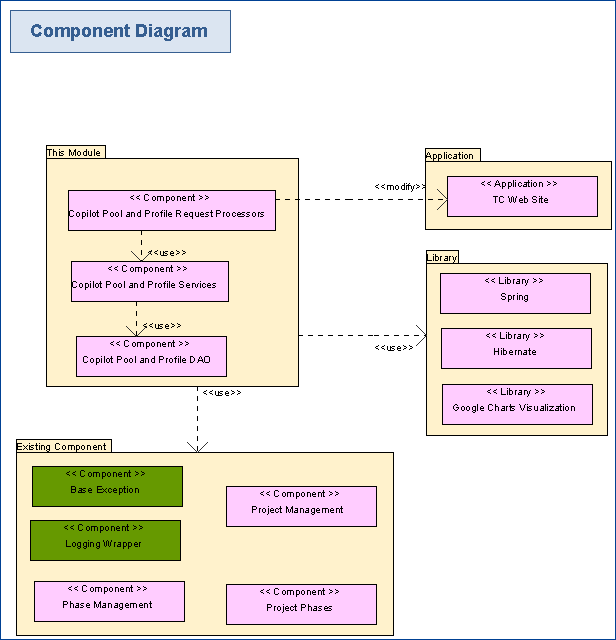
    Any defect that is traced to a specific piece of software will result in that software being fixed and a new unit test being created to ensure that defect does not get reintroduced.

    2.1.2 Integration Test

    Test scenarios will be developed that identify the integration points of the application and ensure the application as a whole behaves properly based on the states of its dependant modules. Integration testing ensures that independently developed aspects of the system work together properly.

    Appendix A includes a mapping of various requirements to integration test scenarios.

    2.1.3 Functional Test

    In order to ensure application tests accurately cover all requirements of the application it is first necessary to ensure that all requirements are stated in a testable manner. Any requirement that is not testable must be restated. For example, a requirement that the application have “good performance” would be restated as “all pages in application load under 1.5 seconds.”

    Appendix A includes a mapping of logical requirements to functional test scenarios.

    2.1.4 GUI Test

    The user interface will be tested to ensure conformity with the prototype developed and approved during the Specification phase. Additionally, technical GUI requirements such as browser support, color palette, and screen resolution will be tested.

    Appendix A includes a mapping of GUI requirements to GUI test scenarios.

    2.1.5 Regression Test

    Regression testing at the application level is enabled by the detailed set of test cases developed for integration, functional, GUI, and performance testing. When a change is introduced to the system, these test cases can be used in whole or in part to re-test the entire application or part of the application. The more automation that is provided in the test cases, the less effort that will be required to perform regression testing.

    Smoke tests will be created for the test cases with priority level of “high” and will be executed after every change to quickly ensure major functionality. Smoke tests will also be executed after every build of the application.

    Appendix B includes a description of the actors and activities associated with regression testing for this application.

    2.1.6 Performance Test

    Although performance testing is an integral part of the component development process, it is important that the performance of the system as a whole is tested. Performance requirements are included in Appendix A. Appropriate tools will be used to measure the performance for each test case.

    Appendix A includes mappings of performance requirements to performance test scenarios.

    2.1.7 Acceptance Test
    • Acceptance testing will be performed by the client’s end users and witnessed by TopCoder. Users will fill out discrepancy reports to document any issues they encounter.

    Appendix C includes a description of the actors and activities associated with acceptance testing for this application.

    3. Test Configuration

    3.1 Test Tool Requirements

    As determined by client’s specifications.

    4. Notes

    • List any special considerations that need to be taken during the testing.

    Appendix A

    Requirements Test Cases

    Please refer to the Preference_Center_Admin_Test_Scenario_Inventory.xls which contains an itemized list of the various Integration, Functional, GUI, and Performance Test Cases to be performed

    Test Case Number Corresponding Application Requirement ID Description of Test Case Priority
    Integration Testing
    1 Generic Verify that the application gets integrated with Database (MySQL 5.1) High
    2 Generic Verify that the application gets integrated with Web Server (Jboss 5.1) and Application Server High
    3 Generic Verify that the application gets integrated with Email Server High
    4 Generic Verify that the application gets integrated with Liferay 6.0.5 High


    Test Case Number Corresponding Application Requirement ID Description of Test Case Priority
    Performance Testing
    1 3.2 Verify maximum expected count of users will be several thousands until the end of the year High
    2 3.2 Verify 500 concurrent students are expected for the application High
    3 3.2 Verify the high availability of the system High
    4 3.2 Verify the high response speed of the application High


    Test Case Number Corresponding Application Requirement ID Description of Test Case Priority
    GUI Testing
    1 3.1.1/3.1.2 Verify that the application works well in 1024x768 resolution High
    2 3.1.1 Verify the appearance of the application is correct High


    Test Case Number Corresponding Application Requirement ID Description of Test Case Priority
    Functional Testing
    1 Generic Verify user's profile page can be displayed High
    2 Generic Verify user's account management page can be displayed High
    3 Generic Verify user's email can be modified successfully High
    4 Generic Verify form validation on account management page works well (empty email) High
    5 Generic Verify form validation on account management page works well (invalid email) High
    6 Generic Verify form validation on account management page works well (empty password/confirm password) High
    7 Generic Verify form validation on account management page works well (unmatched password and confirm password) High
    8 Generic Verify user's password can be modified successfully High
    9 Generic Verify user's "My Profile" page can be displayed High
    10 Generic Verify user's profile can be updated from "My Profile" page High
    11 Generic Verify user's profile will not be updated if pressing "Cancel" High
    12 Generic Verify form validation works well on "My Profile" page (Invalid First Name) High
    13 Generic Verify form validation works well on "My Profile" page (Invalid Last Name) High
    14 Generic Verify form validation works well on "My Profile" page (Invalid City) High
    15 Generic Verify form validation works well on "My Profile" page (Invalid ZIP) High
    16 Generic Verify form validation works well on "My Profile" page (Invalid Date of Birth) High
    17 2.1.1.1/ 2.1.1.2/ 2.1.1.3/ 2.1.1.4/ 2.1.1.6 Verify valid credentials can successfully register to the application High
    18 2.1.1.1 Verify the password is masked with asterisk High
    19 2.1.1.1 Verify all the values in "Role" dropdown list are displayed High
    20 2.1.1.1 Verify CAPTCHA is displayed with 6 chars High
    21 2.1.1.1 Verify CAPTCHA is randomly generated High
    22 2.1.1.1 Verify all the values in "Gender" dropdown list are displayed High
    23 2.1.1.2 Verify "Terms & Conditions" can be clicked in the registration form High
    24 2.1.1.2 Verify "Terms & Conditions" can be clicked in the homepage footer High
    25 2.1.1.1/ 2.1.1.2/ 2.1.1.4/ 2.1.1.5 Verify registration form validation works well (invalid handle) High
    26 2.1.1.1/ 2.1.1.2/ 2.1.1.4/ 2.1.1.5 Verify registration form validation works well (last name of handle non selected) High
    27 2.1.1.1/ 2.1.1.2/ 2.1.1.4/ 2.1.1.5 Verify registration form validation works well (invalid password) High
    28 2.1.1.1/ 2.1.1.2/ 2.1.1.4/ 2.1.1.5 Verify registration form validation works well (invalid email) High
    29 2.1.1.1/ 2.1.1.2/ 2.1.1.4/ 2.1.1.5 Verify registration form validation works well (user role not selected) High
    30 2.1.1.1/ 2.1.1.2/ 2.1.1.3/ 2.1.1.4/ 2.1.1.5 Verify registration form validation works well (Terms & Conditions checkbox not checked) High
    31 2.1.1.1/ 2.1.1.2/ 2.1.1.3/ 2.1.1.4/ 2.1.1.5 Verify email is mandatory to register a new account High
    32 2.1.1.1/ 2.1.1.2/ 2.1.1.3/ 2.1.1.4/ 2.1.1.6/ 2.1.1.7/ 2.1.1.8/ 2.1.1.9 Verify valid credentials can successfully create a new account High
    33 2.1.1.1/ 2.1.1.2/ 2.1.1.3/ 2.1.1.4/ 2.1.1.6/ 2.1.1.7/ 2.1.1.8/ 2.1.1.9/ 2.1.1.10 Verify new account is non approved when registered High
    34 2.1.1.1/ 2.1.1.2/ 2.1.1.3/ 2.1.1.4/ 2.1.1.6/ 2.1.1.7/ 2.1.1.8/ 2.1.1.9/ 2.1.1.12/ 2.1.1.13 Verify new account is automatically logged into the application and welcome message is displayed High
    35 2.1.1.1/ 2.1.1.2/ 2.1.1.3/ 2.1.1.4/ 2.1.1.6/ 2.1.1.7/ 2.1.1.8/ 2.1.1.9/ 2.1.1.12/ 2.1.1.13/ 2.1.1.14 Verify new account user can receive the account creation success email High
    36 2.1.1.1/ 2.1.1.2/ 2.1.1.3/ 2.1.1.4/ 2.1.1.6/ 2.1.1.7/ 2.1.1.8/ 2.1.1.9/ 2.1.1.12/ 2.1.1.13/ 2.1.1.14 Verify system will not send out the account creation success email if user's email address is not provided High
    37 2.2.1.1/ 2.2.1.2/ 2.2.1.4/ 2.2.1.5/ 2.2.1.7/ 2.2.1.8/ 2.2.1.9/ 2.2.1.11/ 2.2.1.14/ 2.2.1.15 Verify parent user can successfully unregister from the application High
    38 2.2.1.1/ 2.2.1.2/ 2.2.1.3 Verify student will not be unregistered from the application if answering "No" High
    39 2.2.1.1/ 2.2.1.2/ 2.2.1.3/ 2.2.1.4 Verify un-registration survey will be shown to authorized user High
    40 2.2.1.1/ 2.2.1.2/ 2.2.1.3/ 2.2.1.4 Verify un-registration survey will not be submitted if pressing "Cancel" High
    41 2.2.1.1/ 2.2.1.2/ 2.2.1.3/ 2.2.1.4/ 2.2.1.5/ 2.2.1.6 Verify validation for un-registration survey works well (radio buttons) High
    42 2.2.1.1/ 2.2.1.2/ 2.2.1.3/ 2.2.1.4/ 2.2.1.5/ 2.2.1.6 Verify validation for un-registration survey works well (text field) High
    43 2.2.1.1/ 2.2.1.2/ 2.2.1.3/ 2.2.1.4 Verify un-registration survey will not be shown to unauthorized user High
    44 2.2.1.1/ 2.2.1.2/ 2.2.1.4/ 2.2.1.7/ 2.2.1.8/ 2.2.1.9/ 2.2.1.10 Verify parent will be informed on file about child student's unregistration High
    45 2.2.1.1/ 2.2.1.2/ 2.2.1.4/ 2.2.1.7/ 2.2.1.8/ 2.2.1.9/ 2.2.1.10/ 2.2.1.11 Verify parent will receive e-mail notifications about child student's unregistration High
    46 2.2.1.12 Verify parent's unregistration will lead to student's unauthorization High
    47 2.2.1.12/ 2.2.1.13 Verify student gets notified on parent's unregistration High
    48 2.2.1.1 Verify there will be a special button on the user's unregistered profile High
    49 2.2.1.1 Verify there will be a hyperlink in the email after the user is unregistered High
    50 2.2.1.1 Verify answer 1 is required to fill for unregistering the profile High
    53 2.2.2.1/ 2.2.2.2/ 2.2.2.5/ 2.2.2.6/ 2.2.2.7 Verify parent can re-register account successfully High
    54 2.2.2.1/ 2.2.2.2/ 2.2.2.3/ 2.2.2.4 Verify it is possible for student to re-register account unsuccessfully High
    55 2.3.1.1/ 2.3.1.2/ 2.3.1.3/ 2.3.1.4/ 2.3.1.5/ 2.3.1.6 Verify parent gets notified on process results of approval form (Approved status) High
    56 2.3.1.1/ 2.3.1.2/ 2.3.1.3/ 2.3.1.4/ 2.3.1.5/ 2.3.1.6 Verify parent gets notified on process results of approval form (Rejected status) High
    57 2.5.1.1 Verify unauthorized student gets restricted to most activities High
    58 2.5.1.2 Verify authorized student gets access to most activities High
    59 2.5.1.3 Verify student access to activities is controlled by parents High
    60 2.5.1.4 Verify student's permissions on the profile can be viewed by the student High
    61 2.7.1.1 Verify student's profile can be viewed by system admin after request for authorization High
    62 2.7.1.2 Verify system will resend the request to parent user if the request is not handled within a period of time High
    63 2.7.1.3 Verify student can receive approval mail on the authorization High
    64 2.7.1.3 Verify student can receive rejection mail on the authorization High
    65 2.7.1.3/ 2.7.1.4 Verify Student's Approval/Rejection Status on the Profile can be viewed High
    66 2.7.1.5 Verify authorized student can also get restricted to activities by parents control High
    67 2.8.1.1 Verify parent user can receive notification e-mail with parent authorization request High
    68 2.8.1.1/ 2.8.1.2 Verify parent user can cancel any parent authorization request High
    69 2.8.1.1/ 2.8.1.3 Verify parent user can download parent approval form for the parent's child student High
    70 2.9.1.1/ 2.9.1.2/ 2.9.1.3 Verify reject reason can not exceed 200 chars High
    71 2.9.1.4 Verify system admin can disable profile of cheating parent High
    72 2.9.1.5 Verify system admin can disable profiles of cheating child Students for the cheating Parent High
    73 2.8.1.1/ 2.8.1.3/ 2.8.1.4/ 2.8.1.5/ 2.8.1.6 Verify parent user can download parent approval form, sign and mail it to system admin High
    74 2.9.1.1/ 2.9.1.2/ 2.9.1.6/ 2.9.1.7 Verify parent user can get approved by system admin High
    75 2.9.1.1/ 2.9.1.3/ 2.9.1.4/ 2.9.1.5/ 2.9.1.7 Verify parent user can get rejected by system admin High
    76 2.9.1.1/ 2.9.1.3/ 2.9.1.4/ 2.9.1.5/ 2.9.1.7 Verify student user gets notified if parent user's approval form gets rejected by system admin High
    77 2.10.1.1 Verify list of student's permissions on his/her Profile can be viewed by parent (Activities data) High
    78 2.10.1.1 Verify list of student's permissions on his/her Profile can be viewed by parent (Forums data) High
    79 2.10.1.1 Verify list of student's permissions on his/her Profile can be viewed by parent (Blog data) High
    80 2.10.1.1 Verify list of student's permissions on his/her Profile can be viewed by parent (Private Messages data) High
    81 2.10.1.1 Verify pagination works well on the list of student's permissions on his/her Profile (Activities Data) High
    82 2.10.1.1 Verify pagination works well on the list of student's permissions on his/her Profile (Forums Data) High
    83 2.10.1.1 Verify pagination works well on the list of student's permissions on his/her Profile (Blog Data) High
    84 2.10.1.1 Verify pagination works well on the list of student's permissions on his/her Profile (Private Messages Data) High
    85 2.10.1.1/ 2.10.1.2 Verify filter works well on the list of student's permissions on his/her Profile (Activity Type) High
    86 2.10.1.1/ 2.10.1.2 Verify filter works well on the list of student's permissions on his/her Profile (Content Track) High
    87 2.10.1.1/ 2.10.1.2 Verify filter works well on the list of student's permissions on his/her Profile (Grade/curriculum type) High
    88 2.10.1.1/ 2.10.1.2 Verify filter works well on the list of student's permissions on his/her Profile (Facebook) High
    89 2.10.1.1/ 2.10.1.2 Verify filter works well on the list of student's permissions on his/her Profile (Twitter) High
    90 2.10.1.1/ 2.10.1.2 Verify multiple filters work well on the list of student's permissions on his/her Profile (Content Track and Activity Type) High
    91 2.10.1.1/ 2.10.1.2 Verify multiple filters work well on the list of student's permissions on his/her Profile (Content Track and Twitter) High
    92 2.10.1.1/ 2.10.1.2 Verify multiple filters work well on the list of student's permissions on his/her Profile (Grade/curriculum and Facebook) High
    93 2.10.1.1/ 2.10.1.3 Verify notification e-mail on new activity can be sent to parents High
    94 2.10.1.1/ 2.10.1.4/ 2.10.1.6/ 2.10.1.7 Verify activities can be marked as allowed for students by parent High
    95 2.10.1.1/ 2.10.1.4/ 2.10.1.6/ 2.10.1.7 Verify activities can be marked as restricted for students by parent High
    96 2.10.1.1/ 2.10.1.4/ 2.10.1.5/ 2.10.1.7 Verify permission for activities can be cancelled by parent High
    97 2.11.1.1 Verify great results notification e-mail can be sent to parent when student gets an award High
    98 2.11.1.1 Verify great results notification e-mail can be sent to parent when student finishes some tracks High
    99 2.11.1.2 Verify parent can get access to child student's activities (read-only access to ALL places) High
    100 2.11.1.2 Verify parent can get access to child student's activities (write access to some activities) High
    101 2.11.1.2 Verify parent can get access to child student's activities (unable to join in activity) High
    102 2.11.1.3 Verify parent can recommend some content to child student High
    103 2.11.1.4 Verify parent can comment content to child student High
    104 2.12.1.1 Verify perform auditing works well (Register to the application) High
    105 2.12.1.1 Verify perform auditing works well (Automatic login of registered user) High
    106 2.12.1.1 Verify perform auditing works well (Unregister from the application) High
    107 2.12.1.1 Verify perform auditing works well (Submitting an un-registration survey) High
    108 2.12.1.1 Verify perform auditing works well (Automatic logout of the unregistered user) High
    109 2.12.1.1 Verify perform auditing works well (Reverting child student to non-authorized state after his/her Parent was unregistered) High
    110 2.12.1.1 Verify perform auditing works well (Process parent approval form) High
    111 2.12.1.1 Verify perform auditing works well (Entering System Admin remarks for parent approval status) High
    112 2.12.1.1 Verify perform auditing works well (Request parent authorization) High
    113 2.12.1.1 Verify perform auditing works well (Resending of the parent authorization request) High
    114 2.12.1.1 Verify perform auditing works well (Get approved by parent) High
    115 2.12.1.1 Verify perform auditing works well (Perform parental control for child students) High
    116 2.12.1.1 Verify perform auditing works well (Parent performs writing of data in shared activities with his/her child) High
    117 2.12.1.1 Verify perform auditing works well (Recommend content for child students) High
    118 2.12.1.1 Verify perform auditing works well ( Perform commenting for child students) High
    119 2.13.1.1 Verify perform logging works well High
    119 2.14.1.1 Verify sending e-mail notifications works well (Send Account Activation E-mail) High
    120 2.14.1.2 Verify sending e-mail notifications works well (Send Account Creation Success E-mail) High
    121 2.14.1.3 Verify sending e-mail notifications works well (Send Success E-mail on Child Student Un-registration to Parent) High
    122 2.14.1.4 Verify sending e-mail notifications works well (Send Success E-mail on Parent Un-registration to Child Student) High
    123 2.14.1.5 Verify sending e-mail notifications works well (Send Account Un-registration Success E-mail) High
    124 2.14.1.9 Verify sending e-mail notifications works well (Send Parent Approval Status Notification E-mail) High
    125 2.14.1.10 Verify sending e-mail notifications works well (Send Notification E-mail with Parent Authorization Request) High
    126 2.14.1.11 Verify sending e-mail notifications works well (Send Notification E-mail on Parent Approval Rejected Results) High
    127 2.14.1.12 Verify sending e-mail notifications works well (Send Notification E-mail on New Activity to Parents) High
    128 2.14.1.13 Verify sending e-mail notifications works well (Send Great Results Notification E-mail to the Student's Parent) High

    Appendix B

    Regression Testing Actors and Activities

    Appendix C

    User Acceptance Testing Actors and Activities